All procedures involving human participants have been performed in compliance with the institutional, national, and international guidelines for human welfare and have been reviewed by the local institutional review board.
1. Magnetic Resonance Imaging (MRI) Image Acquisition in Patients Suffering from Menière's Disease (MD) and Healthy Controls
- Apply an intratympanic gadolinium-injection 24 h prior to the MRI scan in the patient group. Inject 0.4 mL of a gadolinium-based contrast agent intratympanically, (e.g., Magnograf diluted 8-fold in saline), 24 h prior to the scheduled MRI-scan.
- Prepare the patient for an MRI examination: check for metal implants (exams are feasible with a pacemaker if adequate precautions are taken; dental implants are usually feasible), claustrophobia, etc. Use noise reduction devices such as noise reduction headphones for protection of patient hearing.
- Position the patient adequately into the scanner. Position the patient's head straight, and fit and close the MR-head coil. Position the patient's head/temporal bone at the isocenter of the MR scanner.
- Perform the MRI-scan according to the study protocol, including three-dimensional fluid-attenuated inversion recovery (3D-FLAIR) and three-dimensional real inversion recovery (3D-IR) sequences for detection of endolymphatic hydrops in the patient group and strongly T2-weighted three-dimensional constructive interference in steady state (3D-CISS) for morphologic analysis of cranial nerves in the patient group and healthy controls.
- Set the sequence parameters for the morphometric scan 3D-CISS as follows: repetition time (TR) 5.79 ms, echo time (TE) 2.58 ms, flip angle 34°, field of view (FoV) 160 x 160 mm2, matrix size 320 x 320, number of averages 1, slice thickness 0.5 mm (Table 1). Perform the scans of the 3D-FLAIR using a TR of 9,000 ms, TE 128 ms, inversion time 2,500 ms, flip angle of 180°, matrix size 384 x 384, slice thickness 2 mm. Set the parameters for the 3D-real IR as follows: TR 6,000 ms, TE 155 ms, inversion time 1,500 ms, flip angle 180°, matrix size 320 x 320, slice thickness 0.5 mm.
2. MRI Quality Check and Identification of Endolymphatic Hydrops in MRI
- Check the MRI image quality with regard to artifacts like fold-over artifacts, pulsation artifacts, metal artifacts, and take special account of the target of evaluation, in this case the cranial nerves VII and VIII throughout their course.
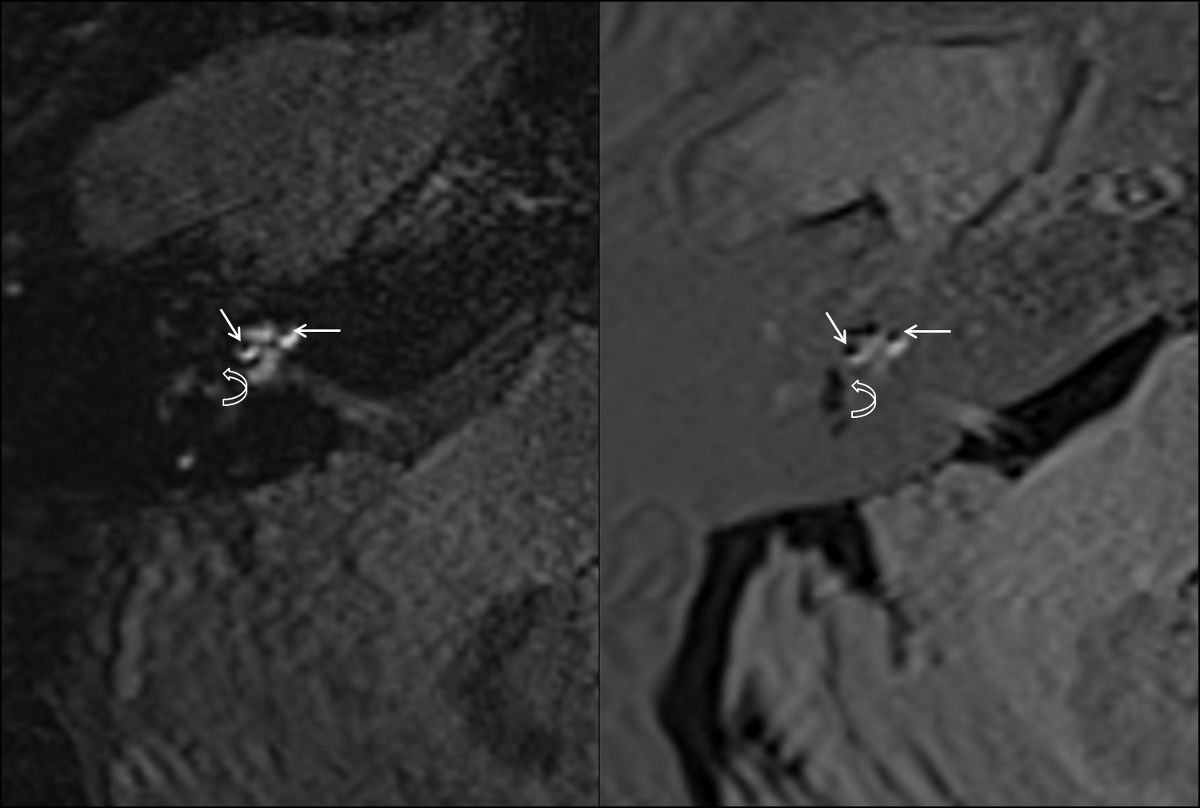
- Evaluate the endolymphatic hydrops in the MRI-scans of the patient group. Check for the degree of cochlear and labyrinthine endolymphatic hydrops made visible by examining the acquired 3D-FLAIR- and 3D-real IR-sequences (Figure 1).
3. Image Based Measurements of Cranial Nerves
- General preparations
- Install a digital imaging and communications in medicine (DICOM) viewer of choice for image evaluation and measurements on the evaluation workstation, e.g., OsiriX or Horos.
- Run the DICOM viewer by double-clicking the application; the database window will be displayed.
- Import the patient image data by left-mouse clicking on "File" in the upper dropdown menu, then select "Import" → "Import file". In the file selector, select the patient image data; the patient name and data will be displayed in the database window after successful import.
NOTE: Importing compressed files (e.g.,.zip) or uncompressed directories of DICOM files is feasible with the aforementioned DICOM viewers. - In the database window expand the patient image folder by left-clicking onto the triangle symbol on the left side of the patient name. Select the sequence of choice from this folder (here CISS sequence) and double left click on it to open the corresponding image data. The patient image data will be displayed.
- Reconstructions of cranial nerves
NOTE: Because of the long and not always in-plane course of the nerves from the brain stem through the cerebellopontine angle (CPA) into the acoustic meatus and further to the fundus of the internal auditory canal (IAC), the reconstruction and evaluation of the nerve's diameters and cross-sectional areas (CSAs) at different levels is necessary.- Prepare for reconstructing transverse sections at the following locations throughout the course of the cranial nerves to avoid measurement errors derived from oblique slices throughout the course of the nerve, by selecting "3D (multiplanar reconstruction) MPR" in the "3D Viewer" dropdown menu at the top of the screen; the MPR-window will be displayed.
- Adjust zoom levels to accommodate for the structures to be reconstructed (here cranial nerves VII and VIII) by selecting the zoom tool (magnifying glass) from the "Change mouse button function" area in the toolbar in the upper left part of the MPR-window. Then move the mouse cursor to each of the 3 planes in the MPR-window and adjust zoom levels by left click and dragging the mouse (the mouse cursor will transform into a magnifying glass).
- Reconstruct the central VIII nerve and set the reconstruction plane orthogonal to the nerve’s course in the middle of the CPA. Check and adapt the orientation of the reconstructed plane in all 3 planes/windows (it should be reconstructed orthogonal to the direction of the crossing of the nerve in order to avoid partial volume effects at the following measurements).
- Check for out-of-plane traversing of the nerve and correct the plane orientation, respectively.
- To correct plane orientation, move the mouse cursor to the center of the axis crosshair of each plane in the MPR-window (when located correctly the mouse cursor will transform into a hand symbol).
- Grab the axis crosshair in each of the 3 planes/windows individually with the grab tool indicated by the hand-icon, and move the axis approximately to the entry to the internal acoustic meatus in each of the 3 planes.
- Adjust the orientation of the 3 axes to the nerve's course using the rotate-function available by moving the mouse to the lateral aspects of each axis (the correct rotate-function is depicted by a change of the mouse cursor to a curvilinear icon). Then hold the left mouse button pressed and drag the mouse to adjust the plane orientation.
- Adjust the plane orientation in all 3 windows of the MPR-window. In order to reconstruct a plane transverse to the VIII nerves course at the level of the middle of the CPA, go to the left lower window in the MPR-window, and move the mouse to the middle of the axis crosshair so the mouse cursor will transform again into a hand symbol. Then left click and drag the plane (orange line) to the desired location (here, to the middle of the CPA).
- Adjust the zoom levels if necessary with the zoom tool (the mouse will change its icon to a magnifying glass) by left clicking and dragging.
- Left click into the upper right window of the MPR-window to select this plane. Select "File" → "Export" → "Export to DICOM file(s)". In the "DICOM Export"-window select "Sequence:" → "Current image only" by left clicking into adjacent circle selector.
- Rename the series appropriately, here "VIII CPA". Then left click the "OK"-button on the right lower aspect of the DICOM export window.
NOTE: This will close the DICOM export window, save the reconstructed image into the patient database, and return to the MPR window.
- Reconstruct the orthogonal views of the branches of VIII nerve: cochlear nerve (CN), superior vestibular nerve (SVN), and inferior vestibular nerve (IVN) at the level of the meatus of the IAC, where representative visualization is usually well feasible. Check for out-of-plane traversing of the nerve and correct the plane orientation respectively.
- Grab the axis crosshair in each of the 3 planes/windows with the grab tool indicated by a hand-icon, move the axis toward the CN, SVN, and IVN, respectively at the level of the meatus of the IAC, and adjust their orientation to the nerve's course using the rotate-function available at the lateral aspects of each axis depicted by the curved icon, as described under step 3.2.3.1.1 - 3.2.3.1.5.
- Export and rename the reconstructed planes as under step 3.2.3.1.6 - 3.2.3.1.7.
- Reconstruct the orthogonal views of the facial nerve (cranial nerve VII) at the level of the CPA, meatus of the IAC, and fundus of the IAC as described under step 3.2.3. Check for out-of-plane traversing of the nerve and correct the plane orientation, respectively at each level of reconstruction.
- Measurements
NOTE: Perform the following measurements: measure CSA, long diameter (LD), and perpendicular short diameter (SD) of the facial nerve (cranial nerve VII) and vestibulocochlear nerve (cranial nerve VIII) in the reconstructed transverse images (Figure 2 and Figure 3). Pay attention to consistent windowing levels between scans to avoid partial volume effects influencing the quantificational measurements in a non-systematic way.- Select the previously reconstructed image of cranial nerve VIII at the level of CPA by left clicking the corresponding image file (previously named "VIII CPA") in the database window of the DICOM viewer. Open it by double left-clicking on the filename. The reconstructed image will open in a single window.
- Zoom in into the image structures, if necessary, as instructed in step 3.2.2. Select "Length" by left clicking with the mouse on the triangular symbol next to the "Change the mouse button function" in the toolbar on top of the screen. Left click and hold the left mouse button pressed to draw a line of measurement for the longest diameter of the cranial nerve VIII; this measurement is LD.
- Perform a measurement perpendicular to LD for the SD measurement.
NOTE: The measurements will be automatically stored if using OsiriX or Horos as DCIOM viewer.- Repeat these measurements of LD and SD also in the reconstructions of the VIII nerve at the level of the meatus of the IAC by measuring in the image file from the image database named "VIII meatus" and at the level of the fundus of the IAC, file name "VIII fundus".
- Evaluate CSA preferably using the closed polygon region-of-interest (ROI) to account for possible inhomogeneities in the contour of the cranial nerve's cross-section. In the toolbar on the upper part of the screen, press the triangular symbol on the right of the "Mouse button function" area and select "Closed Polygon" (the previously selected line symbol will change to a polygon).
- Outline the contour of the cranial nerve VIII by left clicking multiple times on the border of the nerve. To close the polygon double left click at the desired point; the complete contour will be displayed.
NOTE: If necessary, correct the position of the polygon points by left clicking and moving. - Open the previously performed reconstruction of the facial nerve at the level of the CPA (image file name "VII CPA") and perform measurements of LD, SD, and CSA for cranial nerve VII following steps 3.3.1 - 3.3.5.
- Open the reconstructions at the level of the meatus of the IAC and perform measurements of LD, SD, and CSA for the CN, SVN, IVN, and cranial nerve VII following steps 3.3.1 - 3.3.5.
- Open the reconstructions at the level of the fundus of the IAC and perform measurements of LD, SD, and CSA for the CN, SVN, IVN, and cranial nerve VII following steps 3.3.1 - 3.3.5.
Table 1: MRI sequence parameters. Set MRI sequence parameters as described using Constructive Interference in Steady State (CISS)-sequence technique for achieving strongly T2-weighted image contrast for optimal depiction of nerves surrounded by cerebrospinal fluid.
Mr-sequence parameters | 3D-CISS |
TR | 5.79 ms |
TE | 2.58 ms |
Flip angle | 34° |
Field of view | 160 x 160 mm2 |
Matrix size | 320 x 320 |
Averages | 1 |
Slice thickness | 0.5 mm |