This work details the development and usability validation of a web-based application designed to digitize records from low-risk prenatal consultations. The tool was developed to optimize the documentation of clinical information, automate obstetric calculations, and enhance the continuity of maternal care, addressing the limitations inherent in manual record-keeping.
A subscription to JoVE is required to view this content. Sign in or start your free trial.
Research Article
A Web-Based Platform for Low-Risk Prenatal Health Records Integrating Digital Care Management and Usability Validation with Healthcare Professionals
In This Article
Summary
Abstract
The quality and completeness of prenatal records are critical to ensuring effective maternal and fetal care. However, the conventional use of printed handbooks for documenting prenatal consultations introduces significant limitations, including incomplete entries, illegibility, and the risk of physical damage or loss. These constraints can compromise continuity of care and the reliability of clinical information. To mitigate these issues, this work presents the development and preliminary usability evaluation of a web-based application designed to digitize and optimize prenatal consultation records. The goal of the protocol is to provide a structured and efficient digital system for recording, consulting, and managing prenatal data, integrating automated obstetric calculations and visualization tools to support clinical decision-making. System requirements were identified through a literature-based analysis of best practices in prenatal care documentation and health information systems. The proposed solution was implemented as a responsive web application that adhered to usability and accessibility standards to facilitate integration into routine clinical workflows. The usability evaluation involved healthcare professionals with previous experience using the printed handbook. Quantitative data were collected using the system usability scale (SUS), while qualitative insights were obtained through semi-structured interviews. The application achieved a mean SUS score of 77.50, indicating good usability and acceptance. Participants highlighted the system’s relevance to clinical practice, its potential to reduce errors, and its capacity to enhance continuity and quality of prenatal care. The findings demonstrate that the proposed protocol effectively shows promise for aligning digital documentation with the operational needs of prenatal health professionals. The system achieved a mean system usability scale score of 77.5, exceeding the industry threshold of 68 and indicating good usability acceptance among the evaluated professionals. These findings suggest that the proposed platform is a feasible and user-acceptable approach for digitizing prenatal health records.
Introduction
In Brazil, prenatal care is a key public health policy for promoting maternal and child well-being1. Adequate prenatal follow-up encompasses multiple dimensions of care, including clinical actions such as examinations and immunizations, as well as support for the patient’s social and emotional needs2. In this context, the Pregnant Woman’s Health Record serves as the official document used for recording and monitoring clinical data throughout pregnancy3.
Despite its importance, the printed version of the health record presents significant limitations, including handwritten entries prone to errors, incompleteness, illegibility, and issues related to document loss or damage4. These deficiencies burden healthcare professionals with administrative tasks and hinder continuity of care. The poor quality of prenatal data negatively impacts patient safety and informed decision-making, ultimately reducing the effectiveness of primary healthcare actions. Previous studies have demonstrated a direct association between the quality of prenatal care and neonatal outcomes, showing that inadequate follow-up is correlated with preterm birth and low birth weight5.
Globally, the World Health Organization (WHO) emphasizes that digital transformation in maternal health is a strategic priority for achieving the Sustainable Development Goals (SDGs), particularly SDG 3, which aims to ensure healthy lives and promote well-being for all6,7. The WHO’s Digital Health Strategy 2020–2025 advocates adopting interoperable digital systems to improve care coordination, data quality, and continuity across health services. In several countries, electronic maternal health records have been successfully implemented to enhance data-driven decision-making, early detection of complications, and integration between primary and specialized care8,9.
The implementation of such technologies contributes to reducing maternal and neonatal mortality rates, which remain high in low- and middle-income countries despite global efforts. Digital tools allow for real-time data sharing, automated alerts for high-risk pregnancies, and standardized reporting, which are crucial for improving the quality and safety of prenatal care. Furthermore, user-centered design and usability validation are recognized as critical components for ensuring the adoption and long-term sustainability of health information systems10,11.
Given these global and national challenges, the development of technological systems to optimize clinical information management has become increasingly relevant. Such tools seek to relieve healthcare professionals from manual record-keeping tasks, enabling them to focus on direct patient care12. This study presents the development and preliminary usability evaluation of a web-based software prototype for digitizing pregnant women’s health records, specifically designed for low-risk pregnancies. The system was developed with an emphasis on clinical data organization and accessibility, following a clean architecture13 and user-centered design approach14. The objective is to present the usability testing results conducted with healthcare professionals to validate patient intake, consultation workflows, and individualized follow-up processes.
To the best of the author’s knowledge, this is one of the first studies to combine a domain-driven, clinically grounded software architecture based on Domain-Driven Design and Hexagonal Architecture with a structured usability evaluation protocol specifically applied to the digitization of the Brazilian pregnant woman’s health record in low-risk prenatal care settings. The main contributions of this work include the development of a web-based prenatal care system designed to digitize the pregnant woman’s health record for low-risk pregnancies, thereby improving the management, accessibility, and reliability of clinical data within primary healthcare environments. In addition, the study presents a preliminary usability evaluation conducted with healthcare professionals, with results suggesting that the system can enhance workflow efficiency, reduce documentation errors, and support more patient-centered and data-driven maternal care.
Access restricted. Please log in or start a trial to view this content.
Protocol
This study involved a usability evaluation in which healthcare professionals provided professional opinions on a software prototype. No personal, clinical, or identifiable data were collected from participants, and all patient records used during sessions were fictional. As the study posed no risk to participants and collected no sensitive data, it was considered exempt from formal ethics committee review. All participants were informed of the study's objectives and provided verbal consent prior to participation.
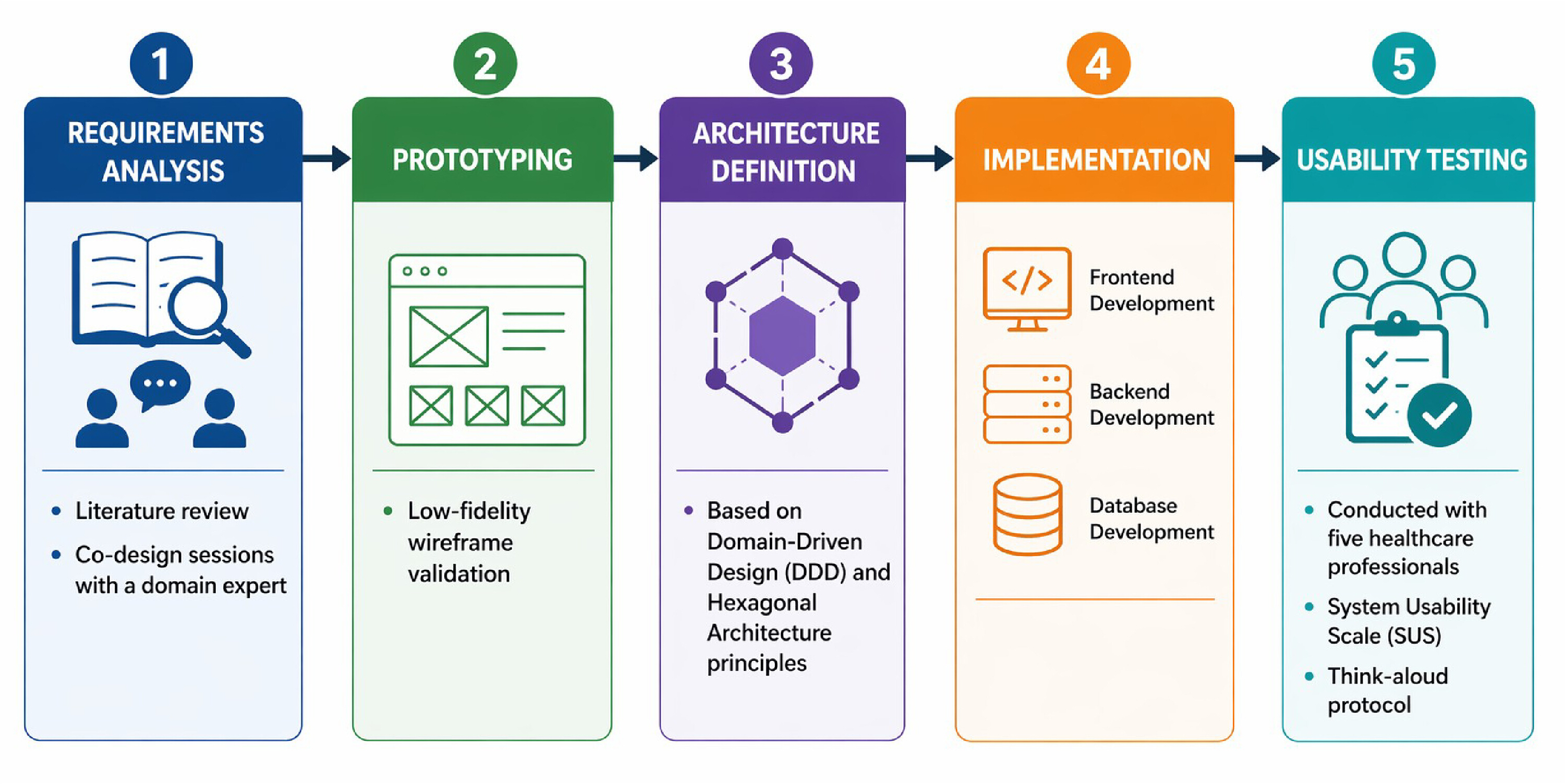
The methodological web interface proposed in this work was structured to ensure a reproducible process for the design, development, and evaluation of the proposed tool-based prenatal care application. The process was organized into sequential phases encompassing requirement analysis15, prototyping, system architecture definition, implementation, and usability evaluation. This structure proposed enabled the development of a robust, user-oriented, and context-aware digital tool to support the optimization of prenatal care documentation and clinical decision-making, see Figure 1.
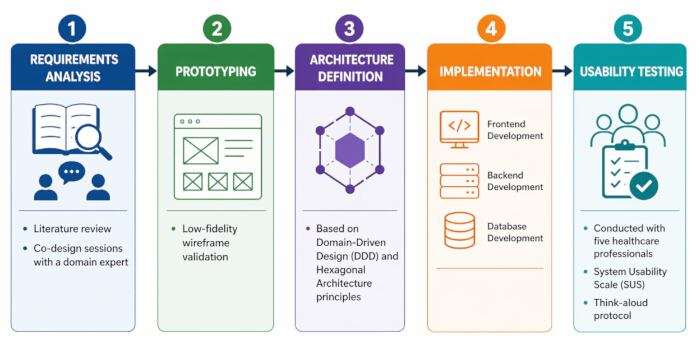
Figure 1: Development process model illustrating the five sequential phases adopted in this study. (1) Requirements Analysis, comprising literature review and co-design sessions with a domain expert; (2) Prototyping, involving low-fidelity wireframe validation; (3) Architecture Definition, based on Domain-Driven Design and Hexagonal Architecture principles; (4) Implementation, covering frontend, backend, and database development; and (5) Usability Testing, conducted with five healthcare professionals using the System Usability Scale and think-aloud protocol. Please click here to view a larger version of this figure.
System requirements
The system requirements phase aimed to identify the functional and operational needs essential for the development of the proposed prenatal care application. The requirement elicitation process combined a structured literature review with co-design sessions conducted with an obstetric nurse specialist in primary prenatal care. The review was performed across SciELO, PubMed/MEDLINE, and Scopus, using search strings combining: ("prenatal care" OR "antenatal care") AND ("digital health" OR "electronic health record" OR "health information system") AND ("usability" OR "user-centered design"). Studies published in English and Portuguese examining digital tools for prenatal documentation or usability evaluation of health information systems were considered. The literature review informed the identification of limitations in the paper-based health record and established the clinical parameters to be digitized. The co-design sessions involved structured interviews and collaborative low-fidelity prototyping, in which the domain expert validated the logical sequence of data entry and the clinical relevance of each system feature prior to implementation. A central outcome of this process was the establishment of a ubiquitous language, a shared vocabulary between the development team and the clinical expert, ensuring that domain-specific terms such as 'Patient Admission', 'Gestational Age', 'Uterine Height', and 'Fetal Heart Rate' were consistently reflected in both the user interface and the system's domain model. This approach reduced the gap between clinical requirements and the implemented solution and validated the two core modules.
For the purpose of this system, a low-risk pregnancy is defined in accordance with the Brazilian Ministry of Health guidelines (in Portuguese, Cadernos de Atenção Básica. No. 32, 2012) as a pregnancy without pre-existing maternal conditions (e.g., hypertension, diabetes mellitus, autoimmune diseases), without obstetric complications arising during prenatal follow-up, and without fetal anomalies identified during consultations. Patients classified as high-risk are outside the scope of this system and should be referred to specialized maternal-fetal care.
Based on the findings, two main modules were established: (i) the consultation module and (ii) the follow-up module. Each module was designed to reflect real-world clinical routines, promoting intuitive navigation and efficient data entry during patient care. The consultation module encompasses several key use cases aligned with the typical prenatal consultation process. The patient admission functionality enables the registration of new patients by entering their full name, national health card (CNS) number, and last menstrual period (LMP) date. Field specifications, format requirements, and validation rules applied at both client and server levels are detailed in Table 1. To ensure data integrity, the system automatically prevents duplicate entries based on the CNS identifier. The Start Consultation function allows healthcare professionals to initiate a new consultation for an already registered patient, redirecting the user to the consultation interface.
| Field | Format | Validation Rule | Example |
| Patient Name | Free text | Minimum of 3 characters; alphabetic characters and spaces only. | “Maria da Silva” |
| CNS (National Health Card) | 15 numeric digits | Validated using a Luhn-based algorithm; must be unique for each patient. | “70000000 0000001” |
| LMP Date | DD/MM/YYYY | Must not be a future date and must fall within 42 weeks prior to the current date. | “01/01/2026” |
Table 1: Patient admission field specifications, format requirements, and validation rules. Fields are organized according to demographic, identification, and clinical registration requirements to ensure standardized patient onboarding and data consistency during prenatal admission.
The consultation workflow follows a sequential and structured process designed to support efficient prenatal care management. First, the healthcare professional accesses the main patient list and locates the target patient by name or CNS number using the search function. After selecting the patient, the professional initiates the consultation by clicking “start consultation.” At this stage, the system creates a new consultation record linked to the selected patient and redirects the user to the consultation interface, which is organized into four sections: physical examination, laboratory tests, ultrasound, and summary.
During the physical examination stage, the professional records general clinical parameters, such as weight, height, blood pressure, and reported complaints, as well as obstetric parameters, including uterine height and fetal heart rate. The system automatically calculates and displays body mass index and gestational age to assist clinical decision-making. In the laboratory tests section, trimester-based exam results can be registered through the corresponding input controls, while completed and pending examinations are visually distinguished to facilitate monitoring of prenatal protocols.
When available, ultrasound information may also be incorporated into the consultation. The professional can access the sonographic registration area and complete the corresponding form with the report data. After all relevant information has been entered, the consultation is finalized through the submission function. The system then validates the required fields and, if the process is completed successfully, redirects the user to the patient’s follow-up screen.
The follow-up screen provides a consolidated overview of the patient’s clinical history, including trend charts for body mass index and uterine height, as well as a chronological list of previous consultations. This structure enables continuous monitoring of maternal health throughout prenatal care.
Within the consultation workflow, specific features were implemented to support the recording of clinical and diagnostic data. The physical examination section enables documentation of general and obstetric parameters following standardized clinical measurement protocols. Weight is recorded in kilograms (acceptable range: 30–200 kg) and height in meters (acceptable range: 1.00–2.50 m), with BMI computed automatically as weight (kg) / height2 (m2). Blood pressure is recorded in mmHg as systolic/diastolic values (e.g., 120/80 mmHg), following standard sphygmomanometric measurement with the patient seated. Uterine height (fundal height) is measured in centimeters from the pubic symphysis to the uterine fundus using a non-elastic tape measure with the patient in dorsal decubitus (acceptable range: 16–40 cm, gestational age–dependent). Fetal heart rate is recorded in beats per minute (normal range: 110–160 bpm). Additional fields include fetal presentation (cephalic/breech/transverse) and notation of edema or exanthema when present.
The laboratory tests interface allows the registration of trimester-based test results, with visual indicators showing completed and pending examinations to prevent redundancy. The system supports documentation of the standard prenatal laboratory examinations recommended by the Brazilian Ministry of Health, organized by gestational trimester as detailed in Table 2. The Ultrasound module is optional and is activated when sonographic examination data are available for documentation. Fields include examination date (DD/MM/YYYY), gestational age at examination based on LMP (weeks), gestational age as determined by ultrasound biometry (weeks), estimated fetal weight (grams), placental location (anterior/posterior/fundal/lateral), and amniotic fluid assessment. The discrepancy between LMP-based and ultrasound-based gestational age estimates is preserved in the record to support clinical decision-making regarding estimated due date revision. All fields except examination date are optional.
| Exam | 1st Trimester | 2nd Trimester | 3rd Trimester |
| ABO/Rh | Required | – | – |
| Fasting Blood Glucose | Required | – | – |
| Oral Glucose Tolerance Test | Required | – | – |
| Syphilis — Rapid Test | Required | – | – |
| VDRL | Required | – | – |
| Indirect Coombs Test | Required | – | – |
| HIV / Anti-HIV | Required | Repeat | – |
| Hepatitis B (HBsAg) | Required | Repeat | – |
| Toxoplasmosis | Required | Repeat | Repeat |
| Hemoglobin / Hematocrit | Required | Repeat | Repeat |
| Urinalysis (EAS) | Required | Repeat | Repeat |
| Urine Culture | Required | Repeat | Repeat |
Table 2: Standard prenatal laboratory examinations supported by the system, organized by gestational trimester. Examinations are grouped according to recommended prenatal follow-up periods to support protocol adherence and facilitate longitudinal monitoring of maternal health.
Finally, the end consultation functionality consolidates and saves all recorded data, automatically redirecting the professional to the patient follow-up screen, where an integrated summary of the patient’s health information is available. The follow-up report presents a consolidated overview of the clinical history, laboratory results, and graphical trends of key parameters such as body mass index (BMI) and uterine height, supporting continuous and data-driven maternal care.
The system automatically computes three key obstetric parameters from the last menstrual period (LMP) date entered at patient admission. Gestational age (GA) in weeks is calculated as the difference in days between the current date and the LMP divided by seven: GA = (Current Date − LMP) / 7. The estimated due date (EDD) is obtained by adding 280 days (40 weeks) to the LMP: EDD = LMP + 280 days. Body mass index (BMI) is calculated from weight (kg) and height (m) recorded during the physical examination:
 (1)
(1)
These calculations are performed automatically upon data entry, eliminating manual computation and reducing transcription errors.
Technologies and system architecture
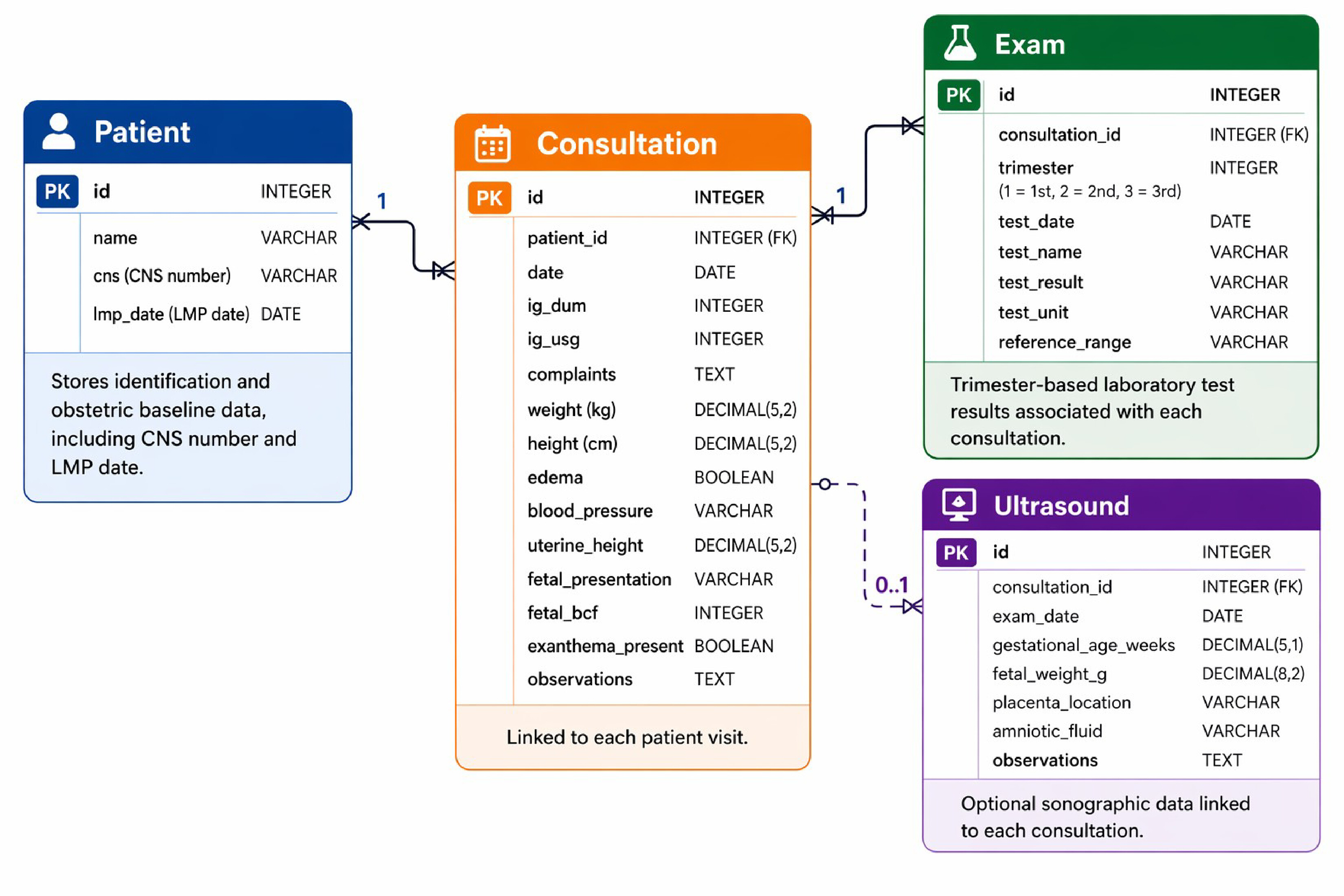
The system was developed following a client–server architecture, in which a web interface-based frontend interacts with a backend service through a RESTful API17. This approach enables modularity, scalability, and interoperability, ensuring that the system can be expanded or integrated with other healthcare information systems in the future. Figure 2 illustrates the entity–relationship (ER) Diagram of the application, highlighting the main entities, patient, consultation, exam, and ultrasound, and their respective associations. The patient entity serves as the core of the model, maintaining personal and identification data linked to multiple consultations. Each consultation record, in turn, is associated with a set of exams and optional ultrasound entries, enabling detailed longitudinal tracking of maternal health parameters. This relational structure allows for the coherent organization of clinical data and supports the generation of consolidated follow-up reports, facilitating comprehensive and continuous prenatal care management. Each entity uses a UUID primary key and implements soft deletion via a dedicated deletedAt. field, ensuring data traceability without permanent removal. Key constraints include: the CNS field in the patient entity is enforced as unique at the database level, preventing duplicate patient registration; consultation vital signs (weight, height, uterine height) are stored as decimal types to preserve clinical precision; and the Ultrasound entity is fully optional, linked to a patient by identifier without a mandatory foreign key constraint. The complete schema definition, including all field types and constraints, is available in the public repository at https://github.com/caderneta-digital-da-gestante/api.
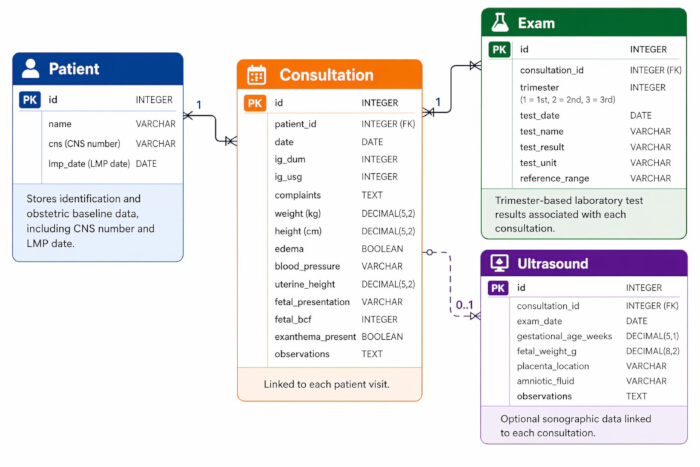
Figure 2: Entity–Relationship (ER) diagram of the system database. Four main entities are represented: Patient (stores identification and obstetric baseline data, including CNS number and LMP date), Consultation (linked to each patient visit), Exam (trimester-based laboratory test results associated with each consultation), and Ultrasound (optional sonographic data linked to each consultation). One Patient may have multiple Consultations; each Consultation may be associated with multiple Exams and zero or one Ultrasound record. Please click here to view a larger version of this figure.
The backend was implemented using Node.js as the runtime environment, combined with the Express.js framework for efficient management of routes and HTTP requests. Data persistence was handled through the PostgreSQL relational database management system, chosen for its robustness and compliance with ACID principles. To facilitate database access and ensure type safety, the Prisma ORM library was adopted, enabling efficient and maintainable interaction between the application logic and the data layer18.
The frontend was built using React in conjunction with the Next.js framework to provide a fast, responsive, and search-engine-optimized web interface. User interaction and form handling were implemented using React Hook Form for state management and Zod for schema-based validation, ensuring data consistency and reducing input errors. Client-side data fetching and caching were managed by TanStack Query, enabling optimized performance and real-time data synchronization with the backend.
For version control and deployment, the project utilized git and github, adhering to the conventional commits standard to maintain a clear and traceable development history. Deployment followed a containerized approach. Prerequisites include Docker 27.x, a Vercel account (frontend), and a Render account (backend and database). The backend requires a .env file with two environment variables: DATABASE_URL (PostgreSQL connection string provided by Render) and DIRECT_URL (direct connection URL for Prisma migrations). To deploy the backend, the Docker image is built with docker build -t cdg-api. and pushed to Render as a web service, with the start command node dist/index.js and the API_PORT environment variable set. The frontend is deployed to Vercel by connecting the gitHub repository via the Vercel dashboard; the NEXT_PUBLIC_API_URL environment variable must be set to the Render backend URL. Database migrations are applied via prisma migrate deploy on the first deploy.
Regarding data security and privacy, the current prototype does not implement end-user authentication, reflecting its early-stage nature. Patient data is stored in a PostgreSQL database hosted on Render's cloud infrastructure, with database access restricted by environment-level credentials not exposed in the source code. For the purposes of this usability study, all patient records used during testing sessions were fictional; no real patient data was collected or processed. Authentication and access control are identified as requirements for a future production-ready version, along with compliance assessment under the Brazilian General Data Protection Law (LGPD — Law nº 13.709/2018).
The system implements both client-side and server-side validation. On the frontend, React Hook Form with Zod schemas prevents form submission when required fields are empty or incorrectly formatted, displaying inline error messages. On the backend, all incoming requests are parsed and validated through Zod schemas before reaching the domain layer; invalid inputs return HTTP 400 with a structured error response indicating the affected field and message. Domain-level validation is enforced through value objects: the CNS field is validated for length, digit-only format, and checksum algorithm (supporting both permanent CNS starting with digits 1–2 and provisional CNS starting with 7–9). Duplicate CNS entries are rejected at the database level via a unique constraint. In case of domain errors, the API returns HTTP 400 with a descriptive error message; successful operations return HTTP 201 (creation) or HTTP 200 (retrieval).
Usability testing
The usability evaluation of the system was conducted using the system usability scale (SUS) to obtain a quantitative measure of user satisfaction and overall usability19,20. Representative scenarios and tasks were designed based on typical activities performed with the physical pregnant woman’s health record, ensuring that the test reflected real-world clinical workflows21.
The evaluation comprised eight tasks covering the complete prenatal consultation workflow, as described in Table 3.
| Task | Instruction Given to Participant | Success Criteria |
| 1 | How would you start a consultation for patient X? | Locate the patient in the list or search bar → click “Start Consultation”. |
| 2 | What steps would you take to enter the physical and obstetric examination data for patient X? | Access the Physical Examination tab → complete the required fields → click Next or navigate to another tab. |
| 3 | What steps would you take to add a laboratory exam during the consultation and verify the entered data? | Access the Exams tab → click “+” for the exam and trimester → complete the form → click Save → click View. |
| 4 | What steps would you take to record an ultrasound result? | Access the Ultrasound tab → click “Receive Ultrasound” → complete the form. |
| 5 | What steps would you take to finalize the consultation? | Ensure that the form is valid → click Submit. |
| 6 | How would you monitor the nutritional status progression and uterine growth curve of patient Y? | Return to the main page → locate patient Y → click “Caderneta” → access the Info tab → view the charts. |
| 7 | Can you show me which laboratory exams have already been completed for patient Y? | Access patient Y’s Caderneta → navigate to the Exams tab. |
| 8 | How many consultations has patient Y had, and can you view the details of one? | Navigate to the Consultations tab → click “View Details”. |
Table 3: Usability evaluation tasks and success criteria. Tasks are structured to assess core system functionalities, including patient search, consultation workflow, data entry, and follow-up review, with predefined criteria for successful completion.
A total of five healthcare professionals were recruited through snowball sampling, based on three criteria: availability, prior hands-on experience with the printed pregnant woman’s health record in a prenatal care setting, and referral by professionals involved in the requirements elicitation phase or by previously recruited participants. No formal demographic questionnaire was administered; collection of structured demographic data is identified as a limitation of this study and a target for future evaluations. This sample size is consistent with established guidelines for formative usability studies, which indicate that five participants are sufficient to identify most critical usability problems in an interface22. Although this number limits statistical generalizability, it is appropriate for the exploratory nature of this preliminary evaluation. During the testing sessions, participants were invited to explore the web application, performing the predefined tasks while thinking aloud. Prior to the session, participants were briefly introduced to the think-aloud technique through a warm-up exercise unrelated to the system. They were instructed to verbalize their thoughts, actions, and difficulties continuously throughout the tasks, without seeking assistance from the evaluator. No corrective feedback was provided during task execution. A trained observer recorded structured field notes documenting observed difficulties, hesitations, and verbal comments for each task23.
At the conclusion of each session, participants completed the SUS questionnaire in Brazilian Portuguese. The standard SUS items were contextually adapted to the prenatal care domain, for example, replacing generic references to 'the system' with specific references to clinical workflows, such as: “register and consult the pregnant woman's data”, “low-risk prenatal follow-up”. These adaptations preserved the original scoring structure while improving relevance to the target user group. The SUS consists of 10 statements rated on a 5-point Likert scale (1 = strongly disagree, 5 = strongly agree), alternating between positive and negative items. Scores were calculated following the standard method: for odd-numbered items, the contribution is the scale position minus 1 (R − 1); for even-numbered items, the contribution is 5 minus the scale position (5 − R). The sum of all contributions is multiplied by 2.5, yielding a final score from 0 to 100, where scores above 68 indicate above average usability24. In addition, two open-ended questions were administered to gather qualitative feedback on the system's strengths and areas for improvement. Responses were analyzed using thematic analysis: recurring themes from participant answers and think-aloud observations were independently coded by two researchers and grouped into categories. Discrepancies were resolved through discussion. The resulting categories, consolidated care overview, professional-patient relationship, continuity of care, connectivity dependency, lack of export functionality, and user support needs, were derived inductively from participant responses and are presented in the qualitative results table.
Usability sessions were conducted remotely. Each participant accessed the system through a publicly available URL using their own device and default web browser; hardware specifications, operating systems, and browser versions were not controlled or recorded. This reflects a real-world usage condition but constitutes a limitation, as performance variability across devices may have influenced the interaction experience. Future evaluations should standardize the testing environment to isolate usability issues from hardware and connectivity variables.
Access restricted. Please log in or start a trial to view this content.
Results
The results section presents the outcomes of the usability evaluation, including quantitative measures from standardized scales and qualitative feedback from healthcare professionals. The analysis focuses on assessing the effectiveness, efficiency, and user acceptance of the web-based prenatal care application. The usability assessment of the prototype yielded an overall System Usability Scale (SUS) score of 77.5, exceeding the commonly cited threshold of 68, which indicates satisfactory usability. The SUS scores were no...
Access restricted. Please log in or start a trial to view this content.
Discussion
The digital pregnancy record prototype achieved a mean SUS score of 77.5 (SD = 9.35), indicating acceptable usability according to established benchmarks. This result suggests that the combination of Domain-Driven Design principles25,26 and Hexagonal Architecture13, by aligning the system closely with real clinical workflows, contributes positively to perceived usability. The high scores in Efficiency and Error Prevention indicate that the...
Access restricted. Please log in or start a trial to view this content.
Disclosures
The authors declare no conflicts of interest.
Acknowledgements
This work was financially supported by the National Council for Scientific and Technological Development (CNPq), Brazil, under Grant No. 305517/2022-8.
Access restricted. Please log in or start a trial to view this content.
Materials
| Name | Company | Catalog Number | Comments |
|---|---|---|---|
| Axios | Axios Contributors | 1.8.4 | N/A |
| Backend repository | Author | N/A | N/A |
| Docker | Docker, Inc. | 27.x | N/A |
| Express.js | OpenJS Foundation | 5.1.0 | N/A |
| Frontend repository | Author | N/A | N/A |
| Next.js | Vercel | 15.2.4 | N/A |
| Node.js | OpenJS Foundation | 22.x | N/A |
| PostgreSQL | PostgreSQL Global Dev. Group | 15.x | N/A |
| Prisma ORM | Prisma Data, Inc. | 6.5.0 | N/A |
| React | Meta Platforms, Inc. | 19.0.0 | N/A |
| React Hook Form | react-hook-form Contributors | 7.55.0 | N/A |
| Recharts | recharts Contributors | 2.15.3 | N/A |
| Render | Render Services, Inc. | N/A | N/A |
| TanStack Query | TanStack | 5.74.4 | N/A |
| TypeScript | Microsoft | 5.8.2 | N/A |
| Vercel | Vercel, Inc. | N/A | N/A |
| Zod | Colin McDonnell | 3.24.2 | N/A |