This research article demonstrates the implementation of a real-time pedestrian detection algorithm on field-programmable gate array hardware, primarily for autonomous driving applications. The algorithm combines the histogram of oriented gradients (HoG) with a support vector machine (SVM) classifier, and results show efficiency in terms of speed, power consumption, and resource utilization.
Method Article
Design and Implementation of a Field Programmable Gate Array-Based Pedestrian Detection Framework for Autonomous Driving Application
June 12th, 2026
Opens in a new tab
In This Article
Summary
Loading...
$$\rightleftharpoonup{xx}$$
$$\longleftharp{xx}$$,
$$\longrightharp{xx}$$,
Abstract
Loading...
$$\rightleftharpoonup{xx}$$
$$\longleftharp{xx}$$,
$$\longrightharp{xx}$$,
Autonomous driving offers a promising way to tackle the rising number of fatalities from traffic accidents. An autonomous vehicle includes many features, but the ability to detect pedestrians is crucial, challenging, and relevant to various real-time situations like surveillance, tracking people, and monitoring. Accurately identifying pedestrians is difficult because they can appear in different shapes, positions, and postures. They can wear various types of clothing and sometimes be partially hidden or blend in with nearby objects. This paper focuses on the real-time detection of pedestrians for self-driving cars using a popular hardware platform: The field programmable gate array (FPGA), Ultra 96 v2. The study implements a method for pedestrian detection based on a histogram of oriented gradients (HOG) combined with a support vector machine (SVM) classifier to recognize individuals on the FPGA board, leveraging high-level synthesis (HLS) tools. The effectiveness of the system has been tested on both still images and live video. The results show that advanced FPGA boards like the Ultra 96 v2 significantly improve performance metrics. The system operates at a clock frequency of 150 MHz while using less than half of the available resources and consuming around 2.5 W of power. Also, the system reports the pedestrian detection accuracy close to 95% and other efficient metrics for detection evaluation, like precision (78.6%), recall (88.3%), and F1 Score (83.1%). In summary, the developed system can detect pedestrians in real-time and has the potential to significantly improve the development of a smart and safe transportation environment.
Introduction
Loading...
$$\rightleftharpoonup{xx}$$
$$\longleftharp{xx}$$,
$$\longrightharp{xx}$$,
Urban development and the emergence of smart cities are topics of interest worldwide. All the nations are working towards the development of their cities that can be built in such a way that they can be safe and comfortable for the people living in them1,2. But at the present situation, it has been observed that as the population grows and road congestion increases, the rate of fatalities resulting from road accidents due to driving negligence and poor visibility issues is rising alarmingly. A promising solution to these issues is the emergence of autonomous vehicles worldwide, which has sparked innovation1,2,3,4 and researchers are making efforts to develop fully autonomous vehicles that can enable passengers to relax without any concerns. The need for the development of autonomous vehicles stems from the fact that even experienced drivers may face stress, dilemmas, fatigue, or difficulties sensing their environment due to bad weather, and all these issues lead to road accidents. A self-driving vehicle is designed to avoid accidents during travel, optimize engine resource use, and comply with traffic laws, which will undoubtedly enhance transportation2,4. An autonomous vehicle is equipped with multiple features, sensors, and functionalities that allow it to sense its surroundings very precisely, avoiding any collisions and accidents, and hence they have now emerged as a promising solution for making the transport safe and secure1,2,3,4.
Among all the features incorporated into an autonomous vehicle, one of the most vital is pedestrian detection. A robust pedestrian detection system can significantly help to lower road accident fatalities5,6,7,8, as the majority of the victims of these accidents are pedestrians. Pedestrian detection involves identifying individuals on the road and avoiding any collisions with them. This feature is not only beneficial for self-driving cars, but also for various other application areas such as crowd monitoring, person identification, and tracking9,10,11. The key aspect of this detection process is the speed and accuracy of detection. It is crucial to detect pedestrians accurately and quickly so that response time is minimal. There is an enormous challenge posed by pedestrian detection. Pedestrians on the road can be in any clothing, appearance, or posture, and may be invisible due to bad weather or occlusion10,11,12,13,14. Moreover, it is quite possible that pedestrians might not follow the rules themselves, and one cannot control human nature, so the best possible approach is to equip the vehicle with the intelligence to handle any wrong action and avoid fatalities. The complete flow of the work in this research and the motivation behind the hardware implementation of pedestrian detection can be easily understood from Figure 1 below, which explains the need for pedestrian detection, its various application areas, the challenges involved, and the implementation on an FPGA to utilize the offered benefits.
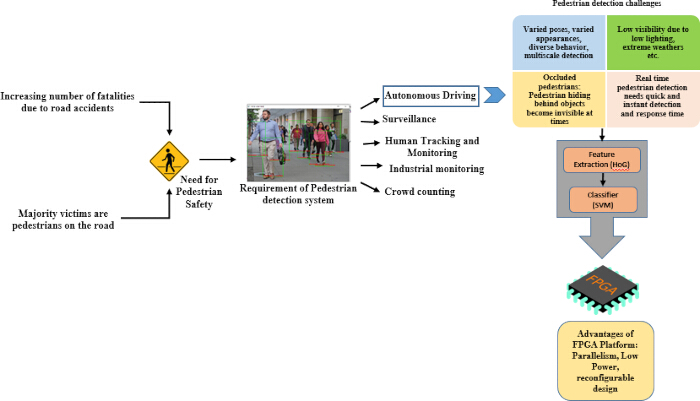
Figure 1: Pedestrian detection. The need for pedestrian detection, key application areas of pedestrian detection, the challenges involved in pedestrian detection, and the implementation flow of pedestrian detection on an FPGA board. Please click here to view a larger version of this figure.
To identify pedestrians on the road, numerous algorithms exist. This overall task can be primarily divided into two main subtasks: the initial step extracts features from an input image, retaining only those that are significant and convey relevant information, while ignoring the redundant ones. For effective recognition of humans or pedestrians in an image, it is crucial that these features indicate the presence of a human figure within the scene13,14. Following this extraction, the features need to be sent to a classifier that can determine whether the identified features correspond to a human. Therefore, the algorithm requires a feature extraction and description phase, followed by a classification step to determine pedestrian presence in the input scene. There are various algorithms available for this purpose. However, the most widely accepted method for pedestrian detection to date remains the combination of the histogram of oriented gradients (HoG) with the support vector machine (SVM) classifier12,13,14,15. Numerous examples of software advancements exist, but ultimately, the goal is to port the implementation to a compatible hardware platform, which can then be integrated into the application system for real-time use. Therefore, the current emphasis is on hardware realization. It can thus be stated that it is required to develop a suitable hardware implementation of pedestrian detection systems, where cameras equipped with appropriate hardware can be deployed on vehicles and identify pedestrians on the road. When considering which hardware is appropriate for such implementations, one of the most commonly utilized options is the field programmable gate array (FPGA) due to its numerous advantages, including reduced design time, scalability, ease of modifications, reconfigurability, and lower energy and power consumption15,16,17,18,19,20,21,22.
FPGA boards have consistently evolved and are now widely used for complex, advanced computer vision applications that span from basic image processing to object detection, augmented reality, and deep learning20,21,22. Presently, several high-performance FPGA boards offer exceptional architectural capabilities to accommodate the extensive processing required for these intricate applications. If the advanced features of autonomous vehicles, such as pedestrian detection, are implemented on such hardware platforms, these platforms can be very useful for quick prototype development to analyze performance, and, after optimization, the implemented algorithm can be transferred to actual integrated circuits for integration into the system.
For over a decade, there have been significant publications based on the implementation of pedestrian detection using the HoG and SVM method on different FPGA platforms. Table 1 summarizes the articles in this field during the time from 2015–202515,16,17,18,19,20,21,22,23,24, focusing on the key factors like the image resolution, the throughput, or the frames per second (FPS), the type of classifier, and the key highlights or the contributions made by the paper.
| Reference | FPGA Platform | Image Resolution | Classifier | Key Highlights / Contributions |
| 15 | Xilinx Zynq | 640×480 | AdaBoost | Real-time FPGA implementation; resource-efficient; uses binarization for optimization; good detection accuracy. |
| 16 | Terasic’s DE1-SOC board | 640×480 | SVM | High-performance HOG extractor; integrates SVM; single-scale detection; low-latency pipeline. |
| 17 | Altera DE2-115 | 640×480 | AdaBoost | Evaluates performance at multiple viewpoints; FPGA implementation of HOG+AdaBoost; real-time pedestrian detection. |
| 18 | Intel Stratix V | 640×480 | SVM | Multi-scale pedestrian detection; FPGA-friendly HOG+SVM pipeline; highlights trade-offs between accuracy and hardware efficiency. |
| 19 | Zynq UltraScale+ MPSoC | 3840×2160 | SVM | Real-time UHD processing; pipelined HOG+SVM; SoC FPGA implementation; fixed-point optimization; scalable architecture. |
| 20 | Not specified | Not specified | SVM | Achieves >95% detection accuracy; real-time FPGA implementation; leverages parallelism; detailed HOG+SVM FPGA design for pedestrian detection. |
| 21 | Zync 7000 FPGA | 1920×1080 | SVM | High-throughput stream architecture for HOG+SVM; supports HD resolution; efficient pipeline for FPGA acceleration. |
| 22 | Ultra96 (rev1) | 240×320 | SVM | FPGA implementation using HLS; detects red traffic signals; calculates probabilities in 891 regions; latency ranges from 153,838 to 19 cycles. |
| 23 | Xilinx Zynq-7000 FPGA | 640 × 480 | HOG + SVM | Implemented pedestrian detection using HOG-SVM on FPGA, achieving real-time performance with reduced power consumption compared to CPU processing. Demonstrated optimized feature extraction pipeline suitable for embedded vision applications. |
| 24 | Xilinx Virtex-6 FPGA | 640 × 480 | Fixed-point object detector (Haar-like features) | Proposed high-throughput FPGA acceleration of object detection using fixed-point arithmetic, reducing computational cost while maintaining accuracy. Showed 15× speedup over CPU implementations with efficient hardware resource utilization. |
Table 1: Literature review of research based on pedestrian detection on FPGA (2015–2025).
Table 1 summarizes that there has been extensive literature in the domain of pedestrian detection, and hardware implementation is the area of interest for researchers. It is also evident that there are advanced deep learning and machine learning techniques, such as convolutional neural networks (CNNs) based detectors like YOLO, transformer-based architectures, etc., for the task of pedestrian detection. They even outperform compared to the traditional HoG algorithm in terms of accuracy but when hardware implementation is considered then the advanced algorithms leads to huge resource utilization23,24 due to the complexities of the algorithm which may also affect other performance parameters and it has also been observed that due to the added complexities the speed is slightly better in the case of the traditional HoG algorithm24,25. It has also been observed that the advanced techniques consume more power when implemented on hardware24,26. Thus, the aim of the work implemented in this paper is to perform pedestrian detection using the traditional HoG and SVM framework on FPGA hardware and achieve a favorable accuracy-speed-resource and power trade-off for real-time embedding. From Table 1 it is quite clear that when the HoG and SVM based work are analyzed then it is observed that there are limited publications that have utilized the recently introduced Zynq UltraScale+ MPSoC (Multi-Processor System On Chip) based FPGA development board27 to explore the capability of these boards as from the point of view of architecture these boards have evolved, and offer great potential in terms of implementation of high end real-time computer vision application. There are limited publications that have realized the entire pedestrian detection system in real-time on the FPGA boards. However, they have focused on the efficient implementation or improvement of the intermediate tasks. Moreover, most of these implementations are based on realizing the entire system on an FPGA board through the use of hardware description languages. Few have utilized the benefits of High Level Synthesis (HLS) tools to speed up the design cycle. This paper demonstrates the design and implementation of real-time pedestrian detection on an FPGA board dedicated to an autonomous driving application. The paper utilizes the HoG and SVM framework for the purpose of pedestrian detection on still images, video, or real camera input. The hardware utilized is a cutting-edge and recently released FPGA board, the Ultra96 v2, which is an advanced FPGA architecture that is a powerful platform for computer vision, image processing, machine learning, edge computing, etc.24. The Ultra96 v2 is a development board featuring an Arm-based AMD Xilinx Zynq UltraScale+ MPSoC27. This board includes the processing system (PS) segment, which consists of ARM-based CPU cores that manage the software aspects of the project, and the Programmable Logic (PL) segment that allows for customizable hardware acceleration20,21,22. Together, these components enhance the functionality of a hybrid system, where the PS part manages control and interaction with external elements, while the PL part handles the actual processing logic.
Protocol
Loading...
$$\rightleftharpoonup{xx}$$
$$\longleftharp{xx}$$,
$$\longrightharp{xx}$$,
The implementation procedure used in this research, based on pedestrian detection with HoG + SVM on an FPGA board, leveraging the benefits of high-level synthesis, is illustrated in Figure 2 below.
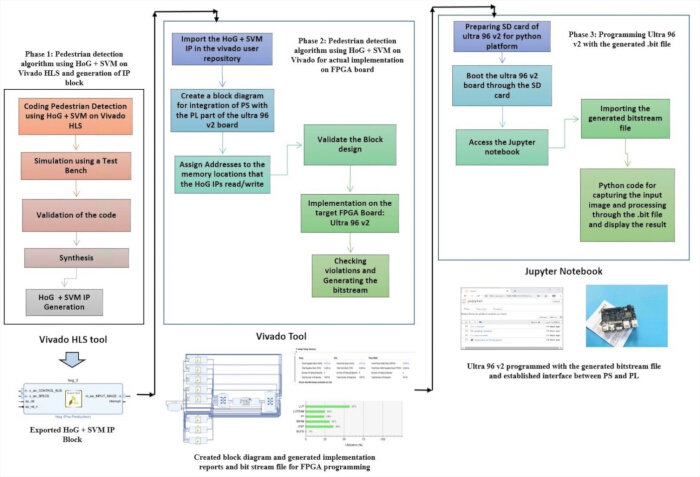
Figure 2: Design procedure for implementation of pedestrian detection on FPGA board. Phase 1: Pedestrian detection algorithm using HoG+SVM on HLS tool and generation of IP block. Phase 2: Pedestrian detection algorithm using HoG+SVM for actual FPGA implementation and generating the bit file. Phase 3: Programming the board with the generated bit file. Please click here to view a larger version of this figure.
1. Pedestrian detection using HoG and SVM on the HLS tool
- Download the Python Integrated Development Environment (IDE) depending on the system properties on which the download is done.
NOTE: In this work, Python 3.10 version is used. - Execute a Python script for running a training model using the HoG algorithm and the SVM classifier. Begin the script with loading the positive and the negative samples from the dataset.
NOTE: Use the INRIA dataset11. - Extract the HoG features for a window size of 64 x 128.
- Split the training and the testing data from the INRIA dataset to a ratio of 80/20 with random shuffling for reproducibility.
NOTE: The dataset is randomly shuffled using the python function before splitting the data. To ensure reproducibility so that the same splitting is done every-time a seed value is fixed in the code. - Train using the C-support vector classification (SVC) SVM with a linear kernel.
- Extract the weight vectors and the bias.
- Save the SVM weights and the bias in fixed-point Q8.8 format for the FPGA implementation.
NOTE: The conversion is done by scaling each floating point values originality generated by a factor of 256 (28) and casting the result to an integer. - Test the trained model through another Python script and adjust the regularization parameter C, until the accuracy is calculated to be more than 95%.
NOTE: Optimized regularization parameter obtained: C = 0.05. - Open the HLS tool and create a new project with the part number selected as xczu3eg-sbva484-1-e.
- Write a pedestrian detection code on the high-level synthesis tool using high-level languages like C++.
- In the code, write three different C++ scripts: one for the HoG feature descriptor and the SVM classifier, another for the testbench to provide input to the test images and save the output images, and the third for a header file that declares the parameters used in the code.
- In the code for HoG feature calculation, resize the image to 640 x 480 and apply a sliding-window architecture with a window size of 64 x 128. For every window, calculate the gradient magnitude and orientation for every overlapping 8 x 8 block.
NOTE: It is important to scan the entire image through the sliding window concept so that every area of the image is covered and pedestrians of every possible size are identified. - In the other part of the same code for the HoG feature descriptor, pass the calculated gradients to the SVM classifier. Write the code for matching the features with the classifier weights and compare with the threshold to classify the detected feature as that of a human or not.
- Click on Run C Simulation in the HLS tool to simulate the code with the help of a test bench to check the functionality correctness of the code.
- Provide different input images to the code and check the output images with the detected pedestrians.
- Click on Run C Synthesis to synthesize the code to map the code to hardware languages by the tool and generate the reports of timing and utilization.
NOTE: The tool automatically opens the HLS synthesis reports. This report shows the estimate of the required clock frequency for implementing the coded task on selected FPGA platform, and also provides an estimate of the utilized resources. These reported values are only estimates and the actual parameters are calculated only after implementation on FPGA board. - Click on Export RTL to export the Intellectual Property (IP) block for the HoG algorithm of pedestrian detection.
NOTE: This IP is to be used in the later stages of implementation.
2. Programming the FPGA board
- Open the tool for FPGA programming and create a new project. Select the part number as xczu3eg-sbva484-1-e and create a new block design.
NOTE: This block diagram is created to establish integration between the PS and the PL part of the FPGA board. The communication protocol used is the Advanced eXtensible Interface (AXI) protocol. - Search for the IP Catalog in the tool and once found open it.
- Create a user repository by adding the path of the exported RTL IP in the step 1.17.
- In the new block design window, now right click and select add IP. All the IPs will be visible including those that are provided by the tool as well as the user added repositories.
- Add the Zync Ultrascale PS block from the repository.
NOTE: This block reflects the PS part of the system, which is responsible for generating the required clocks, and it also has the master and slave ports for connection to the imported HoG IP via the AXI interconnect block, which runs on the AXI protocol fundamentals. - Add 8 HoG IPs because the system will be processing 8 windows simultaneously to leverage the benefit of parallelism offered by the FPGA board.
- Add a processor system reset block, also that controls the clock and reset supplies to each and every block in the diagram.
- Add two axi_smart connect blocks for connecting the HoG IPs with the Zync PS block. The entire block diagram with the complete connections is shown in Figure 3.
NOTE: As shown in Figure 3, all the blocks that are required to be added to the design have been shown clearly. Figure 3 is captured from the tool and it shows the internal ports of every block as well as the interconnections between the ports of different blocks. This block is the main design as it is responsible for establishing the interface between the PS and the PL part of the FPGA board. - After completing the connections as per Figure 3, click on validate design.
NOTE: Validation basically checks the missing connections or broken connections, which may lead to issues in later stages. - Click on synthesis and then Implement design in the tool after the validation of the block diagram is successful.
NOTE: Synthesis maps the designed block diagram and maps it on the FPGA board. This step will report any violations that may indicate that the design cannot be implemented on hardware. - The tool will also generate reports related to timing, resource utilization, and power consumption. Carefully examine the reports to check for any timing violations and analyze the performance of the designed system.
- Click on Generate the bitstream file which will generate the .bit file required for programming the FPGA board.
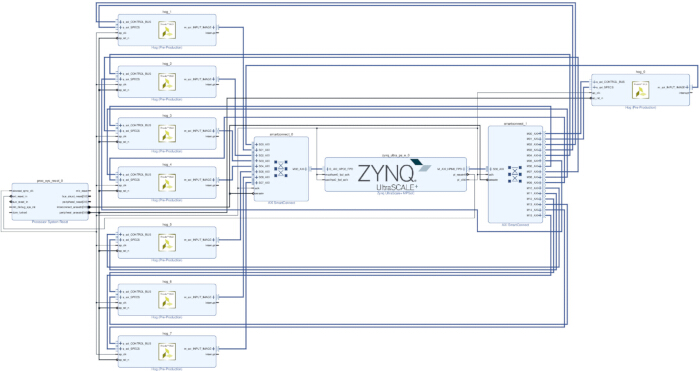
Figure 3: Block diagram for pedestrian detection using HoG + SVM imported IP. Please click here to view a larger version of this figure.
3. Final implementation on the FPGA board
- Get the FPGA board and insert the SD card with the proper image file in the slot on the board.
- Connect the board to the computer as well.
- Boot the FPGA board in the SD card mode to enable Python programming on it21,22.
- Access the jupyter platform on the board after connecting it to the wifi.
- Connect a web camera to the board.
- Write a python code to import the generated bit file and perform the task of accessing the camera images.
- In the code, write the script so that the image is written in the memory of the FPGA board through the PS part and passed onto the PL part for processing.
NOTE: The PL part of the board that corresponds to the HoG IPs accesses the image pixels through these memory locations and processes them and provides the scores as output. - Write appropriate code in the same Python script to read the processed images and display them on the computer screen.
NOTE: This completes the entire design and the system is now ready for deployment in real-world applications. All the codes used in this study are uploaded as supplemental coding files (Supplementary File 1 [Script_1_train_test.py], Supplementary File 2 [Script_2_HLS_hog.cpp], Supplementary File 3 [Script_3_HLS_test_bench.cpp], Supplementary File 4 [Script_4_HLS_consts.h], Supplementary File 5 [Script_5_jupyter_code.txt]).
Results
Loading...
$$\rightleftharpoonup{xx}$$
$$\longleftharp{xx}$$,
$$\longrightharp{xx}$$,
Pedestrian detection implementation on HLS
Figure 4 shows the simulation results on the HLS tool for the pedestrian detection using HoG + SVM. An input image with a pedestrian is fed as the test input to the code, and the output with the detected pedestrians is displayed. There are two sections in the image. The first detection has many bounding boxes around the same pedestrian again and again, and in the second image, the overlapping boxes are removed, and they are suppressed, leaving only the main detection boxes.
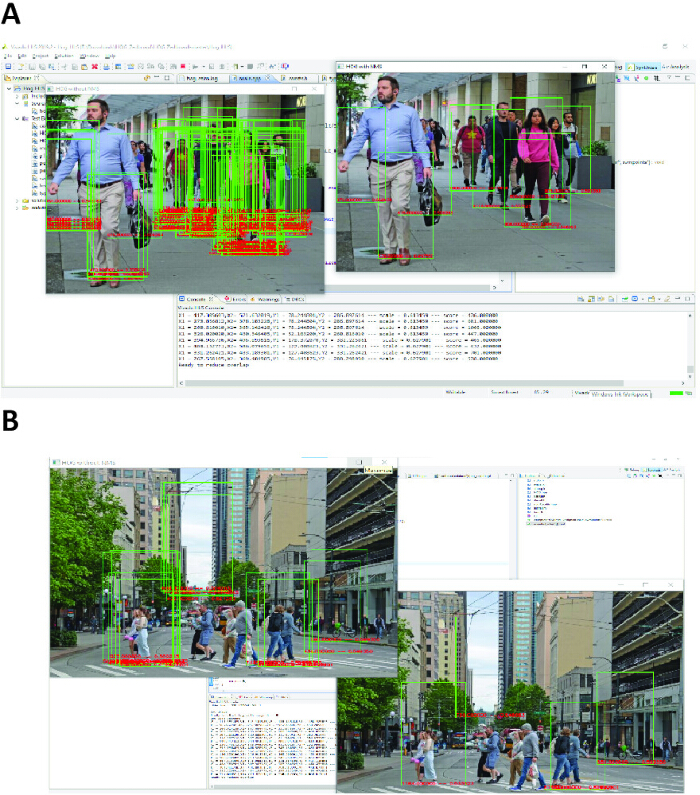
Figure 4: Simulation result from HLS tool. (A,B) Two different input images and the resultant images with the detected pedestrians. Please click here to view a larger version of this figure.
The HLS tool also provides synthesis reports for the timing and resource utilization. The timing summary highlights the time period required by the design and provides the maximum and minimum latency values in terms of the number of cycles. This information is useful for estimating how much time the design requires to execute and what the clock frequency should be when moving to the actual hardware implementation. Table 2 below shows the timing report after HLS synthesis, which clearly depicts that the target clock period was 6 ns and the design took 5.25 ns, which is less than the target, and hence the time period can be 6ns or above but not below 5 ns.
| Timing Summary | ||
| Clock | Target | Estimated |
| 6.00 ns | 5.250 ns | |
| Utilization Summary | ||
| Total / Available | Percentage of Utilization | |
| BRAM18K | 22 / 432 | 5% |
| DSP48E | 13 / 360 | 3% |
| FF | 5611/ 141120 | 3% |
| LUT | 9904/ 70560 | 14% |
| URAM | 0 | 0 |
Table 2: Estimated timing and resource utilization report from HLS tool for pedestrian detection using HoG-SVM.
Table 2 also depicts the utilization report. It shows the percentage utilization of important on-board FPGA resources as per the target board selected. For this pedestrian detection design, the utilization report shows that the design consumes 14% of the look up tables (LUTs), 3% of Flip Flops (FFs), 3% of digital signal processing (DSP), and 5% of block random access memory (BRAM). These estimates are not the exact utilization reports, but the actual reports are close to these estimates. These are only the estimates that can be calculated by the HLS tools. The Actual implementation is usually very different from these estimates.
Actual implementation results from hardware programming
After the code is mapped into an IP, which is imported in the FPGA programming tool, and the design is implemented on the actual FPGA hardware, several reports are also generated. The first is the timing summary, which shows whether the clock frequency provided to the design is enough or not. If all the timing constraints are met and there are no violations, then the design can proceed. Table 3 below shows the timing summary generated by the tool. As depicted in the table, the timing summary indicates the worst negative slack, which is 4.073 ns. As this value is positive, it indicates that this much time is still available. Negative values indicate that the FPGA is taking more time to complete the task, and the clock is running fast. Since in this case there are no negative values, which signifies that the timing constraints are met.
| Design Timing Summary | ||
| Setup | Hold | Pulse Width |
| Worst Negative Slack 4.073 ns | Worst Hold Slack 0.010 ns | Worst Pulse width Slack 3.500 ns |
Table 3: Actual timing summary for pedestrian detection on FPGA board.
Also, the tool shows the resource utilization reports, which are the actual utilization of the on-board resources as per the FPGA board selected. In this case, the selected board is the Zynq UltraScale+ MPSoC (Multi-Processor System On Chip) based FPGA development board27. Table 4 below shows the resource utilization and Figure 5 shows the diagrammatic representation of the resource utilization.
The utilization summary indicates the actual consumption of the on-board resources given that there are 8 HoG IPS used in parallel, and the estimates reported by the HLS synthesis were for a single HoG IP. But even after such extensive usage, the resource utilization for every resource is less than 50%. Table 4 clearly indicates the utilization with respect to the various resources and their utilization percentage, which is represented pictorially in Figure 5.
| Resource | Utilization | Available | Utilization % |
| LUT | 40536 | 70560 | 57.45% |
| LUTRAM | 7304 | 28800 | 25.36% |
| FF | 33342 | 141120 | 23.63% |
| BRAM | 68 | 216 | 31.48% |
| DSP | 128 | 360 | 35.56% |
| BUFG | 2 | 196 | 1.02% |
Table 4: Actual utilization Report for pedestrian detection on FPGA board.
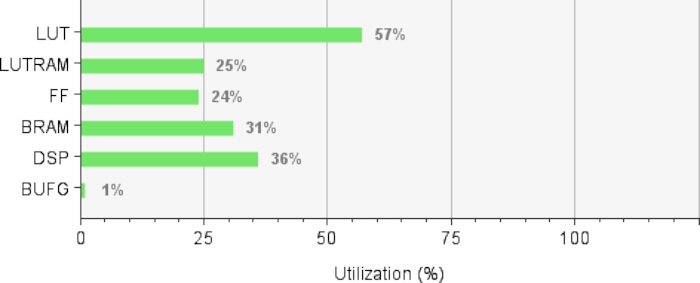
Figure 5: Resource utilization for pedestrian detection on FPGA board after actual implementation. Look up tables (LUT): 57%, LUTRAM: 25%, Flip flops (FF): 24%, Block RAM (BRAM): 31%, Digital signal processors (DSP): 36%, Buffers: 1%. Please click here to view a larger version of this figure.
The third report is regarding the power estimates of the board for the amount of energy consumption by the design. Figure 6 below shows the power consumption report, which shows that the total on-chip power is 2.435 W. The junction temperature and the power consumed by every important net and component are also shown. The power measurements do not highlight any alarming power consumption, and hence the design can be considered energy efficient.
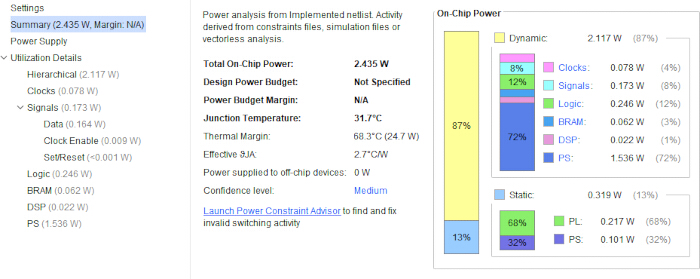
Figure 6: Power estimation for pedestrian detection on FPGA board after actual implementation. Power report generated by the tools depicts the total consumed power as 2.435 W and also shows the distribution of the power among the various resources on the FPGA board. Please click here to view a larger version of this figure.
Another analysis is done to understand the advantage of using 8 HoG IPs instead of a single HoG IP or more than 8 in the created block diagram, as shown in Figure 3. The hardware-related performance metrics were calculated for both a single HoG IP and 8 HoG IPs in parallel. Table 5 below shows the comparison.
| Perfromance Metric | 1 IP | 8 IPs |
| Timing (ns) | 5.312 | ~5.25 |
| Freq (MHz) | 188 | 150 |
| Power (W) | 1.9 | 2.43 |
| LUTs | 4998 | 40536 |
| FF / Registers | 4,031 | 33,342 |
| DSP | 16 | 128 |
| BRAM | 8.5 | 68 |
| FPS | ~10–11 | 83 |
Table 5: Comparison of performance metrics using single vs multiple HoG IPs.
Table 5 clearly indicates that when the resources are considered like the LUTs, FFs, DSPs, and BRAM, then with single HoG IP and 8 HoG IPs, the scaling is linear with almost 8 times increase in the resources utilized. This is clearly expected as more IPs will lead to more resources being consumed. Also, if the frequency is observed, then the maximum frequency also degrades slightly by 20% from 188 MHz to 150 MHz. This is also expected as more blocks lead to more connections and hence longer paths, causing an increase in critical paths. But the advantageous factors like frames per second (FPS) improve from 10 to 83, demonstrating nonlinear scaling in the case of FPS due to the introduced concept of parallelism, due to 8 HoG IPs. Also, the power scales from 1.9 W to 2.4 W, indicating improved energy efficiency through pipelining. Thus, this analysis clearly indicates that the introduction of 8 HoG IPs is beneficial for the design, and scaling beyond 8 can cause overconsumption of resources; thus, numbers of blocks beyond 8 are not considered favorable.
Pedestrian detection results after FPGA implementation
Finally, the entire system is integrated on the FPGA board, and the bitstream file is generated, which is then programmed on the board through the SD card booted with Python programmability capability. Once the board is booted with the SD card, the jupyter interface can be accessed and Python code can be written and run on the platform. The Python code is run and tested for pedestrian detection on different input images. The result of a few images is shown in Figure 7 below. These images are utilized from the INRIA dataset as well as random images of pedestrians obtained from open source online sources26,27.
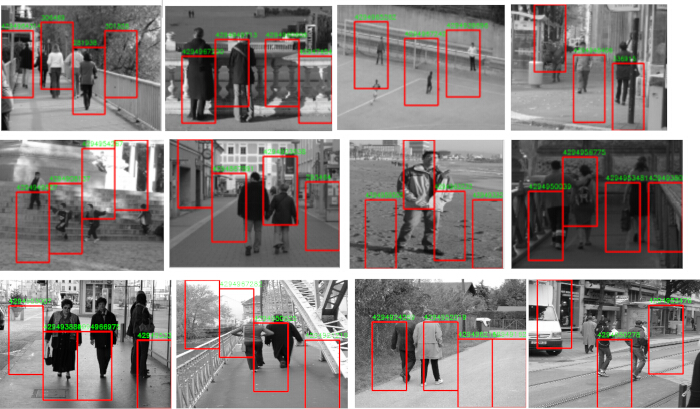
Figure 7: Pedestrian detection results on still images through FPGA Board. The tested images include images from the INRIA dataset, open source images available on google to test to detection accuracy on crowded streets of India. Please click here to view a larger version of this figure.
The system is also tested on real-time frame capturing through a web camera and detecting the pedestrians in the frame as well as the system is tested on already recorded video inputs of pedestrians. The results for this are depicted in Figure 8 and Figure 9. Figure 8 shows set of example frames captured by the web camera and the results of pedestrian detection in each frame, whereas Figure 9 shows the results of pedestrian detection implemented on an input video provided to the system.
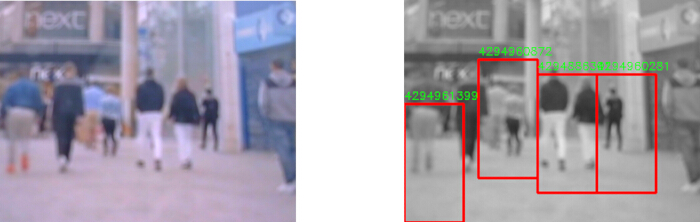
Figure 8: Pedestrian detection results on frame captured by a camera in real-time through the FPGA board. Real-time capturing of video through web camera 720 P and demonstrating the real- time detection of pedestrians. The blurred images are caused as snapshots are taken from the ongoing live video. Please click here to view a larger version of this figure.
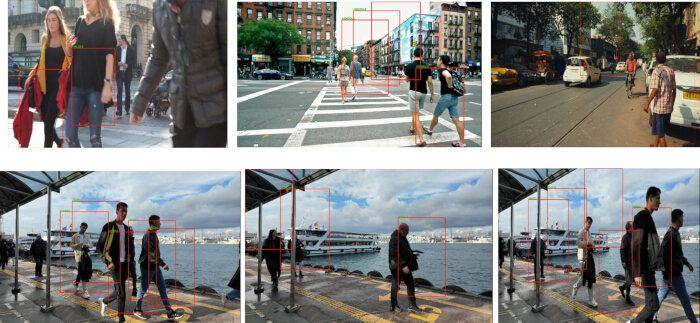
Figure 9: Pedestrian detection results on videos provided as input to the FPGA Board. The videos were taken from open source links. Please click here to view a larger version of this figure.
Estimation of performance metrics
To calculate the efficiency and analyze the performance of the above implemented design, it is essential to calculate performance metrics that are useful to evaluate the performance. The performance metrics for detecting efficiency of a detection algorithm basically depend on values of true positives (TP), true negatives (TN), False positives (FP), and false negatives (FN). From these values, the performance metrics like precision, recall, F1 score, False positives per image, and accuracy can be calculated as per the equations given below. It has been observed that most of the research papers report their detection performance through the accuracy parameter. But it has been observed that the accuracy calculation that involves the use of TN can be a misleading parameter, as the value of TN cannot be calculated correctly in a true sense, as it involves finding the count of all the detection windows in an image that does not actually have a pedestrian, and the implemented algorithm also reports it as no detections. This number is generally very large, as the total number of detection windows in an image is large, and the background areas in every image usually correspond to regions with no pedestrians. By closely looking at the accuracy formula shown in equations [1] – [5], it can be realized that as the value of TN will be quite high as compared to TP+FP+FN, the accuracy parameter usually has a high value. To truly evaluate the performance, it is much better to report the metrics like precision, recall, and F1 score that do not depend on TN and hence are much more accurate.
 [1]
[1]
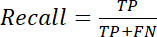 [2]
[2]
 [3]
[3]
 [4]
[4]
 [5]
[5]
To find the values of TP, TN, and FN for this paper, the experiment on the still images was repeated on a huge number of images. From the results of every image, the value of true positives, which is the number of pedestrians detected correctly, false positives, the number of pedestrians wrongly detected, and false negatives, which is the actual pedestrians that were undetected, was calculated. The following values were reported after the performed experiments and are shown in Table 6 below.
| Performance Metric | Value |
| TP | 143 |
| FP | 39 |
| FN | 19 |
| Precison | 0.786 (78.6%) |
| Recall | 0.883 (88.3%) |
| F1 Score | 0.831 (83.1%) |
| FPPI | 0.867 |
Table 6: Performance metrics for the FPGA based implemented of pedestrian detection algorithm.
Table 6 above thus describes the accuracy of the pedestrian detection algorithm through the various performance metrics, precision, recall, F1 score, and FPPI, when the algorithm is implemented on the hardware platform.
Performance comparison with existing FPGA-based HoG implementations
Finally, the executed work can be compared with the previous literature to state any significant contributions of this research. This comparison is depicted in Table 715,16,17,21,24below. The articles with which the comparison is done are all based on pedestrian detection applications implemented on FPGA platforms, and the algorithms used for these detections are also the same for all, which is HoG combined with a classifier, which is either an Adaboost classifier or SVM. The image size is also the same for each (640 × 480). The comparison is made based on parameters like the clock frequency that affects the speed, the frames per second, the power consumption, and the resource utilization in terms of LUTs, DSPs, Memory, Slices, and Registers. To induce a fair comparison, the research papers considered for comparison have similar image resolution, and to normalize the resource comparison, every resource utilization is normalized by dividing the number of consumed resources by the total number of available resources according to the FPGA board used.
| Reference | Image Size | FPGA Board | Clock Frequency | Frames per second (FPS) | Power | Pixels /clock | LUTs (%) | DSP48s (%) | BRAMs /memory Bits (%) | Registers/FF (%) |
| 15 | 640×480 | Xilinx Zynq | 82.2 MHz | 40 | - | 1 | 40 | 2 | 0 | - |
| 24 | 640×480 | Virtex 6 | 150 MHz | 10 | 19 W | 39 | 53 | 22 | - | |
| 16 | 640×480 | Cyclone V | 162 MHz | 526 | 9 W | 0.99 | 21 | 86 | 100 | 21 |
| 17 | 640×480 | Altera DE2-115 | 50 MHz | 129 | 3.6 W | - | 73 | - | 72 | 60 |
| 21 | 640×480 | Zync 7000 | 100 MHz | 240 | 1.6 W | - | 13 | 3 | 1 | 10 |
| THIS WORK | 640 X 480 | Ultra 96 v2 | 150 MHz | 83 | 2.435W | 0.0632 | 57 | 35 | 31 | 24 |
Table 7: Comparison of parameters and performance for implementations of pedestrian detection on FPGA
As visible in Table 7 above, it can be noticed that when the implementation in this research is compared with the previous works, the comparisons showcase significant improvements in terms of speed. The FPGA board is capable of running at a clock frequency of 150 MHz, which signifies that the time period for completing the entire task is less than 6 ns. Although some prior works report significantly more FPS, through careful examination, it can be analyzed that this advantage comes at the cost of higher power consumption as well as almost complete utilization of certain resources. If the power consumption is considered than in this work the reported power is also on the lower side and the resource utilizations suggest that the consumption of every resource is slightly more than certain implementations, but equal to or less than 50% (57% LUTs, 35% DSPs, and 31% BRAM) which shows significant room for more tasks to be implemented in this design. Overall, it can be stated that the work implemented in this paper achieves a balanced trade-off between performance, power, and resource utilization. Additionally, the presented work showcased scalable parallelism through multiple IP blocks without drastically affecting the performance parameters.
Supplementary File 1: Script_1_train_test.py.Please click here to download this file.
Supplementary File 2: Script_2_HLS_hog.cpp. Please click here to download this file.
Supplementary File 3: Script_3_HLS_test_bench.cpp. Please click here to download this file.
Supplementary File 4: Script_4_HLS_consts.h.Please click here to download this file.
Supplementary File 5: Script_5_jupyter_code.txt.Please click here to download this file.
Discussion
Loading...
$$\rightleftharpoonup{xx}$$
$$\longleftharp{xx}$$,
$$\longrightharp{xx}$$,
This study effectively implements a real-time pedestrian detection system utilizing the HoG + SVM algorithm on advanced FPGA hardware based on Zynq UltraScale+ MPSoC development board24. The results indicate that the traditional HoG algorithm of human detection11 achieves accuracy close to 95% and utilizes only half of the on-board FPGA resources (LUTs, FFs, BRAM, DSPs), leaving huge capability of including much more processing to do some different tasks. When the entire implementation approach is analyzed, it is observed that there are various critical steps involved. One major step is to train the SVM model18,19,24 with an appropriate dataset for effective pedestrian detection so that the weights are extracted and utilized in the FPGA programming. The training code will indicate the performance accuracy, and the detection threshold needs to be tuned carefully through the regularization parameter to achieve an accuracy close to 95%. The selected parameters in the training are the custom HoG descriptors with a window size of 64 x 128, a block size of 16 x 16, a cell size of 8 x 8, and a number of bins is selected as 9. Presently, the training has been done on the INRIA dataset11 with 2416 positive images and 1218 negative images. The augmentation includes the rotation of images to provide the horizontal mirrored version. Other major inclusions, like evaluation of the model under conditions of poor visibility or scale variations, will be addressed in future work to ensure reproducibility and robustness. The dataset considered for the training must include images of pedestrians in various poses, and it must also include images that do not have any pedestrians in it18,19.
The other critical step is to create the block diagram for the entire system so that the PS part of the FPGA board can communicate with the PL part. In this step, it needs to be ensured that each block is parameterized with the correct ports and that it is connected with the other blocks properly. The tool also offers automatic routing with suggestions to assist the designer. A very crucial step is the address assignment after completing the block diagram. The imported HoG IPs need to be assigned addresses as per their depth, and these addresses must not be the same for any two IPs. These addresses are required in the python code on the SD card that will help the PS part of the FPGA board to understand the address location in PL that it has to access to read/write the data. Thus the challenging step is the interface development on the Python platform that allows the user to feed the input images/videos/live camera feed to the FPGA, and display the output image with the detected pedestrians after receiving the processed images from the FPGA. The Python code needs to be written with various debugging messages so that intermediate results can be viewed by the designer, and in case of failures, the errors can be diagnosed and corrected. A huge amount of time was spent in this research in establishing a proper interface between the PS and the PL part. The Python script for this interface was able to access the data of the HoG IPs after several iterations, and inclusion of several statements to display the intermediate results was very helpful in troubleshooting and rectifying the errors.
One observed limitation of the method is the utilization of the python part for establishing the interface between the PS and the PL part of FPGA. While the python platform reduced the design time drastically but it introduces additional overheads that impacts the real-time performance. The hardware accelerated system of pedestrian detection reported a throughput of 83 FPS, but the overall performance of the system got affected due to latency or became unresponsive during live camera testing because of delays caused due to data transfer between the PS and the PL part. The future perspective holds the possibility of developing a complete hardware accelerated system without any dependency on software.
Although there are limitations as described above but the research contributes significantly as the developed system can be seamlessly adapted for pedestrian detection in still images, live feeds, or video inputs. All three methods require only minor modifications to the Python code on the Jupyter platform, demonstrating the system's quick adaptability to various scenarios. The results indicate that the implementation on the advanced FPGA architectures yields encouraging outcomes, as the performance parameters are highly optimized, resulting in good and acceptable values. The achieved clock frequency is comparable to previous literature14,15,16,20,23, indicating that speed is not compromised, while the minimal power consumption suggests there are no heating issues. Additionally, resource utilization shows that all resources are utilized at less than 50 %, indicating significant potential for further design enhancements.
The developed system can be utilized in any application demanding the task of detecting humans and can be adapted for real-time applications. Also future efforts may concentrate on removing the mentioned limitations by developing the entire system either completely on the PL part with making the FPGA logic to itself read the input images and display the processed output images as almost 50 % on board resources are still available. Also if the PS and the PL integration is to be utilized then interface development through Software Development Kit (SDK) tools can be undertake. Other possible extensions could be identifying pedestrians in significantly harsher weather conditions or during low visibility, or identifying the occluded pedestrians that are hidden behind other objects, necessitating modifications to the algorithm. The only modification required in these cases would be to replace the SVM trained weights after proper training according to the selected challenge and the rest of the system does not require any other modifications. Thus the implemented system is well suitable for adapting itself to other challenging scenarios easily. Another future perspective could be to focus on incorporating additional features into the system to create a fully autonomous vehicle using the advanced FPGA board.
Disclosures
Loading...
$$\rightleftharpoonup{xx}$$
$$\longleftharp{xx}$$,
$$\longrightharp{xx}$$,
The authors declare that they have no conflict of interest.
Materials
| Name | Company | Catalog Number | Comments |
|---|---|---|---|
| Python | Python | Version 3.10 | |
| Ultra 96 V2 FPGA Board | Xilinx | Introduced in 2018 | Hardware Implementation Platform used for implementing the pedestrian detection algorithm |
| Vivado | AMD | 2019.2 | FPGA Programming tool used for programming the Ultra 96 v2 FPGA board with the pedestrian detection algorithm |
| Vivado HLS | AMD | 2019.2 | High Level Synthesis Tool used for high level programming of the pedestrian detection code in the paper to export the Intellectual Property (IP) |
References
Loading...
$$\rightleftharpoonup{xx}$$
$$\longleftharp{xx}$$,
$$\longrightharp{xx}$$,
- Nkuzo, L., Sibiya, M., Markus, E. Computer vision-based applications in modern cars for safety purposes: A systematic literature review. 2023 Conference on Information Communications Technology and Society (ICTAS), Durban, South Africa, , (2023).
- Nidamanuri, J., Nibhanupudi, C., Assfalg, R., Venkataraman, H. A progressive review - Emerging technologies for ADAS driven solutions. IEEE Trans Intell Veh. 7 (2), 326-341 (2021).
- Bathla, G., et al. Autonomous vehicles and intelligent automation: Applications, challenges, and opportunities. Mob Inf Syst. 2022, 7632892(2022).
- Yamamoto, R., Izumi, Y., Aono, R., Nagahara, T., Tanaka, T., Liao, W., Mitsuyama, Y. Development of autonomous driving system based on image recognition using programmable SoCs. 2021 International Conference on Field-Programmable Technology (ICFPT), Auckland, New Zealand, , (2021).
- Kasem, A., Reda, A., Vásárhelyi, J., Bouzid, A. A survey about intelligent solutions for autonomous vehicles based on FPGA. Carpathian J Electr Comput Eng. , (2021).
- Nane, R., et al. A survey and evaluation of FPGA high-level synthesis tools. IEEE Transactions on Computer-Aided Design of Integrated Circuits and Systems. 35 (10), 1591-1604 (2015).
- Cao, J., et al. Pedestrian detection algorithm for intelligent vehicles in complex scenarios. Sensors. 20 (13), 3646(2020).
- Chen, W., Zhu, Y., Tian, Z., Zhang, F., Yao, M. Occlusion and multi-scale pedestrian detection: a review. Array. 19, 100318(2023).
- Galvao, L. G., Abbod, M., Kalganova, T., Palade, V., Huda, M. N. Pedestrian and vehicle detection in autonomous vehicle perception systems—A review. Sensors. 21 (21), 7267(2021).
- Akshayaa, S., Nithin, S. Comparative study of pedestrian detection techniques for driver assistance system. 2021 Second International Conference on Electronics and Sustainable Communication Systems (ICESC), Coimbatore, India, , (2021).
- Dalal, N., Triggs, B. Histograms of oriented gradients for human detection. Proceedings of the 2005 IEEE Computer Society Conference on Computer Vision and Pattern Recognition (CVPR), San Diego, CA, USA, , (2005).
- Singh, G., Kaur, A., Bhardwaj, V., Shrivastava, S. Optimizing IoT capabilities: leveraging FPGA for superior performance, efficiency and security. 2024 5th International Conference for Emerging Technology (INCET), Belgaum, India, , (2024).
- Shrivastava, S., Kumar, B. V., Gupta, R., Sharma, V. Advancements in real-time image processing using Kintex and Virtex FPGAs: enhancing speed, efficiency, and versatility. 2025 IEEE International Conference on Interdisciplinary Approaches in Technology and Management for Social Innovation (IATMSI), Gwalior, India, , (2025).
- Rettkowski, J., Boutros, A., Göhringer, D. Real-time pedestrian detection on a Xilinx Zynq using the HOG algorithm. 2015 International Conference on Reconfigurable Computing and FPGAs (ReConFig), Riviera Maya, Mexico, , (2015).
- Ngo, V., Casadevall, A., Codina, M., Castells-Rufas, D., Carrabina, J. A high-performance HOG extractor on FPGA. arXiv. , 1802.02187(2018).
- Adiono, T., Prakoso, K. S., Putratama, C. D., Yuwono, B., Fuada, S. HOG-AdaBoost implementation for human detection employing FPGA ALTERA DE2-115. Int J Adv Comput Sci Appl. 9 (10), 353-358 (2018).
- Dürre, J., Paradzik, D., Blume, H. A HOG-based real-time and multi-scale pedestrian detector demonstration system on FPGA. Proceedings of the 2018 ACM/SIGDA International Symposium on Field-Programmable Gate Arrays, Monterey, California, USA, , (2018).
- Wasala, M., Kryjak, T. Real-time HOG+SVM based object detection using SoC FPGA for a UHD video stream. 2022 11th Mediterranean Conference on Embedded Computing (MECO), Budva, Montenegro, , (2022).
- Lin, Y. Research on HOG-SVM pedestrian detection method based on FPGA. Appl Computat Eng. 9, 272-281 (2023).
- Ranawaka, P., et al. Application specific architecture for hardware accelerating HOG-SVM to achieve high throughput on HD frames. 2019 IEEE 30th International Conference on Application-Specific Systems, Architectures and Processors (ASAP), New York, NY, USA, 2160, 131-134 (2019).
- Luo, J. H., Lin, C. H. Pure FPGA implementation of an HOG based real-time pedestrian detection system. Sensors. 18 (4), 1174(2018).
- Ma, X., Najjar, W. A., Roy-Chowdhury, A. K. Evaluation and acceleration of high-throughput fixed-point object detection on FPGAs. IEEE Transactions on Circuits and Systems for Video Technology. 25 (6), 1051-1062 (2015).
- Weng, G. Real-time pedestrian recognition on low computational resources. arXiv. , 2309.01353(2023).
- Nguyen, T. A., Tran-Thi, T. Q., Bui, D. H., Tran, X. T. FPGA-based human detection system using HOG-SVM algorithm. 2023 International Conference on Advanced Technologies for Communications (ATC), Da Nang, Vietnam, , (2023).
- Tarchoun, B., Khalifa, A. B., Dhifallah, S., Jegham, I., Mahjoub, M. A. Hand-crafted features vs deep learning for pedestrian detection in moving camera. Traitement du Signal. 37 (2), 209-216 (2020).
- Suleiman, A., Chen, Y. H., Emer, J., Sze, V. Towards closing the energy gap between HOG and CNN features for embedded vision. 2017 IEEE International Symposium on Circuits and Systems (ISCAS), Baltimore, MD, USA, , (2017).
- Ultra96-V2 Single Board Computer Hardware User’s Guide. , Avnet. Available from: https://www.avnet.com (2025).
Reprints and Permissions
Request permission to reuse the text or figures of this JoVE article
Request Permission