The objective is to offer an accessible, standardized focus stacking method for insect photography, using affordable equipment to create sharp, high-resolution images for taxonomy, biodiversity research, ecological studies and public outreach.
Method Article
Focus Stacking Protocol for High-Resolution Insect Photography
Opens in a new tab
In This Article
Summary
Loading...
$$\rightleftharpoonup{xx}$$
$$\longleftharp{xx}$$,
$$\longrightharp{xx}$$,
Abstract
Loading...
$$\rightleftharpoonup{xx}$$
$$\longleftharp{xx}$$,
$$\longrightharp{xx}$$,
Here, we present a protocol to acquire high resolution, extended depth of field images of insect specimens by photographic focus stacking using a modular digital imaging system. The method provides a standardized workflow linking equipment assembly, calibration, image acquisition, and post processing. Using a full frame mirrorless camera (61 MP) coupled to microscope objectives and synchronized strobe illumination, the protocol achieves pixel scales from 0.76 m–0.19 m and produces artifact free composites through sub-micron focus increments (0.2 m). The procedure can capture and process approximately 20 final images per week under routine laboratory conditions. Compared with existing stacking solutions, this low-cost hybrid setup (< 30% of the cost of commercial systems) maximizes accessibility while maintaining diffraction limited image quality. Representative applications include the production of color calibrated identification plates for taxonomy, biodiversity digitization, and outreach. The protocol’s standardized structure facilitates reproducibility across laboratories and field stations, supporting large scale insect imaging campaigns in both resource limited and institutional environments.
Introduction
Loading...
$$\rightleftharpoonup{xx}$$
$$\longleftharp{xx}$$,
$$\longrightharp{xx}$$,
Insects represent the most diverse group of organisms on Earth and play critical roles in ecosystem functioning1. Yet, global assessments indicate alarming declines in their abundance and diversity worldwide2,3. Accurate imaging of insect morphology is essential to taxonomy, ecological monitoring, and conservation, particularly in biodiversity-rich tropical regions where many taxa remain undescribed4. However, conventional macrophotography remains constrained by limited depth of field, which prevents a single image from encompassing fully sharp three‑dimensional structures such as antennae or wings5.
Efforts to photograph insects for scientific purposes date back more than a century, with early methodological descriptions emphasizing the inherent difficulties of capturing fine morphological details6. Conventional macrophotography, although widely used, remains constrained by the shallow depth of field achievable at high magnification7,8. This limitation makes it difficult to document three-dimensional structures such as antennae, legs, or wings, resulting in images that lack the resolution required for accurate identification or morphological analysis.
Advances in digital photography and image processing have enabled significant progress. Focus stacking, where multiple images taken at different focal planes are merged to produce a fully sharp composite, has emerged as a particularly effective approach9. Its value for entomology by comparing commercial set-ups with low-cost semi-automatic solutions, highlights its potential for large-scale digitization of type specimen approach9. Subsequent work has explored the use of compact, affordable cameras equipped with focus stacking functions, showing that the approach can be extended beyond well-funded institutions to support wider digitization projects10.
Focus stacking—combining sequential images taken at different focal planes to produce one extended focus composite—has become a practical solution6. Early comparative studies7showed that even low-cost semi-automatic systems can approach the performance of commercial microscopes, but a standardized, reproducible protocol suitable for resource limited laboratories is still lacking. Alternative 3 D imaging methods such as DISC3D8 provide precise models but require specialized hardware and complex reconstruction software, limiting their accessibility.
Here, we present a protocol optimized for insect specimens that balances image quality, cost, and portability. The system integrates widely available optical and mechanical components with rigorous color calibration and post processing steps. Its suitability extends from museum digitization to semi-permanent field stations, enabling researchers to produce reproducible images without reliance on proprietary equipment or high-cost automated microscopes. This
study fills a methodological gap by offering a validated, open workflow
aligned with emphasis on transparency and reproducibility.
Protocol
Loading...
$$\rightleftharpoonup{xx}$$
$$\longleftharp{xx}$$,
$$\longrightharp{xx}$$,
1. Equipment set up
- Design a modular imaging system that integrates high-end optical components with affordable and widely available equipment (Supplementary File 1)
- Combine precision mechanics, controlled illumination, and advanced optics to achieve high-resolution focus stacking while maintaining flexibility for different insect sizes and morphologies.
- Use the following core components.
- Camera
- Use a high-resolution full-frame digital camera with strong dynamic range to capture fine morphological structures in detail.
- Mount the camera on a highly specialized focusing rail (Supplementary File 1)
- Optics
- Use infinity-corrected microscope objectives with magnifications such as 5X, 7.5X, 10X, and 20X (Supplementary File 1), mounted on a tube system.
- Complement the objective setup with an ultra-macro lens for larger specimens.
- Include lens tubes of different magnification levels as needed (Supplementary File 1)
- Illumination
- Install two studio flash units in the rear upright position to provide consistent and powerful lighting.
- Position two high-speed flash units in the front at an angle to enable short flash duration and fast recycling time.
- Mount the lights on adjustable stands to achieve uniform, shadow-free illumination (Supplementary File 1).
- Place a diffuser in front of the lens to soften the light and reduce harsh shadows (Supplementary File 1).
- Support system
- Set up an antivibration table to minimize vibration during image capture.
- Use a tripod support and a black nonreflective background to reduce vibrations and reflections.
- Add a specialized macro rail to stabilize the camera in the stacking system (Supplementary File 1).
- Use a three-axis rotary positioning (Supplementary File 1) device to align and position the subject precisely.
- Use a precision micrometric adjustment stage to make fine mm-scale macro adjustments.
- Focusing system
- Operate a stepping motor-controlled focusing rack through a dedicated control unit and network cable.
- Adjust movement increments as finely as 0.2 µm to ensure precise depth sampling for focus stacking.
- Use a cylindrical black tunnel to control light direction and reduce reflections when imaging very small subjects (Supplementary File 1).
- Use a trigger to synchronize flash firing precisely with the camera shutter (Supplementary File 1).
- Computing and accessories
- Use a high-performance laptop with at least 128 GB RAM for image processing.
- Use a fast memory card reader, a graphics tablet, and a high-precision mouse to accelerate post-processing.
- Carry two high-capacity memory cards to ensure sufficient storage for field operations.
- Camera
- Assemble the system from components sourced from multiple manufacturers to create a custom hybrid setup optimized for insect imaging.
2. Color calibration
- Reduce stray light and color inaccuracies by surrounding the camera setup with black-painted walls.
- Use a standardized daylight illuminant at 6500 K to mimic daylight and maintain consistent imaging conditions.
- Perform camera calibration.
- Calibrate the camera using a standardized color reference chart.
- Photograph the color reference chart under the same daylight-balanced lighting used for the insect specimens.
- Generate a custom color profile using color calibration software.
- Apply the custom color profile during post-processing to correct lens and lighting variations.
- Perform monitor calibration.
- Calibrate the monitor using a color management device.
- Calibrate the editing monitor with a colorimeter and profiling software.
- Set the monitor calibration to gamma 2.2 and white point D65 to match the imaging conditions.
- Maintain this dual calibration workflow to preserve color accuracy from capture to final output.
3.Stacking
- Mount each specimen on adjustable supports to ensure stable positioning.
- Acquire images using the motorized focusing rack.
- Adjust step sizes between 0.2 and 2 µm according to specimen size and required depth of field.
- Capture between 50 and 2,000 images across the focal range for each specimen.
- Synchronize illumination with camera exposure to minimize motion blur.
- Store raw image files on memory cards and transfer them to the processing computer immediately after acquisition.
4.Software
- Transfer the raw files to image management software for initial organization.
- Select all images and apply the camera-specific color profile to preserve color accuracy.
- Export the images as high-resolution TIFF files.
- Process the TIFF files in focus-stacking software.
- Test the available stacking methods according to specimen complexity.
- Use a contrast-based averaging method when working with simple, uniform subjects.
- Use a depth-map-based method when you need the best balance of sharpness and artifact reduction (Supplementary File 1).
- Use a pyramid-based method when you need to capture fine details and complex edges while monitoring for haloing artifacts.
- Apply the hybrid workflow.
- Process the original image stack first with the depth-map-based method to create an intermediate composite with strong overall sharpness and color fidelity.
- Save the first intermediate output.
- Reprocess the original stack with the pyramid-based method to create a second composite emphasizing edge detail.
- Save the second intermediate output.
- Load both intermediate outputs as a new stack in the focus-stacking software.
- Apply the depth-map-based method again to merge them into a final composite that combines the strengths of both methods while minimizing artifacts.
- Refine the stacked image in image editing software.
- Remove the background, correct artifacts, and verify color calibration.
- Make subtle contrast and brightness adjustments to improve morphological visibility.
- Log every post-processing step to ensure reproducibility.
- Use a graphics tablet to improve precision during advanced editing.
- Use the following tools during advanced editing.
- Use a freehand selection tool to select irregular areas for targeted edits.
- Use a darkening tool to reduce overexposed or uneven regions selectively.
- Use a navigation tool to move and reposition the image during detailed editing.
- Use a healing or correction brush to remove blemishes, dust marks, and minor imperfections.
- Produce a fully sharp, publication-quality image while maintaining efficiency in resource-limited settings.
(Place Supplementary File 1 here)
5. Preparation and setup
- Assembling the imaging workstation
- Place a vibration-damping table on a stable surface.
- Position a camera mounting rail at the center of the table.
- Fix the digital camera body onto the rail using a rigid plate adapter.
- Attach the selected microscope objective (5×–20×) or macro lens via the appropriate tube adapter.
- Install two rear and two frontal light sources equipped with diffusers to create uniform illumination.
- Mount the subject support (XYZ stage or rotary holder) directly beneath the lens axis.
NOTE: PAUSE POINT: The complete hardware arrangement can remain assembled indefinitely if it is covered to protect it from dust.
- Verifying system alignment
- Ensure that the optical axis is perpendicular to the specimen plane.
- Adjust the horizontal and vertical levels using the stage micrometers until reflections are symmetrical.
- Confirm that illumination is homogeneous across the field; realign diffusers as needed.
6. Color calibration
- Setting lighting and environment.
- Use diffused light at ~6500 K (daylight equivalent).
- Minimize ambient reflections by surrounding the setup with dark, matte surfaces.
- Calibration of color
- Photograph a 24-patch color reference chart under the imaging light.
- Generate a camera profile using the companion calibration software.
- Apply this profile to all subsequent raw images during conversion.
- Calibrate the display monitor to γ = 2.2 and white point D65 to ensure consistent color rendering through the workflow.
- Use diffused light at ~6500 K (daylight equivalent).
7. Specimen mounting and focusing
- Preparation of specimens.
- Fix dried or ethanol‑preserved insects on a soft mounting base such as modeling clay.
- Orient the specimen according to the desired view (dorsal, lateral, ventral, or frontal).
- Position the support centered under the optical axis.
- Adjustment of focus‑stack spacing
- Define the beginning and end of the focal range with the nearest and farthest sharp planes.
- Program incremental movement between 0.2 µm and 2 µm depending on magnification.
- Synchronize the capture trigger so that illumination fires simultaneously with each image exposure.
- Capture sequences of 50–2000 images according to specimen size and depth.
NOTE: PAUSE POINT: Capture may be paused safely between sequences.
8. Image Processing
- Convert and organize raw images.
- Transfer files to a local computer immediately after acquisition.
- Group each stack into a unique folder using incremental numbering.
- Apply lens and color correction profiles, then export images as 16-bit TIFF files.
- Stacking of images
- Open the TIFF stack in focus stacking software.
- Choose a depth map algorithm (equivalent to “Method B”) for the first composite.
- Optionally re-stack using an edge enhancement algorithm (“Method C”) and merge both outputs to maximize sharpness while reducing halos.
- Save the final composite in a lossless format.
- Post-processing of images
- Open the composite in an image editing program.
- Remove background artifacts and dust using selection and healing tools.
- Adjust overall brightness and contrast to improve the visibility of morphological features.
- Document every adjustment to ensure traceability.
Note: PAUSE POINT: The cleaning stage can be resumed later without data loss.
9. Quality assurance and storage
- Inspect the final image at 100% magnification to verify that no stacking misalignments or color shifts remain.
- Record all imaging parameters (magnification, step size, exposure, software versions) in the metadata sheet.
- Store raw, intermediate, and final files on redundant drives; maintain a digital logbook.
Results
Loading...
$$\rightleftharpoonup{xx}$$
$$\longleftharp{xx}$$,
$$\longrightharp{xx}$$,
Validation of Image Quality and Resolution
The focus stacking system produced fully sharp, high contrast composites across magnifications from 5×–20×. Calculated pixel scales ranged from 0.76 µm (5×)–0.19 µm (20×) in object space, confirming adequate sampling for sub-micron structural details of insect cuticle and appendages. Representative stacks of 800–2000 frames demonstrated consistent in-plane sharpness without halo artifacts. The protocol-maintained alignment precision within ± 0.2 µm between frames.
The effective resolving power—estimated from the smallest observable periodic structures—was approximately 4 µm, matching the diffraction limit of the employed objectives. This correspondence indicates that the system operates at the physical resolution boundary for visible light imaging. Quantitative values are summarized in Table 1, while Table 2 details the expected depth of field ranges.
| Magnification | Pixel Pitch | Scale per Pixel | Interpretation |
| (Sensor Plane, μm) | (Object Plane, μm) | ||
| 5× | 3.76 | 0.752 | Suitable for overview imaging of larger insect features (e.g., wing venation) |
| 10× | 3.76 | 0.376 | Enables resolution of mid-scale details (e.g., setae or antennal segments) |
| 20× | 3.76 | 0.188 | Finest detail for sub-micron structures (e.g., ommatidia facets), sensor-limited |
Table 1: Achievable Pixel Resolution. Displays pixel size in object space for each magnification (5×–20×) with corresponding standard deviations; confirms sub‑micron sampling at all levels.
| Objective | Magnification | Effective f-number | Airy disk diameter | Depth of field (μm) | Pixels per airy disk | Limiting factor |
| (Object plane, μm) | ||||||
| 5X HR Plan Apo (#34-247) | 5X | 16.8 | 4.51 | 5.05 | ~4.3 | Diffraction |
| 7.5X Plan Apo (#66-383) | 7.5X | 30.8 | 4.135 | 2.32 | ~6.4 | Diffraction |
| 10X HR Plan Apo (#58-236) | 10X | 58.8 | 3.947 | 1.1 | ~4.3 | Diffraction |
| 20X Plan Apo (#46-145) | 20X | ~110 | ~3.5 | ~0.5 | ~8.5 | Diffraction |
| 50X SL Plan Apo (#46-399) | 50X | ~200 | ~3.0 | ~0.2 | ~21.3 | Diffraction |
| 100X SL Plan Apo (#46-401) | 100X | ~300 | ~2.8 | ~0.1 | ~32.4 | Diffraction |
Table 2: Estimated Depth of Field and Diffraction Limits. Summarizes calculated DOF values (1.1–5.0 µm) compared with measured resolution. Error range between theoretical and experimental values <10%.
Throughput and Reproducibility
Two experienced operators generated on average four identification plates per week (≈ 20 final high‑quality images). Each stack required 40 min–3 h for acquisition depending on magnification, followed by 1–2 h for post‑processing. Results were reproducible between independent sessions, with brightness deviation < 3% and chromatic shift below a ΔE of 1.5 after color calibration.
Representative Outcomes
Figure 1, Figure 2, Figure 3, Figure 4, Figure 5, Figure 6, Figure 7 and Figure 8 shows representative composites produced at 5×, 10×, and 20× magnifications. Fine surface sculpturing such as pronotal punctures and antennal setae are resolved clearly across fields of 0.5–3 mm. Figure 9 contrasts stacks with optimal and intentionally mis‑aligned capture settings, demonstrating that sub‑micron focus steps prevent banding and ghosting artifacts.
Comparative tests using a simplified table support (without a vibration‑isolation platform) yielded minor sharpness reduction (< 5% decrease in Fourier‑based resolution metric), confirming that portable configurations remain viable for medium magnifications (≤ 7.5×) in field environments.
Limitations and Sources of Variation
Stacking sequences exceeding 1500 frames occasionally displayed motion‑induced blur due to minor flash heating; these cases were mitigated by introducing 10‑min cooling intervals. Differences in specimen moisture content and surface reflectivity produced contrast variability, but consistent outcomes were achieved after standardizing flash intensity.
Data Presentation
All quantitative results are summarized in Tables 1–3. Figure legends clearly define image scale and error bars. Images are provided in the data repository as high‑resolution TIFFs with metadata detailing magnification, step size, and processing time.
| Specimen | Culicoides | Long horn beetle | Aedes aegypti |
| Body Size | 1 mm | 22.2 mm | 4-7 mm |
| Lens/Magnification | N/A | N/A | 20× |
| 1 RAW Image Size | 116 MB | 120 MB | 120 MB |
| Total Images | 406 | 620 | 580 |
| Total RAW Size | 47.096 GB | 74.4 GB | 69.6 GB |
| Single stacked TIFF size | ~ 136GB | ~208GB | ~195 GB |
| Post-Helicon Size (for Editing) | 266 MB | 2.8 GB | 855 MB |
| Final Post-Photoshop Size | 303 MB | 1.8 GB | 822 MB |
| Notes | Focus stacking with Helicon Focus. | Stitching of 1–4 images in Adobe Photoshop. | High magnification focus stacking with Helicon Focus. |
Table 3: Throughput and File Size Metrics. Provides quantitative summary of acquisition time, image count, and data volume per specimen. Average processing time ≈ 1.5 h per stack (mean ± SD = 0.3 h, n = 12).
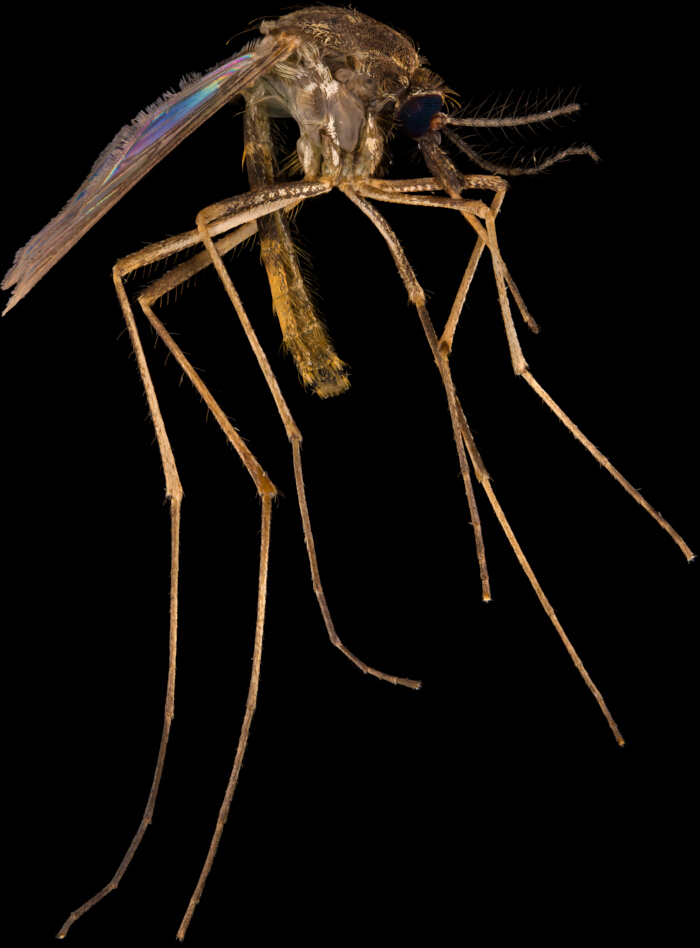
Figure 1: Representative focus‑stacked images of Lutzia fuscana captured at 2x Please click here to view a larger version of this figure.
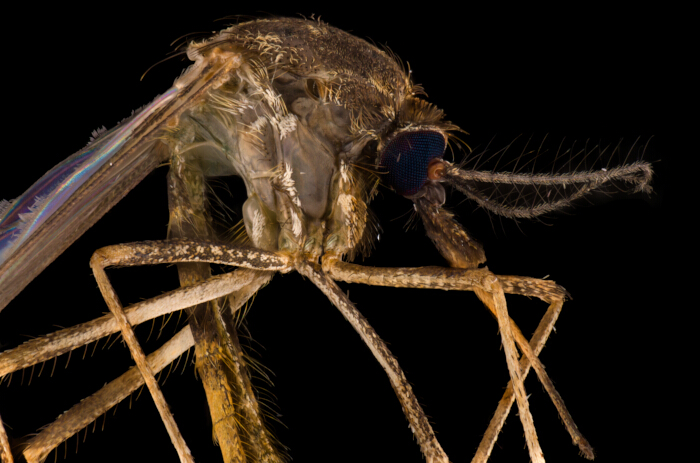
Figure 2: Representative focus stacked image of Lutzia fuscana captured at 5x Please click here to view a larger version of this figure.
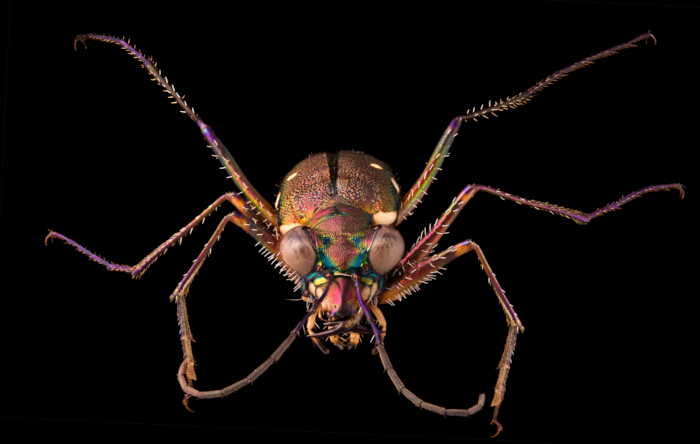
Figure 3: Representative focus stacked image of Prothyma heteromalla captured at 2x Please click here to view a larger version of this figure.
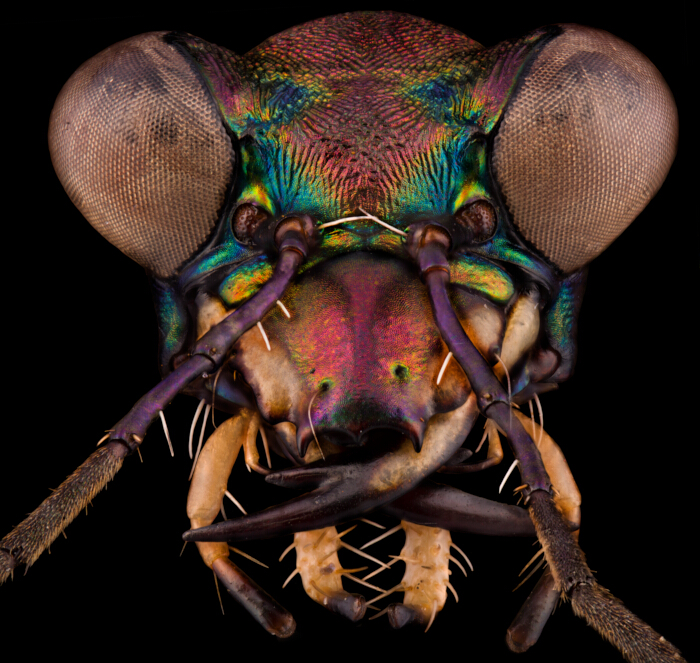
Figure 4: Representative focus stacked image of Prothyma heteromalla captured at 10x Please click here to view a larger version of this figure.
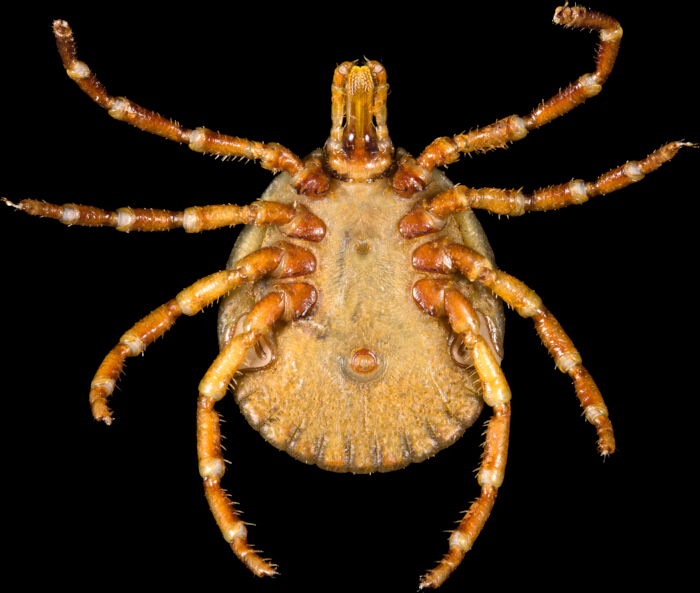
Figure 5: Representative focus stacked image of Amblyomma testudinairum captured at 2x Please click here to view a larger version of this figure.
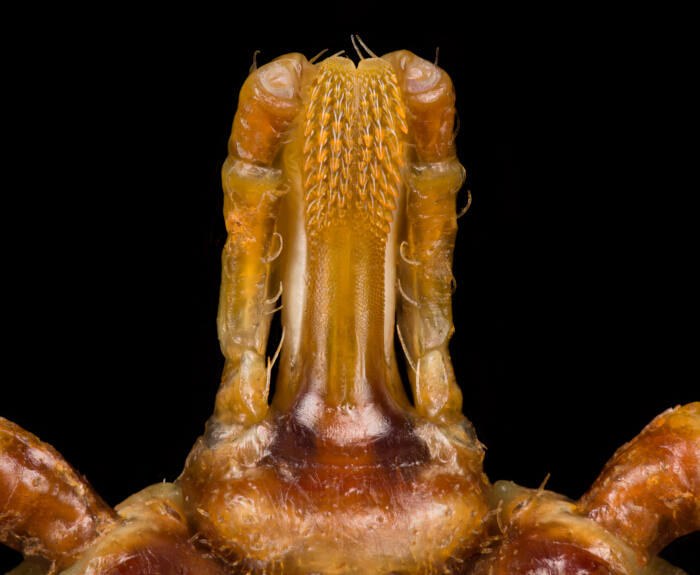
Figure 6: Representative focus stacked image of Amblyomma testudinairum captured at 10x Please click here to view a larger version of this figure.
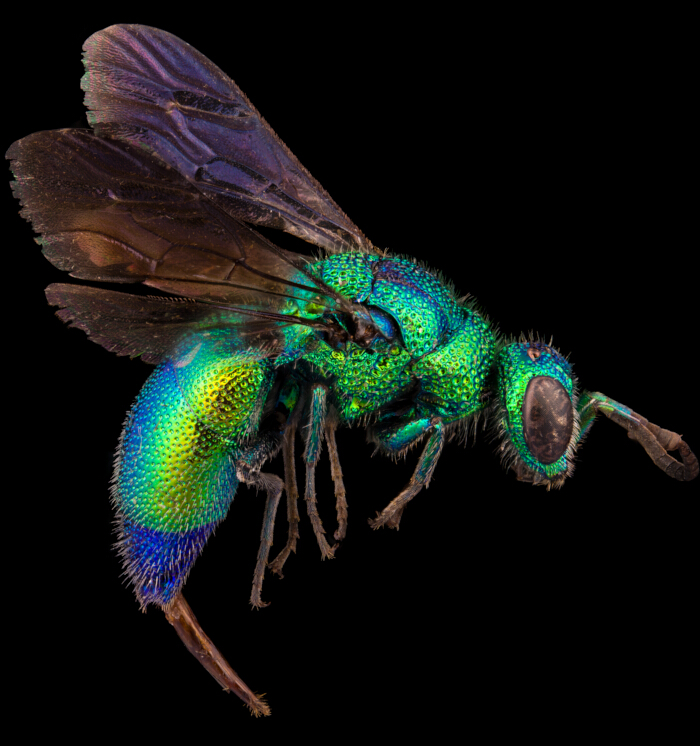
Figure 7: Representative focus stacked image of a wasp from Chrysididae family captured at 5x Please click here to view a larger version of this figure.
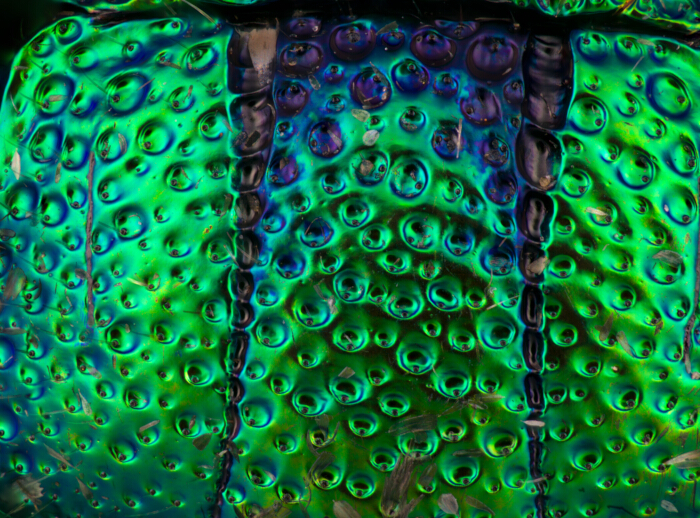
Figure 8: Representative focus stacked image of a wasp from Chrysididae family captured at 20x Please click here to view a larger version of this figure.
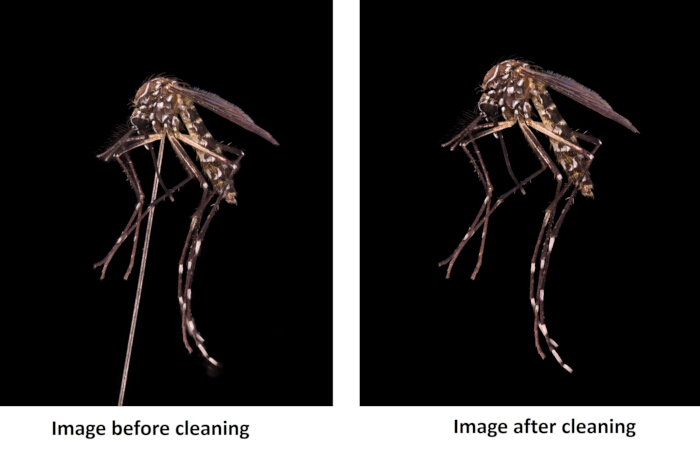
Figure 9: Comparison of properly aligned and cleaned specimen (A) vs uncleaned mounted specimen (B) stacks demonstrating the influence of sub‑micron focus increments. Please click here to view a larger version of this figure.
Table 2,3 summarize key quantitative parameters cited in the Results.
Supplementary File1: Photo of the equipment, including cylindrical black tunnel and lens tubes (2x, 5x, 7.5x, 10x, 20x), studio strobe lights (Godox SK300II back upright and Godox QT600II front angled) and antivibration table and focusing rack (macro rail) with subject in light modifiers, support gear (macro rail) and light modifier. XYZ rotary and Focusing rack. Sony Alpha 7R IV camera with trigger and Novoflex Castel-Micro. Lightroom interface for image selection and export to TIFF. Helicon Focus interface showing the final stacked image after hybrid Method B/C workflow. Photoshop interface and classical tools.Please click here to download this file.
Discussion
Loading...
$$\rightleftharpoonup{xx}$$
$$\longleftharp{xx}$$,
$$\longrightharp{xx}$$,
Optimal performance of the focus‑stacking procedure depends on (i) complete isolation of the setup from vibration, (ii) precise focus‑rail calibration at sub‑micron increments, and (iii) consistent color calibration. Any deviation from these parameters significantly increases halo formation and color shifts9. The combination of mechanical stability and standardized illumination represents the single most critical determinant of image quality.
Troubleshooting and possible modifications were addressed as part of system optimization. Uneven illumination was corrected by verifying diffuser alignment and reducing asymmetry in flash intensity. Stack misalignment issues were resolved by updating the focus controller firmware and confirming proper calibration of the linear stepping system. Overheating of the light sources was mitigated by introducing 10 min cooling intervals after every 1500 exposures. For field adaptation, when anti-vibration tables were not available, portable support was constructed using dense stone or metal combined with rubber isolation; this configuration remained satisfactory up to 7.5× magnification [17.1]. Additional modifications included the implementation of automated acquisition scripts and the use of open-source stacking software, which reduced both processing time and licensing costs10.
The system’s resolution is ultimately constrained by diffraction (4 m in object space), irrespective of sensor density8. Throughput remains modest: 20 final images per week for two operators. The requirement for controlled lighting and electrical power restricts direct outdoor use, and image‑processing time scales non‑linearly with the number of frames. These factors delineate the current operational limits of the protocol.
Relative to commercial automated stacking microscopes, this configuration achieves comparable optical resolution at < 30% of their cost, though with longer acquisition time9. Unlike fully automated systems, the described protocol allows manual control over depth resolution and lighting geometry, which is critical for specimens with reflective or iridescent surfaces. Compared with photogrammetric solutions such as DISC3D, our protocol sacrifices three‑dimensional reconstructions but provides higher lateral resolution and truer color fidelity, features vital for exhaustive taxonomic imaging.
The standardized workflow facilitates large‑scale image digitization projects and can be adapted for other small arthropods or botanical specimens4,5. Integration with citizen‑science initiatives could expand geographically referenced image databases, if training materials and field kits are developed. Future refinements should focus on (i) automation of stacking and post‑processing, (ii) integration of open‑source analysis pipelines, and (iii) miniaturized stabilization platforms for true field portability.
The presented protocol bridges the gap between affordability and high‑quality macro‑imaging. By detailing every operational step, critical checkpoint, and limitation, it empowers independent laboratories to replicate diffraction‑limited insect photography without dependence on proprietary industrial systems.
Disclosures
Loading...
$$\rightleftharpoonup{xx}$$
$$\longleftharp{xx}$$,
$$\longrightharp{xx}$$,
The authors declare no conflicts of interest.
Acknowledgements
Loading...
$$\rightleftharpoonup{xx}$$
$$\longleftharp{xx}$$,
$$\longrightharp{xx}$$,
We thank the Medical and Veterinary Entomology Unit of the Institut Pasteur du Cambodge for field sampling and technical assistance, and the Cambodian Entomology Initiatives (Royal University of Phnom Penh) for access to reference collections. We also acknowledge Pierre‑Olivier Maquart and Flavien Cabon for taxonomic consultation, and Eric Deharo (IRD) for scientific support.
Materials
| Name | Company | Catalog Number | Comments |
|---|---|---|---|
| Support table | Preferentially 3 pods | Stable base for the entire set-up | 150 |
| Antivibration table | Custom | Minimizes vibrations during image capture | 3,200 |
| Cylindrical black tunnel | Custom | Controls light direction | 350 |
| Reduces reflections for small subjects | |||
| Novoflex CASTEL-MICRO focusing rack (macro rail) | Stepping motor–controlled, control unit, network cable, Euro AC adapter | Sub-micron precision focusing (0.2 µm steps); | 3,000 |
| automates camera movement | |||
| XYZ rotary | Adjustable mount | Meticulous subject alignment and positioning | 500 |
| Camera | Sony Alpha 7R IV (61 MP full-frame) | High-resolution image capture | 3,000 |
| Illumination | 2× Godox SK300II | Uniform, shadow-free lighting; | 400 |
| Illumination | 2× Godox QT600II | high-speed with short flash duration | 1400 |
| Flash stands | 3 adjustable stands | Flexible positioning of lights | 100 |
| Light modifier | Diffuser | Softens light and reduces harsh shadows | 50 |
| Background | “Black hole” velvet | Eliminates reflections, provides uniform background | 200 |
| Microscope objectives | Mitutoyo Plan Apo Infinity Corrected: 5× | High-quality magnification for microstructures | 1,000 |
| Mitutoyo Plan Apo Infinity Corrected: 7.5× | 2,000 | ||
| Mitutoyo Plan Apo Infinity Corrected: 10× | 1,400 | ||
| Mitutoyo Plan Apo Infinity Corrected: 20× | 5,000 | ||
| Lens tube system | Direct camera use of Mitutoyo M-Plan lenses (2x, 5x, 7.5x, 10x, 20x) | Coupling microscope objectives to camera | 400 |
| Adapter | Sony E-mount to NOVOFLEX universal bayonet A | Mechanical connection of camera and optical system | 300 |
| Macro lens | Venus Optics Laowa 100 mm f/2.8 2× Ultra Macro APO (Sony E-mount) | Imaging larger specimens at high magnification | 550 |
| Trigger | Flash trigger | Synchronizes flash with camera shutter | 50 |
| Computer | ASUS or Alienware laptop, ≥128 GB RAM, high-performance processor | Image processing and storage | 3,000 |
| Storage media | 2× SD 256 GB, fast SD card reader | Secure high-volume image storage and transfer | 200 |
| Accessories | Gaming mouse | Precision during editing and navigation | 50 |
| Accessories | Wacom One (graphic tablet) | Fine control during image cleaning and editing | 500 |
| Total cost | 26,800 |
Reprints and Permissions
Request permission to reuse the text or figures of this JoVE article
Request Permission