This protocol provides a standardized methodology for designing and evaluating mixed reality cultural experiences in operational heritage sites, utilizing spatial narratives, interactive interfaces, and multimodal metrics that systematically combine psychological surveys with objective behavioral logs.
A subscription to JoVE is required to view this content. Sign in or start your free trial.
Method Article
A Protocol For Designing And Evaluating Mixed Reality Cultural Experiences In Museums And Heritage Sites Using Spatial Narratives And Metrics
* These authors contributed equally
In This Article
Summary
Abstract
Mixed reality (MR) applications are increasingly used in museums and heritage sites; however, their deployment often lacks methodological coherence, with spatial narrative, interaction, and evaluation treated as separate elements. This protocol presents a standardized, field-deployable methodology that distinguishes itself from prior evaluation frameworks by integrating dynamically adaptive spatial narratives with a hybrid assessment model. The approach unifies spatial narrative sequencing, guided interactive interfaces, and multimodal user experience metrics—specifically triangulating subjective psychometric evaluations with objective behavioral telemetry (e.g., spatial dwell times and interaction logs). The protocol describes a two-site, three-arm concurrent control trial adaptable to indoor museums and semi-open archaeological venues. Participants are assigned to one of three conditions: a traditional digital guide, a MR static narrative, or a MR adaptive narrative. A standardized six-zone route is implemented, with assessments conducted at baseline, immediately after the visit, and at a 14-day follow-up. Outcome measures include spatial presence, usability, narrative engagement, perceived authenticity, and knowledge acquisition. The protocol further incorporates structured behavioral logging, predefined technical thresholds, and systematic cybersickness monitoring to ensure safety and feasibility under routine visitor conditions. This framework provides researchers and cultural institutions with a reproducible methodology to coordinate spatial storytelling and interface control, enabling rigorous evaluation of MR interventions in heritage contexts.
Introduction
Museums and heritage institutions increasingly employ immersive digital technologies to create novel visitor experiences outside conventional gallery settings. A growing body of literature indicates that recent mixed-reality (MR) studies in museum contexts have increasingly shifted focus from merely providing passive immersive displays to dynamically transforming how visitors interact with exhibits and historical narratives1. Comparative research indicates that while the quality of digital assets is important, the spatial arrangement of these exhibits within virtual or augmented environments plays a more critical role in shaping the visitor experience2,3. Consequently, the integration of extended reality (XR) systems has become a prevalent strategy to revitalize heritage tourism, support experiential learning, and enrich emotional and cognitive engagement. Furthermore, current human-computer interaction literature increasingly advocates for multi-sensory and somatosensory interactive designs to resurrect dormant cultural artifacts, while broader multi-modal mixed reality explorations demonstrate immense potential in facilitating the holistic inheritance of cultural heritage4,5,6. Recent comprehensive frameworks have underscored the necessity of bridging educational applications with robust immersive interaction standards to elevate experiential quality across extended reality and metaverse platforms7. However, reviews of augmented reality (AR) applications in cultural heritage reveal a persistent challenge: despite significant reported benefits, there is a profound lack of methodological uniformity across system design, deployment, and evaluation within operational environments8,9. While recent scholarship has begun to propose high-level architectures and technological standards for immersive heritage education, translating these conceptual frameworks into granular, field-deployable protocols remains an urgent necessity. This gap often results in fragmented implementations where technological novelty outweighs methodological rigor.
The fundamental issue is no longer whether immersive systems hold practical value, but rather how they are designed and rigorously assessed within the daily operations of cultural sites. While institutions have readily incorporated digital innovations into their interpretation strategies, several critical reviews observe that the evaluation of these systems frequently isolates surface-level outcome metrics, such as technological novelty, basic satisfaction levels, and revisit intentions, often at the expense of understanding deeper cognitive and spatial engagement10. This fragmented approach neglects critical operational variables, including route layout organization, narrative sequencing, behavioral interaction limits, and physical deployment constraints11. Furthermore, although story-driven AR applications have proven effective in enhancing visitor participation, emotional bonding12, and learning outcomes—even improving the sense of place across different historical periods13—translating these conceptual findings into concrete, deployable frameworks remains unresolved. There is a pressing need for a standardized protocol that defines route logic, interaction thresholds, and robust evaluation metrics in real-world heritage contexts.
To bridge these methodological gaps, this article presents a comprehensive MR cultural experience protocol that integrates three core components: a spatial narrative structure, an interactive interface framework, and a multimodal measurement system. Grounded in theories of embodied cognition and narrative transportation, this protocol operationalizes mediated spatial experience as an organized cognitive state rather than a simple visual overlay. Specifically, it frames spatial storytelling as a mechanism where physical locomotion and digital narrative elements collaboratively deepen visitor engagement. It incorporates concise global usability metrics suitable for deployed interactive systems14 and leverages recent advancements in multimodal interaction to elevate evaluation quality beyond basic self-reporting15. To explicitly manage methodological expectations, multimodality within this framework is strictly defined as the triangulation of subjective psychometric assessments with objective spatial and interaction logs. Although conventional human-computer interaction research frequently equates multimodal evaluation with physiological sensing, such as heart rate variability or galvanic skin response, deploying such biometric equipment severely disrupts natural visitor mobility. Consequently, this protocol intentionally omits physiological tracking to preserve high ecological validity and ensure seamless operational feasibility within unrestricted public heritage venues. Ultimately, the development of effective MR cultural experiences necessitates a field-oriented assessment framework16. By systematically combining spatial storytelling with interface control and preset performance rules, the presented protocol provides researchers and practitioners with a structured, ecologically valid tool to deploy and evaluate MR systems in operational museums and heritage sites. To systematically demonstrate the efficacy of this methodological framework, the present protocol is designed to address two primary research questions: first, how does the integration of a spatially anchored narrative structure influence visitor cognitive retention and multimodal engagement compared to traditional digital guides; and second, to what extent does an adaptive, rule-based interactive interface enhance longitudinal knowledge acquisition without compromising operational feasibility or exacerbating cybersickness in real-world heritage environments.
Access restricted. Please log in or start a trial to view this content.
Protocol
All methods involving human subjects were performed in compliance with the relevant institutional guidelines and approved by the Ethics Committee on Human Research Protection of Shanghai Daji Education Technology Co., Ltd. (Approval Number: 4500AL0512). Obtain written informed consent from all participants prior to any study activity.
1. Participant Recruitment and Pre-screening
- Recruit adult participants aged 18 to 70 years. Ensure that participants demonstrate sufficient Mandarin Chinese proficiency to comprehend the standardized research instructions.
- Verify that participants can navigate the route independently or with basic mobility assistance. Define basic mobility assistance as requiring no more than a standard walking cane or a manually propelled wheelchair.
- Recruit participants using site-approved visitor invitations with a standardized verbal script, digital pre-registration via the official venue platform, or printed public announcements. Limit recruitment to a daily enrollment quota of 12 participants/site.
- Exclude individuals with a history of severe motion sickness induced by XR or VR. Establish this using a baseline Motion Sickness Susceptibility Questionnaire Short-form score exceeding 15.
- Exclude individuals with medically diagnosed vertigo or uncontrollable visual disturbances. Include conditions such as uncorrected strabismus.
- Exclude individuals with acute illnesses affecting participation safety. Identify these by resting heart rates above 100 beats/min or active respiratory symptoms.
- Exclude individuals who are unable to provide competent informed consent.
- Conduct eligibility screening in a designated quiet area away from the main visitor flow. Maintain ambient noise levels below 55 dB.
- Conduct the informed consent process in the same designated area. Provide a minimum seating area of 4 m2/participant.
- Assign a unique study identification code to each enrolled participant. Generate this identifier using a computerized pseudo-random alphanumeric algorithm structured as SiteCode-Date-Sequence to prevent duplication.
- Store 14-day follow-up contact information in encrypted form. Use Advanced Encryption Standard 256-bit protocols on a password-protected institutional local server.
- Separate the contact information file from the main analytic dataset. Restrict access to the study coordinator only.
2. Session Scheduling and Condition Allocation
- Randomly allocate participants using site-stratified blocking to maintain a balanced distribution across the indoor museum (Site A) and the semi-open heritage venue (Site B). Execute block generation using the blockrand package in R software with a fixed pseudo-random seed to ensure computational reproducibility.
- Implement allocation concealment using sequentially numbered, opaque, sealed envelopes. Refer to Figure 1A for the participant workflow and Figure 1B for the assessment timetable.
- Divide participants into blocks of six for each collection window. Define each collection window as a 2-h operational period.
- Discard incomplete blocks that fail to reach six enrollees within the defined timeframe. Redirect these individuals to feasibility piloting.
- Allocate two participants to the traditional digital guide control group, two to the MR static narrative group, and two to the MR adaptive narrative group.
- Schedule study sessions during routine operating hours. Avoid peak congestion periods.
- Define peak congestion as intervals when venue monitoring systems report an instantaneous visitor density exceeding 1.5 persons/m2 within the designated route zones.
- Schedule sessions within the time windows of 09:30 to 11:30 and 14:25 to 16:25.
NOTE: Maintain environmental consistency by ensuring ambient lighting between 300 and 500 lux and ambient noise below 55 dB. Maintain unobstructed spatial layouts across all route zones. For semi-open or outdoor heritage venues, implement spatial anchoring using global navigation satellite systems combined with physical optical markers to accommodate variable environmental illumination. - Suspend the initiation of new sessions for 30 min immediately following the venue’s closing time.
- Record sessions substantially delayed or altered by abnormal crowding as protocol deviations. Define abnormal crowding as unexpected visitor surges causing participant dwell time in any single transit corridor to exceed 5 min.
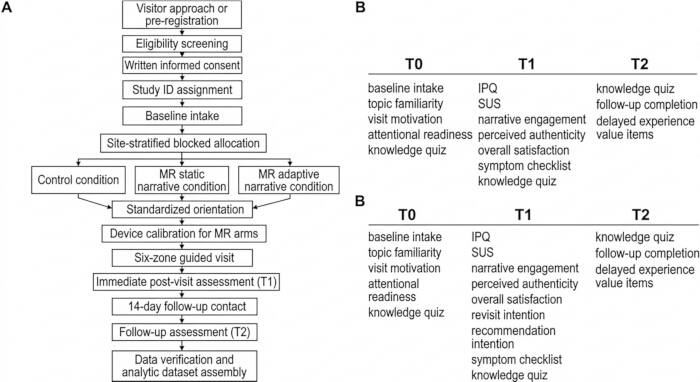
Figure 1. Workflow and assessment schedule for the mixed-reality (MR) cultural experience protocol. (A) Participant workflow illustrating sequential steps from visitor approach or pre-registration through eligibility screening, informed consent, study identification assignment, baseline assessment, site-stratified blocked allocation, intervention implementation, immediate post-visit assessment (T1), 14-day follow-up contact, follow-up assessment (T2), and dataset assembly. (B) Assessment schedule showing data collection at three time points: baseline (T0), immediate post-visit (T1), and follow-up (T2). Measures include topic familiarity, visit motivation, attentional readiness, knowledge assessment, presence questionnaire (PQ), system usability scale (SUS), narrative engagement, perceived authenticity, overall satisfaction, symptom checklist, and follow-up experience measures. Please click here to view a larger version of this figure.
3. Device Preparation and Calibration
- Inspect all devices before the first session of each day. Verify that the battery level is above 80% and confirm that the interface operates without freezing.
- Verify that each device has a minimum of 15 GB of available local storage capacity. Ensure that this capacity is sufficient to accommodate high-fidelity spatial asset rendering.
NOTE: The study utilizes the Microsoft HoloLens 2 running Windows Holographic (Version 22H2), with the MR application built on Unity Engine (Version 2022.3 LTS) and Mixed Reality Toolkit 3. The spatial narrative content package is structured as compiled AssetBundles (.ab) mapped via JSON configuration scripts. - Synchronize all devices to a common study clock using the Network Time Protocol via a secure local server. Maintain a maximum acceptable time drift of 500 ms across devices.
- Verify synchronization accuracy daily using an automated pre-session diagnostic script. Ensure that synchronization enables reliable integration of questionnaires, session summaries, and event logs.
NOTE: Execute device clock synchronization using the network time protocol (NTP) via a secure local server to ensure precise alignment of multi-modal data streams. - Set the initial audio output volume to a calibrated baseline of 65 A-weighted decibels. Measure this level using a standardized sound level meter positioned at the typical ear-to-speaker distance.
- Allow manual audio adjustment only within the calibrated range of 55–75 dB. Adjust based on venue noise and participant comfort.
- Calibrate the device with the participant at the physical start of the route. Confirm that the participant can discern 24-point Arial text at a virtual distance of 1.5 m.
- Confirm that the participant can hear narration clearly above an ambient noise baseline of 50 dB. Verify that the participant can activate at least one interface function during a 30-s stationary test.
- Restart the application and attempt recalibration if the initial test fails. Define failure as an inability to register continuous eye-tracking coordinates or a spatial mapping lag exceeding 2 s.
- Replace the hardware device if calibration fails twice. Terminate the session and code it as a technical non-completion if the replacement device also fails to meet these performance parameters.
4. Route Configuration and System Operation
- Configure the spatial narrative system across six designated route zones: historical background, artifact identity, process logic, social meaning, reflection, and narrative synthesis.
- Define the spatial boundaries of each zone using polygon geofencing. Ensure a minimum physical footprint of 9 m2/zone.
- Maintain a minimum separation distance of 5 m between adjacent zones. Prevent audio-visual interference between zones.
- Implement spatial anchoring protocols based on environmental conditions. Use point-cloud mapping for indoor museum environments.
- Use real-time kinematic positioning combined with high-contrast fiducial markers for semi-open archaeological sites. Refer to Figure 2A for system architecture and Figure 2B for the six-zone route structure.
NOTE: Select route zones to reflect the narrative arc of the heritage site by mapping historical turning points onto physical landmarks. Use this structure to align spatial progression with cognitive scaffolding principles in museum education.
- Deploy the interpretive intervention based on participant allocation.
- Provide one text-image-audio item per zone for the control condition. Standardize the content to include a 150-word text description, a high-resolution image exceeding 1920 × 1080 pixels, and a 60–90 s audio track encoded at 192 kbps.
- Present a fixed set of overlays and a single guided interaction for the static narrative condition. Maintain a linear interpretive sequence where digital content remains constant regardless of participant behavior.
- Require participants to perform an air-tap pinch gesture on a designated holographic hotspot. Trigger a 360° continuous rotation of the virtual artifact.
NOTE: Document qualitative characteristics of heritage items alongside quantitative data. Include descriptions of environmental constraints, cultural context, and user interface design to complement formal metrics.
- Enable automated behavioral triggers for the adaptive narrative condition. Implement a rule-based logic architecture using real-time spatial telemetry.
- Adjust prompt timing and cue density using deterministic behavioral inputs. Evaluate inactivity exceeding 45 s or spatial deviation from the tracking center.
- Activate a directional audio cue if the participant’s head-tracking gaze deviates from the primary exhibit bounding box for 15 s.
- Render a secondary floating text prompt if dwell time exceeds 180 s without hotspot activation.
- Limit additional system prompts to a maximum of two per zone and eight per session.
- Monitor technical performance continuously to maintain motion-to-display latency below 120 ms. Measure latency using the Mixed Reality Toolkit diagnostic profiler configured at a sampling frequency of 60 Hz.
- Verify tracking stability continuously. Require immediate staff verification if tracking loss exceeds 10 s.
- Attempt technical recovery immediately during tracking failures. Restore system functionality within 120 s.
- Switch the participant to a predefined fallback guide if recovery fails. Define the fallback guide as a pre-loaded two-dimensional interactive map on a tablet device with identical audio narratives but no spatial tracking.
- Terminate mixed-reality data collection if tracking cannot be restored within 120 s. Refer to Table 1 for predefined technical thresholds, fallback rules, and quality flags.
Table 1: Predefined technical thresholds, completion criteria, quality flags, fallback rules, and safety stopping rules. This table defines the operational criteria governing device readiness, calibration, technical performance thresholds, zone and route completion rules, adaptive delivery constraints, staff intervention logging, quality flags, fallback procedures, and safety monitoring and stopping conditions. Each item specifies the required condition, corresponding action, and implementation notes used to ensure standardized execution and reproducibility across study sessions. Time-based thresholds are expressed in seconds (s) and milliseconds (ms) where applicable. Please click here to download this Table.
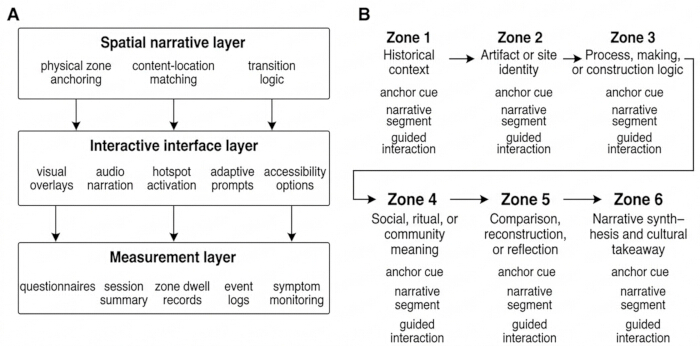
Figure 2. System architecture and six-zone route structure. (A) Three-layer system architecture consisting of the spatial narrative layer (physical zone anchoring, content-location matching, transition logic), interactive interface layer (visual overlays, audio narration, hotspot activation, adaptive prompts, accessibility options), and measurement layer (questionnaires, session summaries, zone dwell records, event logs, symptom monitoring). (B) Six-zone route structure showing sequential zones: historical context, artifact or site identity, process or construction logic, social or community meaning, comparison or reflection, and narrative synthesis. Each zone includes an anchor cue, narrative segment, and guided interaction component. Please click here to view a larger version of this figure.
5. Conducting the Visit and Safety Monitoring
- Administer the baseline (T0) assessment immediately after participant arrival. Collect data on cultural topic familiarity, visit motivation, attentional readiness, and baseline knowledge.
- Use a standardized 15-item questionnaire for baseline assessment. Configure the instrument with 5-point Likert scales and criterion-referenced multiple-choice queries. Refer to Supplementary Table 1 for the complete instrument battery.
- Provide a standardized verbal orientation lasting 3–5 min. Deliver the briefing using a verbatim script.
- Instruct participants on hardware adjustment procedures, physical boundary limits, and the standardized hand-raise gesture for requesting staff assistance. Refer to Supplementary Text 1 for the full script.
- Train all administrative personnel prior to study deployment. Require completion of a two-hour operational training module and successful completion of a simulated troubleshooting competency evaluation.
- Track participant progression through the six zones continuously. Record zone entry and exit events.
- Classify a zone as completed only if the participant remains within the zone for at least 30 s. Require at least one narrative content event trigger.
- Confirm zone completion using a system-triggered exit cue. Define this cue as a spatial coordinate intersection recorded when the participant exits the polygon geofence.
NOTE: The 30-s minimum dwell time ensures sufficient exposure to baseline audio-visual stimuli without inducing visitor fatigue. - Log any staff intervention exceeding 30 s in duration. Maintain a staff-to-participant ratio of 1:3 during all sessions.
- Restrict staff interventions to hardware recalibration, physical obstacle clearance, and standardized seating support. Prohibit staff from providing interpretive guidance on cultural content.
- Monitor participants for cybersickness using a structured five-item symptom checklist: nausea, dizziness, disorientation, headache, and eye strain.
- Administer the checklist verbally at the midpoint transition between zone three and zone four. Require digital self-report submission immediately after route completion.
- Pause the session immediately if the participant reports a symptom severity score of 3 or 4 on a 0–4 scale.
- Instruct the participant to rest while seated for 5 min following a safety pause.
- Terminate the session if symptoms remain above a score of 2. Terminate the session if the participant requests discontinuation.
- Terminate the session if continued participation is unsafe. Define unsafe conditions as loss of postural stability, persistent stumbling, or sustained heart rate exceeding 120 beats/min confirmed through pulse verification.
6. Post-Visit Evaluation and Data Logging
- Administer the immediate post-visit (T1) assessment outside the main visitor path immediately after route completion. Assess spatial presence, usability, narrative engagement, and overall satisfaction.
- Use instruments adapted from the Igroup Presence Questionnaire (IPQ) and System Usability Scale (SUS). Incorporate heritage-specific descriptors to ensure construct validity and reliability.
- Apply standardized scoring algorithms for all assessment scales. Refer to Table 2 for complete itemized scales, operational definitions, and scoring procedures.
- Contact the participant 14 days after the visit to administer the follow-up (T2) knowledge and retention assessment. Deliver the assessment via an encrypted digital survey link to the participant’s registered email or mobile device.
- Send a maximum of three standardized reminder prompts. Distribute reminders evenly over a 72-h period.
- Allow assessment completion within the window of days 12 through 16.
- Code participants as lost to follow-up if no complete response is recorded by the end of day 16. Handle missing data using pairwise deletion.
- Extract and compile participant-level questionnaire data, session summaries, zone-level dwell records, and time-stamped event logs.
- Exclude zone dwell times under 10 s from engagement summaries. Include these data only if logs confirm meaningful content completion.
- Define meaningful content completion as initiation of the core audio narrative and at least one recorded active hotspot interaction gesture within the same zone.
- Assemble the final analytic dataset by merging all compiled data streams.
- Apply an exposure-quality flag using a binary inclusion rule. Assign a value of 1 if five or more zones meet valid completion criteria.
- Assign a value of 0 if four or fewer zones meet valid completion criteria.
- Exclude sessions flagged as 0 from primary efficacy analyses. Retain these sessions for feasibility and safety analyses only.
Table 2: Operational definitions, scoring rules, and assessment timing of study variables. This table summarizes all study variables, including pre-visit covariates, primary and secondary outcomes, behavioral measures, and process variables. Each variable is defined with its measurement type, scoring range, interpretation criteria, and time of assessment across baseline (T0), immediate post-visit (T1), and follow-up (T2). Instrument-based measures include the Igroup Presence Questionnaire (IPQ) and the System Usability Scale (SUS). Derived variables are calculated from observed measures as specified. Please click here to download this Table.
Access restricted. Please log in or start a trial to view this content.
Results
Participant Characteristics and Allocation
A total of 180 participants were recruited, with each of the three conditions receiving 60 individuals (the traditional digital guide control group, the MR static narrative group, and the MR adaptive narrative group). Among the enrolled participants, 109 visited the urban history museum (Site A) and 71 visited the archaeological heritage park (Site B). The three groups demonstrated comparable baseline demographic profiles, including a...
Access restricted. Please log in or start a trial to view this content.
Discussion
This study positions MR not merely as an isolated display technology, but as a field-embedded interpretative framework that intricately integrates spatial route structures, interface controls, and multimodal evaluation. A primary achievement of this protocol is its operational cohesion. Historically, immersive technologies in cultural institutions have often been deployed as separate supplementary attractions rather than integrated narrative tools. However, recent literature emphasizes that deployable XR experiences in c...
Access restricted. Please log in or start a trial to view this content.
Disclosures
The authors have nothing to disclose.
Acknowledgements
We would like to express our sincere gratitude to Kyonggi University, Zhengzhou Vocational College of Intelligent Technology, and Zhengzhou University of Economics and Business for providing the essential academic environment and administrative support that made this research possible. We also extend our deepest appreciation to the management and staff at the participating urban history museum and archaeological heritage park for their invaluable assistance with site coordination, device deployment, and participant recruitment. Finally, we are profoundly grateful to all the visitors who volunteered their time to participate in the field evaluations of this mixed-reality protocol.
Access restricted. Please log in or start a trial to view this content.
Materials
| Name | Company | Catalog Number | Comments |
|---|---|---|---|
| Event logging system | Research team | Study-specific logging module integrated within MR application (Unity-based telemetry system) | Recording dwell time, interaction events, and session logs |
| Mixed-reality application platform | Research team | Unity Engine 2022.3 LTS integrated with Mixed Reality Toolkit (MRTK 3) | Presentation of static and adaptive mixed-reality narratives |
| Mixed-reality headset | Microsoft Corporation | HoloLens 2 running Windows Holographic 22H2 | Delivery of mixed-reality cultural experience |
| Questionnaire survey tool | Research team / Qualtrics XM (Qualtrics, LLC) | Qualtrics XM Platform (cloud-based, 2025 release) | Collection of baseline, post-visit, and follow-up data |
| Spatial narrative content package | Research team | Compiled AssetBundles (.ab) mapped via JSON configuration scripts | Delivery of six-zone narrative materials |
| Statistical analysis software | IBM Corp.; GraphPad Software, LLC; R Foundation for Statistical Computing | SPSS Statistics 29.0; GraphPad Prism 10.0; R 4.3.1 | Data cleaning, statistical analysis, and figure generation |
| Randomization software | R Foundation for Statistical Computing | R 4.3.1 with blockrand package | Site-stratified block randomization and allocation sequence generation |
| Time synchronization system | Institutional server / NTP | Network Time Protocol (NTP) | Synchronization of device clocks for multimodal data integration |
| Traditional digital guide system | Site research team / museum platform | Custom WeChat Mini Program (API v3.0) | Control-condition content delivery |
References
- Boboc, R. G., Băutu, E., Gîrbacia, F., Popovici, N., Popovici, D. M. Augmented reality in cultural heritage: An overview of the last decade of applications. Appl Sci. , (2022).
- Trunfio, M., Lucia, M. D., Campana, S., Magnelli, A. Mixed reality experiences in museums: Exploring the impact of functional elements of mixed reality on visitors’ immersive experiences. Tour Manag. , (2022).
- Chung, S. J., Kim, J., Lee, J. Comparison of visitor experiences of virtual reality exhibitions by spatial environment. Int J Hum Comput Stud. , (2024).
- Guo, W., et al. The “rebirth” of traditional musical instrument: An interactive installation based on augmented reality and somatosensory technology to empower the exhibition of chimes. Comput Anim Virtual Worlds. , (2023).
- Guo, W., Chen, Z., Sun, G., Wang, H. “Heart flows with zen”: Exploring multi-modal mixed reality to promote the inheritance and experience of cultural heritage. IEEE Trans Vis Comput Graph. , (2025).
- Wu, Y., Zhu, M., Chen, Z., Guo, W. HCI international 2023 – late breaking papers. Proceedings of HCI International 2023, , (2023).
- Anwar, M. S., et al. Metaverse and XR for cultural heritage education: Applications, standards, architecture, and technological insights for enhanced immersive experience. Virtual Real. , (2025).
- Muñoz, A., Climent-Ferrer, J. J., Martí-Testón, A., Solanes, J. E., Gracia, L. Enhancing cultural heritage engagement with novel interactive extended-reality multisensory system. Electronics. , (2025).
- Chatsiopoulou, A., Michailidis, P. D. Augmented reality in cultural heritage: A narrative review of methodologies, user experience, and learning outcomes. Heritage. , (2025).
- Bekele, M. K., Pierdicca, R., Frontoni, E., Malinverni, E. S., Gain, J. A survey of augmented, virtual, and mixed reality for cultural heritage. J Comput Cult Herit. , (2018).
- Xu, J., Shi, P. Curators or creators: Role configurations of digital innovation strategy in museum tourism destination and the principles underlying their attractiveness. Tour Manag. , (2025).
- Xu, W., Homuth, C., Wang, F. Cultural narratives through augmented reality: Hidden stories in the Chinatown storytelling centre. J Cult Herit Manag Sustain Dev. , (2025).
- Tang, Y., Zhou, Q. Inspired by intertemporal connections: Using AR technology to enhance visitor satisfaction in historical museums. Tour Manag. , (2025).
- Schubert, T., Friedmann, F., Regenbrecht, H. The experience of presence: Factor analytic insights. Presence Teleoperators Virtual Environ. , (2001).
- Brooke, J. Usability evaluation in industry. , Taylor & Francis. (1996).
- Zou, N., Chen, Y., Chen, P., Gong, Q. Research on multimodal interaction system based on cognitive style in virtual historical and cultural scenes. Des Artif Intell. , (2025).
- Asobayire, D. Y., Dieck, M. C. T., Jung, T. Designing immersive experiences for heritage sites. J Tour Cult Change. , (2026).
- Smets, W. Systematic instructional design using immersive learning experiences in museum settings. Educ Inf Technol. , (2026).
- Ariya, P. Immersive realities in museums: Evaluating the impact of VR, VR360, and MR on visitor experience. Virtual Real. , (2025).
- Smed, J., Lynch, P. Where digital meets place: Deriving strategies for curating mixed reality exhibitions in public spaces. arXiv [Preprint]. , (2026).
- Zhu, Y., Li, X. A spatio-temporal overlap narrative experience model for archaeological site museums: A case study of the Panlongcheng archaeological site museum. Buildings. , (2025).
- Karakuş Yılmaz, T. Guidance in museum virtual tours: The impact of a gamified, structured guide on learning outcomes. Educ Inf Technol. , (2026).
- Quirós-Ramírez, M. A. Virtual reality experiments in the field: Methodological implications for real-world deployment. Behav Res Methods. , (2025).
- Tromp, J. Designing and evaluating XR cultural heritage applications: An interdisciplinary framework. Appl Sci. , (2025).
- Zhang, Z., Jiang, S., Zhang, R., Dong, R. K. Interactive visual communication for cultural learning and preservation: A mixed-methods study of user engagement with China’s intangible heritage. Acta Psychol. , (2026).
Access restricted. Please log in or start a trial to view this content.