本方案的目标有两个:一是利用无人机作为提供基础架构的计算实体,构建一个网络功能虚拟化环境,以执行虚拟化网络功能;二是利用该环境支持在空中飞行器上自动部署功能完整的互联网协议电话服务。
方法文章
基于网络功能虚拟化的无人机互联网协议语音服务自动化部署
* These authors contributed equally
本文内容
摘要
摘要
网络功能虚拟化(NFV)范式是推动第五代(5G)及未来通信网络发展的关键技术之一th 移动网络的演进。该技术旨在通过虚拟化技术,在抽象层上实现网络功能与服务的软件化,从而降低对硬件的依赖。在此背景下,人们日益关注探索无人机(UAV)的潜力,以提供一种灵活的平台,能够在特定地理区域内实现具有成本效益的网络功能虚拟化(NFV)操作。
为了验证在无人机(UAV)平台上应用网络功能虚拟化(NFV)技术的实际可行性,本文提出了一种基于开源技术构建功能性NFV环境的实验方案,该方案利用一组小型无人机提供计算资源,以支持中等复杂度网络服务的部署。随后,该方案详细描述了在相互连接的无人机网络上,利用已配置的NFV环境实现互联网协议(IP)语音电话服务自动化部署所需的各个步骤。实验结果表明,该服务在部署后能够正常运行。尽管本方案聚焦于特定类型的网络服务(即IP语音电话),但所述步骤可作为部署其他类型网络服务的通用指南。另一方面,本方案的描述基于具体的硬件设备和软件来构建NFV环境(例如特定的单板计算机和开源软件)。虽然使用其他硬件和软件平台也是可行的,但NFV环境的具体配置细节以及服务部署过程可能与本方案所述存在差异。
引言
移动通信新时代(通常称为5th 移动通信技术或5G的目标是在主要通信基础设施可能无法使用的情况下(例如由于紧急情况)仍能提供可靠的信息化服务。在此背景下,无人机(UAVs)因其固有的多功能性而受到科研界日益增长的关注。已有大量研究将这些设备作为提供多种服务的核心支撑。例如,已有文献分析了这些设备构建空中通信基础设施以支持多媒体服务的能力1,2,3此外,先前的研究表明,多架无人机之间的协作能够扩展多种通信服务的功能,例如监控。4协作式搜救5,6,7,8,或农业综合企业9.
另一方面,网络功能虚拟化(NFV)技术作为5G的关键使能技术之一,在电信运营商中已获得重大意义。NFV通过将网络功能软件化,减轻了当前网络设备对专用硬件的依赖,从而实现了电信基础设施的范式变革,使得新型通信服务能够灵活、敏捷地部署。为此,欧洲电信标准协会(ETSI)成立了专门的规范组,以定义NFV的架构框架10。此外,ETSI目前还托管开源MANO(OSM)小组11,该小组负责开发符合ETSI NFV架构框架定义的NFV管理和编排(MANO)软件栈。
鉴于上述所有因素,目前研究人员正在探索无人机(UAV)与网络功能虚拟化(NFV)技术的协同融合,以开发新型网络应用与服务。文献中已有大量研究工作阐明了此类系统的优势14,15,16,指出了这种融合所面临的技术挑战及其尚不完善之处,强调了该领域未来的研究方向17,并提出了基于开源技术的开创性解决方案。
特别是,将网络功能虚拟化(NFV)技术集成到无人机(UAV)领域,能够实现网络服务和应用在特定地理区域(例如IP语音服务)内的快速且灵活部署。采用这一方法,可在特定位置部署多架无人机,以计算平台作为有效载荷(例如小型单板计算机)。这些计算平台将在部署区域内提供可编程的网络基础设施(即NFV基础设施),并在MANO平台的控制下支持网络服务和应用的实例化。
尽管存在上述优势,实现这一构想仍面临一系列需要妥善解决的根本性挑战,例如:如何将这些计算平台作为网络功能虚拟化(NFV)基础设施的一部分进行合理整合,并利用现有的NFV软件栈,使得NFV编排服务能够在无人机(UAV)上部署虚拟网络功能;计算平台所提供的计算资源受限的问题,因为运载这些平台的无人机在有效载荷设备的尺寸、重量和计算能力方面通常存在限制;虚拟网络功能在无人机上的合理部署(即选择最适合部署特定虚拟网络功能的无人机候选者);维持与无人机的控制通信,以便在与无人机的网络通信可能间歇性中断(例如由于移动性或电池限制)的情况下仍能管理虚拟网络功能(VNF)的生命周期;由于电池消耗导致无人机运行时间有限;以及当某架无人机因电量耗尽需要更换时,虚拟网络功能的迁移问题。这些优势与挑战在先前的研究18,19中已有详细阐述,相关研究包括设计一种能够支持在无人机平台上自动部署网络功能与服务的NFV系统,并验证该设计方案实际可行性的实验工作。
在此背景下,本文重点描述一种基于网络功能虚拟化(NFV)标准和开源技术,在无人机(UAV)网络上实现中等复杂度网络服务自动化部署的协议。为说明该协议的各个步骤,本文重新阐述了Nogales等人19所提出实验中的一个案例,即IP语音电话服务的部署。为便于本研究的可重复性,所呈现的流程中将实际飞行视为可选步骤,性能测试结果均通过地面状态的无人机设备获得。感兴趣的读者即使在受控的实验室环境中,也应能够复现并验证该协议的执行过程。
图1 展示了为本实验设计的网络服务。该网络服务由特定的软件化单元(在NFV范式中被归类为虚拟网络功能,即VNFs)组合构建而成,可为无人机(UAV)附近用户提供IP语音电话服务。构成该服务的VNF定义如下:
- 接入点虚拟网络功能(AP-VNF):该虚拟网络功能为终端设备(在本实验中即IP电话)提供Wi-Fi接入服务。
- IP语音服务器虚拟网络功能(IP-telephony-server-VNF):负责管理IP电话之间为建立和终止语音通话而交换的呼叫信令消息。
- 域名系统虚拟网络功能(DNS-VNF):该虚拟网络功能提供域名解析服务,在IP语音通信服务中通常需要此功能。
- 接入路由器虚拟网络功能(AR-VNF):提供网络路由功能,支持IP电话与电信运营商域之间的通信流量(在本实验中即呼叫信令)交换。
- 核心路由器虚拟网络功能(CR-VNF):在电信运营商域内提供网络路由功能,实现对运营商特定服务(如IP语音服务器)以及外部数据网络的访问。
此外,图1 展示了实验所用的物理设备、设备之间的互连方式,以及虚拟网络功能(VNF)在设备上的具体分配情况。
方案
1. 实验的先决条件
- 安装由开源 MANO(OSM)项目提供的管理与编排(MANO)软件栈。具体而言,本实验采用 OSM Release FOUR20,该版本可在满足 OSM 社区指定要求的单台服务器计算机或虚拟机(VM)上运行:操作系统为 Ubuntu 16.04(64 位版本镜像)、两个中央处理器(CPU)、8 GB 随机存取存储器(RAM)、40 GB 存储磁盘,以及一个具备互联网访问能力的网络接口。OSM Release FOUR 的安装流程及其技术细节可在 OSM 社区提供的在线文档中查阅21。
- 搭建一个符合 OSM Release FOUR 标准的虚拟基础设施管理器(VIM)功能的云计算平台。本实验采用 OpenStack Ocata 版本22,运行于配备 Ubuntu 16.04 操作系统、四个 CPU、16 GB RAM 和 200 GB 存储磁盘的虚拟机中。在本实验中,该 VIM 管理一个由两台高性能服务器组成的网络功能虚拟化基础设施(NFVI),每台服务器均配备 Ubuntu 16.04 操作系统、八个 CPU、128 GB RAM 和 4 TB 存储磁盘。有关搭建云计算平台的全部信息均包含在 OpenStack 文档中的安装指南内23。该云平台被称为核心云平台。
- 为无人机(UAV)搭建另一个额外的云计算平台,称为无人机云平台。
- 确保该平台采用基于 OpenStack Ocata 版本的 VIM。本例中,VIM 安装所使用的资源包括:Ubuntu 16.04 操作系统、两个 CPU、6 GB RAM、100 GB 存储磁盘,以及一个外置 Wi-Fi USB 适配器。
- 该云平台所集成的 NFVI 包含一台固定计算服务器(操作系统为 Ubuntu 16.04,八个 CPU、8 GB RAM、128 GB 存储磁盘,以及一个外置 Wi-Fi USB 适配器)和三台单板计算机(SBC)。后者提供了一种可轻松搭载于无人机上的硬件平台。有关使用这些设备作为计算节点搭建无人机云平台的步骤,请参见第 3 节。
- 为每台单板计算机(SBC)配备一个顶部安装的电池供电硬件附加板(HAT),以确保这些单元在被无人机携带移动时仍能正常运行。
注意:步骤 1.5 为可选步骤,因为本实验中网络服务的提供并不依赖于无人机的存在。此外,SBC 作为无人机的有效载荷被携带,无需其他额外连接(例如以太网或 USB),因为 IP 电话服务正常运行所需的网络通信由 SBC 通过其 Wi-Fi 适配器提供,而电力则由步骤 1.4 中提到的供电 HAT 提供。 - 通过固定配件将每台 SBC 作为有效载荷安装到无人机上。在本实验中,选择了三架商用无人机来运输 SBC 提供的计算单元。
- 选择两台支持 IEEE 802.11b 无线通信标准的无线 IP 语音(VoIP)电话;该型号通过 Wi-Fi 实现无线通信。作为替代方案,可使用 Linphone24 或 Jitsi25 等软电话应用程序进行语音通话。
- 作为实验要求,需确保满足以下三层通信条件:a)OSM 软件栈与各 VIM 之间具备三层通信能力,以支持本实验所开发网络服务的编排式部署;b)OSM 与各云平台上的虚拟网络功能(VNF)之间具备三层通信能力,以支持 VNF 配置流程;c)各 VIM 上运行的 VNF 之间具备三层通信能力,以确保网络服务的正常运行。
- 本实验所需全部内容均可在公开实验资源库 http://vm-images.netcom.it.uc3m.es/JoVE/ 中获取。
2. 通过仿真验证软件化单元的功能性
注意:为验证实验中的网络服务在真实部署条件下的正常运行(见图1),采用了一个基于 Linux 容器26 和 ns-327 的专用仿真平台。该平台可模拟多跳空中链路,并定义这些链路的特性(例如无线通信链路的长度、数据包丢失模式、无线通信中使用的无线电技术等)。因此,本协议的这一部分描述了通过仿真平台验证 IP 电话服务在真实无线通信链路条件下正常运行所需遵循的步骤。
- 从实验仓库下载仿真平台。该平台以虚拟机形式提供,名为“uav-nfv-jove-experiment.qcow”,符合KVM虚拟化技术28。该虚拟机包含一个预创建的模板,用于模拟图1中所示的网络服务和多无人机场景,以及一个具有管理员权限的用户,可用于执行该模板。
注意:默认情况下,当启动仿真平台虚拟机时,将自动执行以下步骤:a) 配置虚拟环境以启用网络仿真(即网络接口、Linux网桥29);b) 创建代表测试平台各个物理组件的Linux容器(即用于无人机云平台的单板计算机和固定计算服务器,以及用于核心云平台的计算服务器);c) 将IP电话服务中各个虚拟网络功能(VNF)所提供的功能(即接入点、路由器、DNS服务器和IP电话服务器)作为Linux容器部署到其对应的仿真单板计算机和计算服务器上。 - 在验证过程开始前,使用ns-3仿真器建立一个仿真的多跳空中网络,以实现不同网络参与者之间的连通性。该过程将模拟图1所示场景中的真实无线通信(即Wi-Fi自组织网络),该网络可实现无人机云平台各节点之间以及服务中两个Wi-Fi接入点所提供的无线网络之间的数据交换。
- 创建多跳空中网络。为此,请在仿真平台虚拟机中执行multi-hop-aerial-net.sh脚本,使用以下命令:sudo sh /home/jovevm/scripts/multi-hop-aerial-net.sh > multi-hop-aerial-net-trace.log 2>&1 &。该命令将仿真过程的跟踪信息输出至指定的日志文件,以便在发生错误时进行调试。
- 检查网络是否成功创建。为此,请验证Linux容器“IP-phone-a”和“IP-phone-b”(在图1中表示为连接至AP-VNF的终端用户设备)是否已通过DHCP服务获取IP地址,而该服务仅能通过多跳空中网络访问。可通过执行命令lxc list来查看在仿真虚拟机中运行的Linux容器的状态及其IP地址。
- 验证仿真网络服务处理建立IP电话呼叫所需信令消息的能力。为此,在“IP-phone-a”和“IP-phone-b”两个Linux容器中均已安装“SIPp”工具30。“SIPp”具备模拟IP电话的功能,可生成上述信令消息,将其发送至IP电话服务器,并处理响应以验证后者是否正常运行。
- 在两个容器中分别执行脚本test-signaling.sh,该脚本将运行“SIPp”工具,向IP-telephony-server-VNF生成并发送信令消息。
- 查看上一步执行后提供的场景界面。接收到“200”响应表明IP-telephony-server-VNF功能正常。
- 验证该网络服务能否处理IP电话呼叫期间产生的数据流量。为此,在“IP-phone-a”和“IP-phone-b”两个Linux容器中均安装了流量调度工具“Trafic”31。
- 执行以下命令以启动Trafic的服务器端代理:lxc exec IP-phone-b sh called-party.sh。
- 然后执行以下命令以启动Trafic的客户端代理并获取网络统计信息:lxc exec IP-phone-a sh caller.sh。模拟语音呼叫的数据流量将在60秒后终止。脚本将显示确认信息以及与语音流量相关的关键性能指标。
- 检查所获得的指标,并验证IP电话服务是否能够有效支持交互式语音通话。具体可参考“代表性结果”部分所提供的信息。
3. 无人机云平台构建
- 选择能够提供虚拟化基础以执行轻量级虚拟网络功能(VNF)的单板计算机(SBC)型号。实验中所用SBC设备的技术规格为:四核CPU、1 GB RAM和32 GB存储硬盘。此外,每块SBC均配备三个网络接口:一个以太网接口、一个集成的Wi-Fi接口和一个外置Wi-Fi USB适配器。
- 将单板计算机(SBC)准备就绪,以便后续集成至无人机云平台。
- 安装 Ubuntu Mate32 使用16.04.6作为操作系统,因为该Linux发行版包含了OpenStack安装包。
- 根据 OpenStack 文档的指示安装并配置所需的软件包33 使SBC能够作为无人机云平台的计算节点。根据前述指南,在OpenStack软件包的配置中启用Linux容器的使用。由于小型无人机上通常搭载的设备存在资源限制,因此采用容器虚拟化技术。
- 在 SBC 上下载并执行脚本 rpi-networking-configuration.sh,可在实验代码仓库中获取。该脚本用于启用单板计算机的无线通信,以及进行必要的配置,以支持在无线接口上创建虚拟网络。
- 下载并执行脚本 VIM-networking-configuration.sh,可在实验仓库中获取,位于运行 UAV 云平台 VIM 的主机上。该脚本负责配置 VIM 的无线通信,以实现与 SBC 的信息交换。
注意:一旦网络配置妥当且VIM与SBC之间实现连通,VIM将自动把这些SBC集成到UAV云平台中,作为能够执行VNF的计算单元
- 为每块单板计算机(SBC)创建一个 OpenStack 可用性区域。这将允许将实验中的每个轻量级虚拟网络功能(VNF)部署到适当的无人机(UAV)单元中。为此,请使用管理员凭据登录虚拟基础设施管理器(VIM)提供的网页图形用户界面,在 管理员 > 系统 > 主机聚合 标签页,并编辑每个可用区以添加相应的主机(即集成到无人机云平台中的每台单板计算机)。
- 验证无人机云平台的正确配置。为此,请访问 管理员 > 系统 > 系统信息 与上一步相同的登录信息打开标签页,然后点击 计算服务与网络代理 ch 部分检查所显示项目的状态是否 "存活" 和 "向上".
4. 配置实验
- 下载实现 IP 电话服务各个组件的虚拟网络功能(VNF)镜像:AP-VNF、DNS-VNF、IP-telephony-server-VNF、AR-VNF 和 CR-VNF。这些镜像可从实验仓库中下载。
- 将 VNF 镜像上传至其对应的虚拟基础设施管理器(VIM)中(即将 AP-VNF 和 DNS-VNF 上传至无人机云平台 VIM,将 VoIP-VNF 上传至核心云平台 VIM)。为此,请使用管理员凭据登录各 VIM 提供的网页图形用户界面,点击 管理员 > 系统 > 镜像 选项卡中的 创建镜像 按钮,然后在显示的表单中创建镜像并选择相应的镜像文件。对上一步中下载的每个镜像,均需在其对应的 VIM 中执行此过程。
- 从实验仓库下载该实验的 VNF 描述符(VNFD)。这些描述符提供了描述 VNF 运行需求的模板,以及指示负责托管该 VNF 的可用性区域的部署策略。有关 NFV 描述符的更多信息,可参见 OSM34 的信息模型。
- 上传 VNFD。使用网页浏览器访问 OSM 图形用户界面,并使用管理员凭据登录。然后,将 VNFD 拖放至 VNF 包 选项卡中。
- 从实验仓库下载网络服务描述符(NSD)。该描述符是一个模板,用于指定构成该服务的 VNF 及这些 VNF 之间的互连方式。
- 上传 NSD。将 NSD 拖放至 OSM 图形用户界面的 NS 包 选项卡中。
- 使用 OSM 的图形用户界面,为无人机云平台 VIM 和核心云平台 VIM 分别添加 VIM 账户。为此,请使用管理员凭据进入 VIM 账户 选项卡,点击 + 新建 VIM 按钮,并在显示的表单中填写所需信息。对两个 VIM 均需重复此操作。
5. 执行实验
- 部署网络服务。在 OSM 图形用户界面的 NS packages 选项卡中,点击第 4.6 步上传的 NSD 对应的 Instantiate NS 按钮。然后填写弹出的表单,指明将用于部署构成该网络服务(NS)的各个虚拟网络功能(VNF)的虚拟基础设施管理器(VIM)。此外,OSM 负责处理 VNFD 中指定的部署策略,以确定由哪个 VIM 的可用性区域(即本实验平台中的计算单元)来承载每个 VNF。在本实验中,VNF 的部署位置如 图 1 所示。
注意:作为替代方法,OSM 提供了命令行接口,支持用户直接交互。重复本实验的用户可使用该命令行接口替代图形界面,执行本协议中定义的各项操作步骤,特别是与上传 VNF 或 NS 描述符以及部署网络服务相关的步骤。 - 等待 OSM 图形用户界面显示网络服务部署成功。
注意:网络服务的运行完全独立于无人机的飞行状态:无论无人机处于飞行状态,还是停靠在表面以节省电池功耗,均可提供 IP 电话服务。因此,步骤 5.3 为可选步骤。 - 起飞无人机。登录移动应用程序,控制每架无人机的飞行,使其稳定悬停在中等高度,避免因电机靠近表面旋转而引起的湍流干扰。
- 准备各 IP 电话以进行通话。
- 将无线 VoIP 电话连接至该网络服务提供的各个接入点。为此,请在 Menu > Wireless > SSID 选项卡中设置 SSID(服务集标识符),并在 Menu > Wireless > Network Mode 部分选择 Infrastructure 模式。最后,在 Menu > Net Settings > Network Mode 选项卡中选择通过动态主机配置协议(Dynamic Host Configuration Protocol, DHCP)进行网络配置。
- 配置会话发起协议(Session Initiation Protocol, SIP)参数,以实现与 IP 电话服务器的信令消息正确交互。在此过程中,进入 Menu > SIP Settings 选项卡,并在 Registrar > Registrar IP 和 Proxy Server > Proxy IP 选项中填写 IP 电话服务器 VNF 的主机名("dronesVoIP.net")。此外,在 User Account > Phone Number 和 User Account > Username 部分输入用户名称(例如 caller-A),以创建用户账户。
- 在其中一部 IP 电话的电话簿中添加被叫用户的条目。操作方法为:选择 Menu > Phonebook > Add Entry 选项卡,并按以下方式填写显示的请求参数:显示名称 = caller-B;用户信息 = caller-B;主机 IP = dronesVoIP.net;端口 = 5060。最后,选择“Proxy”选项,而非 P2P(点对点)模式。
- 向对方发起通话。操作方法为:在 IP 电话上使用 Menu > Phonebook > Search 选项选择被叫方,然后按下呼叫按钮。当另一部 IP 电话开始响铃时,使用呼叫按钮接听来电。
6. 收集实验结果的步骤
- 将一台普通笔记本电脑连接到其中一个无线接入点(AP),并在180秒内对连接至另一个AP的电话的IP地址运行ping命令行工具。IP地址可在IP电话与AP建立连接后,通过其菜单中的菜单 > 信息 > IP地址选项查看。保存往返时间(RTT)测量结果,将ping工具输出的内容重定向至一个文件中。
- 在其中一个正在运行的AP虚拟网络功能(VNF)中执行tcpdump命令行工具,以捕获IP通话期间交换的流量。在执行命令时启用写入标志,并指定文件名,将捕获的流量保存到文件中。
- 发起一次新的IP语音通话,保持通话所需时长(例如1分钟),然后按下任一IP电话的挂断按钮结束通话。
- 保留由tcpdump和ping工具生成的文件,以供后续处理。参见代表性结果。
结果
根据实验执行过程中获取的数据,其中进行了真实的 VoIP 通话,并按照协议指示的步骤收集该信息,图2展示了在两个终端用户设备(即一台普通笔记本电脑和一部IP电话)之间测得的端到端延迟的累积分布函数。这些用户设备通过已部署网络服务中的AP虚拟网络功能(VNF)相互连接。超过80%的端到端延迟测量值低于60 ms,且没有任何测量值超过150 ms,这保证了语音通话执行时具备合适的延迟指标。
图3展示了DNS和SIP信令消息的交换过程。这些消息对应于IP电话服务器中一个用户的注册(即IP电话连接到运行“tcpdump”工具的AP VNF上的用户)以及语音呼叫的建立过程。
最后,图4 和 图5 展示了通话期间捕获的数据流量。具体而言,前者表示通话期间由其中一部无线电话发送和接收的语音数据包的稳定流,而后者则显示了前向方向的抖动情况,其平均值低于 1 ms。
实验中获得的时延指标(端到端时延和抖动)结果满足国际电信联盟电信标准化部门(ITU-T)35 所规定的建议值。因此,语音通话过程无异常,音质良好。本实验验证了利用网络功能虚拟化(NFV)技术和无人机(UAV)部署功能型IP语音服务的实际可行性。
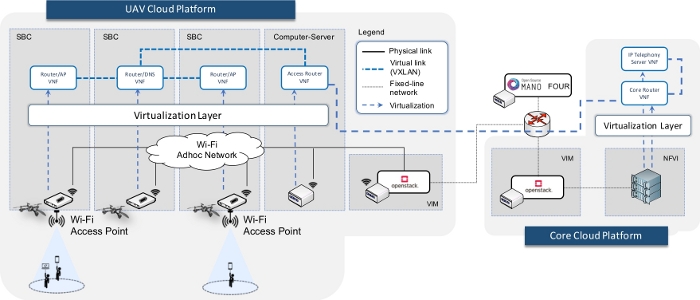
图 1:网络服务概览,展示虚拟化网络功能(VNF)、其运行所在的实体,以及提供 IP 语音电话服务所需的虚拟网络。 请点击此处查看此图的放大版本。
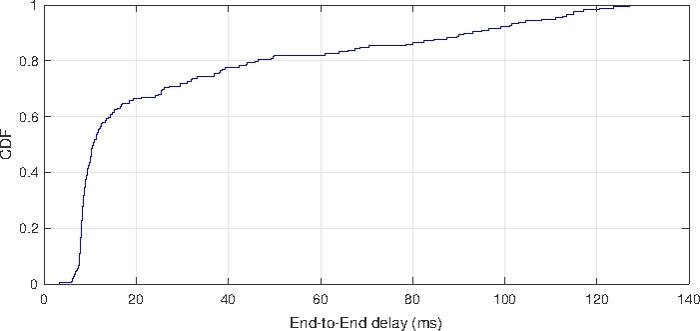
图 2:端到端延迟。 显示连接至 AP VNF 的终端用户设备所获得的端到端延迟情况。为此,通过使用“ping”命令行工具测得的 RTT 样本数据,计算了端到端延迟的累积分布函数。 请点击此处查看该图的放大版本。
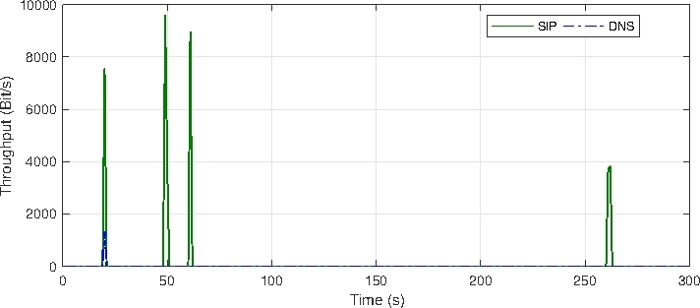
图 3:用户注册与呼叫信令消息。 示意图展示了在 IP 电话服务器中注册用户以及建立和终止支持语音呼叫执行的多媒体会话时,所交换的信令流量(DNS 和 SIP)。请点击此处查看此图的放大版本。
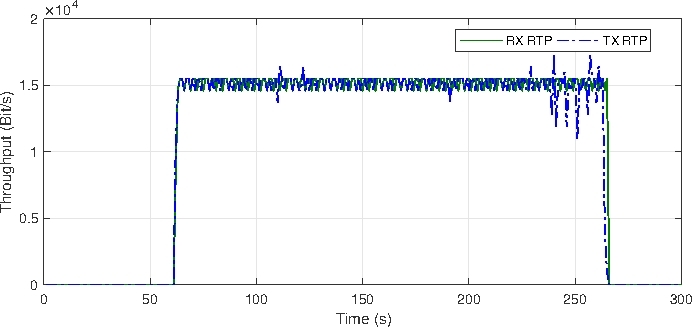
图 4:语音数据包流。 在其中一个 AP VNF 上测得的通话期间交换的语音业务表示。(缩写:RX = 接收,TX = 发送,RTP = 实时传输协议)。请点击此处查看该图的放大版本。
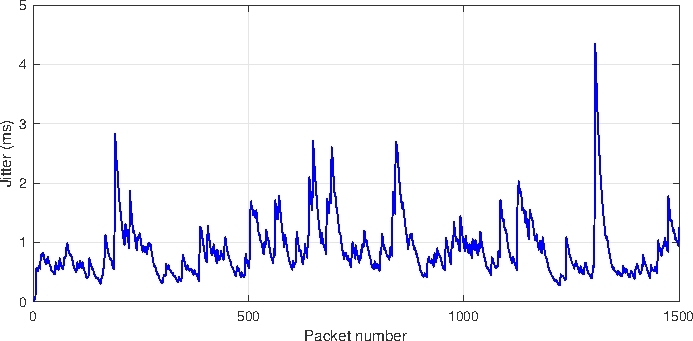
图 5:通话期间网络抖动的变化情况。 显示语音数据包从一部电话向另一部电话单向传输过程中所经历的抖动情况。请点击此处查看该图的放大版本。
讨论
本实验最重要的方面之一是将虚拟化技术和网络功能虚拟化(NFV)标准与无人机(UAV)平台结合使用。NFV 提出了一种新范式,旨在解除网络功能对硬件的依赖性,从而通过软件化方式提供这些功能。因此,本实验不依赖于协议中指定的硬件设备。只要单板计算机的尺寸和承载能力与无人机相匹配,并支持 Linux 容器,即可选用不同型号的单板计算机。
尽管在硬件选择上具有灵活性,但为确保实验可重复性所提供的所有内容均以使用开源技术为导向。在此背景下,配置方面和软件工具均以采用 Linux 作为操作系统为前提条件。
另一方面,该实验考虑了两种不同计算平台(即无人机云平台与核心云平台)之间的协同操作,以提供一种中等复杂度的网络服务。然而,这种双平台协作并非严格必需,本协议也可用于仅涉及无人机云平台的场景。
此外,所提出的解决方案还可能适用于其他环境,例如在资源受限的硬件平台上具备执行虚拟化容器所需能力的场景(如物联网,即 IoT 环境)。无论何种情况,该解决方案在不同环境中的适用性及其潜在的适应性调整,均需针对具体案例进行逐一深入研究。
最后需要指出的是,本文所呈现的结果均在实验室环境中获得,且无人机设备处于接地状态或遵循有限且明确定义的飞行计划。其他涉及室外部署的场景可能会引入影响无人机飞行稳定性的条件,从而影响IP语音服务的性能。
披露
作者无任何利益冲突需要披露。
致谢
本工作部分得到了欧洲H2020 5GRANGE项目(资助协议编号777137)以及西班牙经济与竞争力部资助的5GCIty项目(TEC2016-76795-C6-3-R)的支持。Luis F. Gonzalez的工作部分得到了欧洲H2020 5GinFIRE项目(资助协议编号732497)的支持。
材料
| 姓名 | 公司 | 目录编号 | 评论 |
|---|---|---|---|
| AR. Drone 2.0 - 精英版 | 鹦鹉 | 用于实验的无人机,负责运输树莓派(RPis),从而为无人机云平台的计算单元提供移动性。 | |
| Bebop 2 | 鹦鹉 | 用于实验中的无人机,以运输树莓派(RPis),从而为无人机云平台的计算单元提供移动性。 | |
| 商用英特尔酷睿 Mini-ITX 计算机 | 逻辑电源 | 用于托管实验无人机云平台的 OpenStack 控制节点(以虚拟机形式运行)的计算机服务器。此外,该设备的另一台单元(与树莓派共同组成)构成了无人机云平台的计算资源。 | |
| Linux 容器(LXC) | Canonical Ltd. | (软件)虚拟化技术,可实现本实验中所述虚拟网络功能的供应。源代码可在线获取:https://linuxcontainers.org | |
| 锂电池组扩展板。型号 KY68C-UK | Kuman | 用于无人机云平台计算单元(即树莓派)的电池供电HAT(硬件附加模块),此外,该设备还包括用于将计算单元(即树莓派或RPis)安装固定到无人机上的外壳组件。 | |
| MacBook Pro | 苹果 | 实验过程中使用普通笔记本电脑获取并收集手稿中所述结果。 | |
| ns-3 网络模拟器 | nsnam | (软件)一种离散事件模拟器网络模拟器,为前述仿真站提供底层通信基质 "实验方案" 部分(更具体地说是在步骤中) "2. 通过仿真验证软硬件化单元的功能性")。源代码可在线获取:https://www.nsnam.org | |
| 开源MANO(OSM)- FOUR版本 | ETSI OSM - 开源社区 | (软件)实验中配置的网络功能虚拟化(NFV)系统的管理与编排(MANO)软件栈。源代码可在线获取:https://osm.etsi.org/wikipub/index.php/OSM_Release_FOUR | |
| OpenStack - Ocata 版本发布 | OpenStack - 开源社区 | (软件)用于搭建实验中的无人机云平台和核心云的开源软件。源代码可在线获取:https://docs.openstack.org/ocata/install-guide-ubuntu | |
| Ping | 开源工具 | (软件)一种开源测试工具,用于验证通过通信网络连接的两个设备之间的连通性。此外,该工具还可用于评估网络性能,因为它能够计算往返时间(即发送数据包并从网络接收响应所需的时间)。源代码可在线获取:https://packages.debian.org/es/sid/iputils-ping | |
| Power Edge R430 | 戴尔 | 提供实验中所述核心云平台计算能力的高性能计算机服务器。 | |
| Power Edge R630 | 戴尔 | 用于托管执行MANO栈的虚拟机(VM)的设备。此外,OpenStack控制器节点也作为虚拟机在此设备上运行。需要注意的是,该设备的使用并非严格必需,由于上述虚拟机的资源需求不高,这些操作也可由性能较低的设备完成。 | |
| Prestige 2000W | ZyXEL | 支持 IEEE 802.11b 无线通信标准的网络电话(VoIP Wi-Fi 电话)。该设备用于通过实验所用平台提供的网络服务进行网络电话(VoIP)呼叫。 | |
| 树莓派 3b 型号 | Raspberry Pi 基金会 | 用于为实验的无人机云平台提供计算能力的单板计算机(SBC)选型模型。 | |
| SIPp | 开源工具 | (软件)一种开源测试工具,可生成SIP协议流量。该工具可用于验证IP电话服务中所需信令流量的正确支持,例如本实验中部署的服务。源代码可在线获取:http://sipp.sourceforge.net | |
| Tcpdump | 开源工具 | (软件)一款开源工具,可实现网络流量的捕获与分析。源代码可在线获取:https://www.tcpdump.org | |
| 交通 | 开源工具 | (软件)一种开源的流调度器,用于验证部署的网络服务处理IP语音通话期间产生数据流量的能力。源代码可在线获取:https://github.com/5GinFIRE/trafic |
参考文献
- Sanchez-Aguero, V., Nogales, B., Valera, F., Vidal, I. Investigating the deployability of VoIP services over wireless interconnected Micro Aerial Vehicles. Internet Technology Letters. 1 (5), 40(2018).
- Maxim, V., Zidek, K. Design of high-performance multimedia control system for UAV/UGV based on SoC/FPGA Core. Procedia Engineering. 48, 402-408 (2012).
- Vidal, I., et al. Enabling Multi-Mission Interoperable UAS Using Data-Centric Communications. Sensors. 18 (10), 3421(2018).
- Vidal, I., Valera, F., Díaz, M. A., Bagnulo, M. Design and practical deployment of a network-centric remotely piloted aircraft system. IEEE Communications Magazine. 52 (10), 22-29 (2014).
- Jin, Y., Minai, A. A., Polycarpou, M. M. Cooperative real-time search and task allocation in UAV teams. 42nd IEEE International Conference on Decision and Control. 1, IEEE. IEEE Cat. No. 03CH37475 7-12 (2003).
- Maza, I., Ollero, A. Multiple UAV cooperative searching operation using polygon area decomposition and efficient coverage algorithms. Distributed Autonomous Robotic Systems. 6, Springer. Tokyo. 221-230 (2007).
- Quaritsch, M., et al. Collaborative microdrones: applications and research challenges. Proceedings of the 2nd International Conference on Autonomic Computing and Communication Systems. , ICST (Institute for Computer Sciences, Social-Informatics and Telecommunications Engineering. 38(2008).
- Waharte, S., Trigoni, N., Julier, S. Coordinated search with a swarm of UAVs. 2009 6th IEEE Annual Communications Society Conference on Sensor, Mesh and Ad Hoc Communications and Networks Workshops. , IEEE. 1-3 (2009).
- De Freitas, E. P., et al. UAV relay network to support WSN connectivity. International Congress on Ultra-Modern Telecommunications and Control Systems. , IEEE. 309-314 (2010).
- European Telecommunications Standards Institute. Network Functions Virtualisation (NFV); Architectural Framework; Research Report ETSI GS NFV 002 V1.2.1. European Telecommunications Standards Institute. (ETSI). , (2014).
- An Open Source NFV Management and Orchestration (MANO) software stack aligned with ETSI NFV. ETSI OSM. , Available from: https://osm.etsi.org/ (2019).
- Nogales, B., et al. Design and Deployment of an Open Management and Orchestration Platform for Multi-Site NFV Experimentation. IEEE Communications Magazine. 57 (1), 20-27 (2019).
- Omnes, N., Bouillon, M., Fromentoux, G., Le Grand, O. A programmable and virtualized network & IT infrastructure for the internet of things: How can NFV & SDN help for facing the upcoming challenges. 18th International Conference on Intelligence in Next Generation Networks. , IEEE. 64-69 (2015).
- Rametta, C., Schembra, G. Designing a softwarized network deployed on a fleet of drones for rural zone monitoring. Future Internet. 9 (1), 8(2017).
- Garg, S., Singh, A., Batra, S., Kumar, N., Yang, L. T. UAV-empowered edge computing environment for cyber-threat detection in smart vehicles. IEEE Network. 32 (3), 42-51 (2018).
- Mahmoud, S., Jawhar, I., Mohamed, N., Wu, J. UAV and WSN softwarization and collaboration using cloud computing. 3rd Smart Cloud Networks & Systems (SCNS). , IEEE. 1-8 (2016).
- González Blázquez, L. F., et al. NFV orchestration on intermittently available SUAV platforms: challenges and hurdles. 1th Mission-Oriented Wireless Sensor, UAV and Robot Networking (MISARN). , IEEE. (2019).
- Nogales, B., Sanchez-Aguero, V., Vidal, I., Valera, F., Garcia-Reinoso, J. A NFV system to support configurable and automated multi-UAV service deployments. Proceedings of the 4th ACM Workshop on Micro Aerial Vehicle Networks, Systems, and Applications. , ACM. 39-44 (2018).
- Nogales, B., Sanchez-Aguero, V., Vidal, I., Valera, F. Adaptable and automated small UAV deployments via virtualization. Sensors. 18 (12), 4116(2018).
- Hoban, A., et al. An ETSI OSM Community White Paper, OSM Release FOUR: A Technical Overview. European Telecommunications Standards Institute. (ETSI). , Whitepaper (2018).
- Quick start installation and use guide. Open Source MANO Release FOUR. , Available from: https://osm.etsi.org/wikipub/index.php/OSM_Release_FOUR (2019).
- Open Source Software for Creating Private and Public Clouds. OpenStack. , Available from: https://docs.openstack.org/ocata (2019).
- OpenStack Installation Tutorial for Ubuntu. OpenStack. , Available from: https://docs.openstack.org/ocata/install-guide-ubuntu/ (2019).
- Linphone. An Open Source VoIP SIP Softphone for voice/video calls and instant messaging. Linphone. , Available from: https://www.linphone.org (2019).
- An Open Source Project to easily build and deploy secure video-conferencing solutions. Jitsi. , Available from: https://jitsi.org (2019).
- Infrastructure for container projects. Linux Containers (LXC). , Available from: https://linuxcontainers.org (2019).
- A Discrete-Event Network Simulator for Internet Systems. Ns-3. , Available from: https://www.nsnam.org/ (2019).
- Kernel-based Virtual Machine (KVM). A virtualization solution for Linux. Linux. , Available from: https://www.linux-kvm.org (2019).
- Bridging & firewalling. Linux Foundation. , Available from: https://wiki.linuxfoundation.org/networking/bridge (2019).
- An Open Source test tool and/or traffic generator for the SIP protocol. SIPp. , Available from: http://sipp.sourceforge.net/ (2019).
- Trafic. An open source flow scheduler. , Available from: https://github.com/5GinFIRE/trafic (2019).
- Ubuntu Mate for the Raspberry Pi. , Available from: https://ubuntu-mate.org/raspberry-pi/ (2019).
- Enabling LXC (Linux Containers) as virtualization technology. OpenStack. , Available from: https://docs.openstack.org/ocata/config-reference/compute/hypervisor-lxc.html (2019).
- Open Source MANO Information Model. , Available from: https://osm.etsi.org/wikipub/index.php/OSM_Information_Model (2019).
- ITU-T. ITU-T Recommendation G.114. General Recommendations on the transmission quality for an entire international telephone connection; One-way transmission time. International Telecommunication Union - Telecommunication Standardization Sector. , (2003).
重印与许可
