This video demonstrates in vivo imaging of retinal microglia in a mouse model of glaucoma. A transgenic mouse with fluorescent protein-expressing retinal microglia is positioned under an ophthalmoscope. Infrared illumination is used to locate the optic nerve head (ONH), and the focal plane is established using retinal blood vessels as landmarks. Fluorescent imaging is then employed to visualize the fluorescent microglia. Activated microglia, characterized by enlarged cell bodies and reduced branching complexity, are assessed.
A subscription to JoVE is required to view this content. Sign in or start your free trial.
Method Article
In Vivo Imaging of Retinal Microglia in a Mouse Model of Glaucoma
1.1K views
⸱
May 29th, 2025
In This Article
Abstract
Protocol
All procedures involving animal models have been reviewed by the local institutional animal care committee and the JoVE veterinary review board.
NOTE: This imaging protocol is used for reporter mice in which retinal microglia and infiltrating monocytes/macrophages express green-fluorescent protein (GFP) under the control of the fractalkine receptor locus (CX3CR1).
1. In Vivo Imaging of Retinal GFP+ Microglia by Confocal Scanning Laser Ophthalmoscopy (cSLO)
- Turn on the water-controlled heating system, set to stabilize mouse temperature between 35-37 ºC during the procedure, and connect two heating pads.
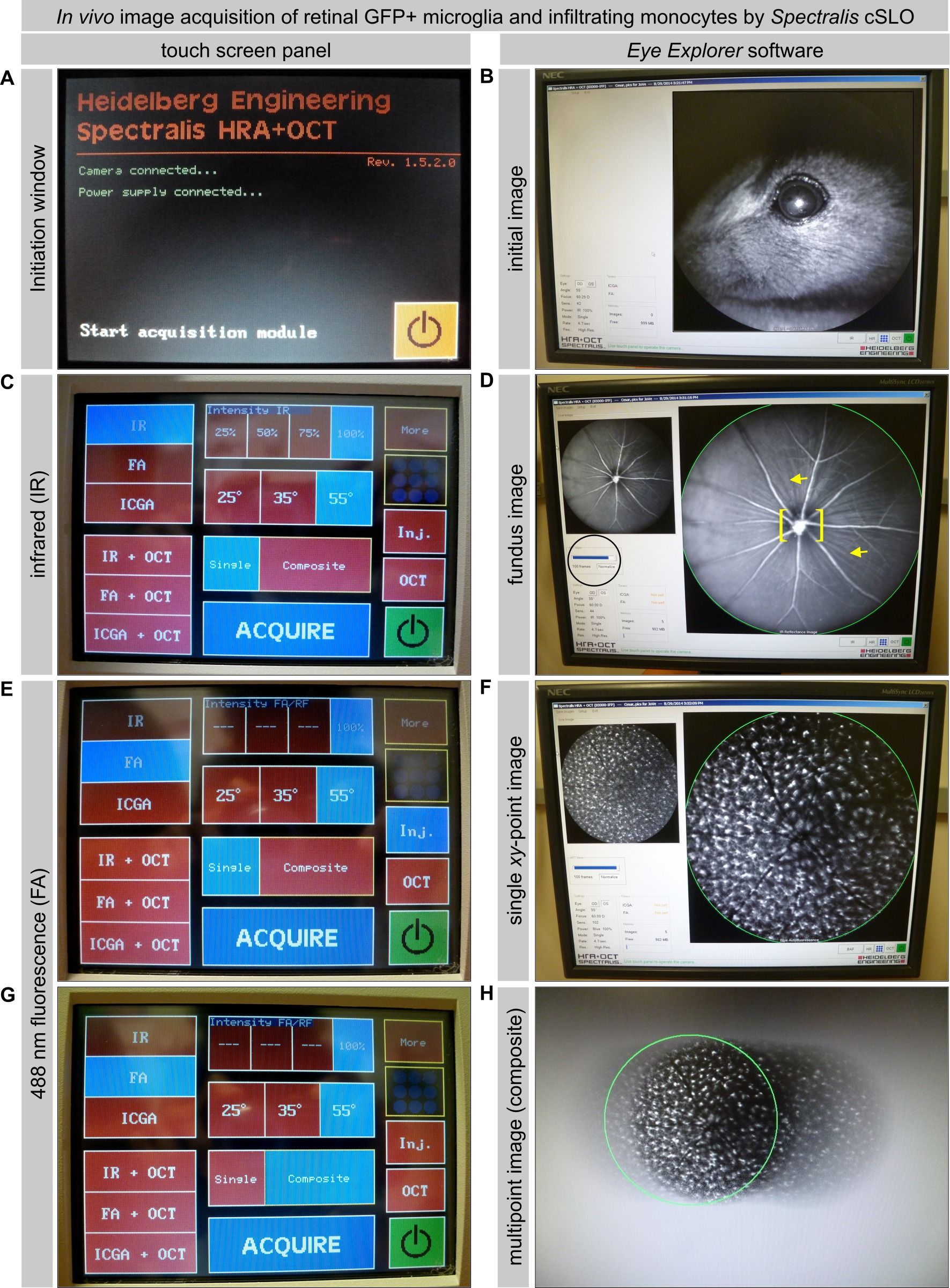
- Start the cSLO system (Figure 1A). Open the cSLO program, enter the information to identify the individual mouse, and set a corneal curvature of 2 mm (Patient Data menu).
- Prepare for imaging. Securely fit a clean 55º wide-field objective lens on its socket. Prepare the ophthalmoscope imaging platform by securing a heating pad covered with clean paper. Use clips to flatten the pad and paper and keep them from blocking the movement of the objective lens.
- Anesthetize the mouse by intraperitoneal injection of 1.3% 2,2,2-tribromoethanol and 0.8% tert-amyl alcohol (250 mg/kg body weight; 0.5 ml/25 g body weight) using a 30½ G needle fitted to a 1 ml disposable syringe. Return the mouse to its cage, kept over a heating pad.
NOTE: The delivery of the anesthetic by injection versus inhalation allows easier mouse positioning for imaging and unobstructed eye access, free of nose cones and tubing. - Once the animal stops moving and is unresponsive to tail pinch, pupil dilation with Tropicamide and phenylephrine (0.5% each) is induced by positioning the animal prone and covering both eyes with drops for 7 min.
- After 5 min, place the mouse prone on the center of the ophthalmoscope platform and fit contact lenses over both eyes, applying minimal pressure.
NOTE: Contact lenses are small and fragile but can be carefully handled with fingers, although forceps can be used instead. Although contact lenses are optional, they are recommended as they minimize eye dryness and preserve corneal transparency during imaging. - After 7 min, orient the mouse with the right eye facing the objective lens and the orbit parallel to the objective lens, keeping the animal unrestrained near the platform's edge (Figure 1B). To collect images of comparable saturation and orientation, constantly maintain the distance from the eye to the objective lens and the alignment of the eye to the light path throughout imaging sessions. Clip long whiskers interfering with the observation of the eye.
NOTE: For the next 8-10 minutes, the mouse will not move or blink and will breathe with gentle movements. This is tracked by the cSLO Eye Tracking ART (automatic real-time) mode, which adjusts the scan head position based on fundus landmarks with high contrast. Past that time, mice begin panting and blinking, making imaging impractical. - If imaging is performed without contact lenses, apply phosphate-buffered saline (PBS) drops to both eyes every 2-3 min to prevent them from drying.
- Collect a fundus image of the retinal vasculature and optic disc, focused on the inner retina.
- Select the infrared mode (IR) and adjust settings to 820 nm excitation, 100% laser power, and 40-60% sensitivity (Figure 1C).
- Working in high-speed mode (12.6 frames/sec), locate the eye using the joystick to drive the ophthalmoscope. Inspect the cornea and lens for injury or opacity at low magnification and exclude from the study eyes with defects or injuries that will affect retinal imaging (Figure 2A).
- Locate the optic disc area (the surface of the optic nerve head, ONH) by bringing the objective closer to the eye, then center the image on it and lock this position by screwing the joystick. This eye alignment to the ophthalmoscope is critical to obtaining even focus and emission across the image.
- Visualize the inner planes of the retina and the ONH using the major blood vessels located on the vitreal surface of the retina as a reference focal plane (59 and 60 D) or deeper (55 D) in eyes showing excavated optic discs. The optimal focus should resolve circulating blood cells within major blood vessels, with their lumen and walls distinct.
- Optimize image saturation by adjusting the touchscreen control panel dial until a white halo of uniform illumination spans most of the 55º fundus field around the optic disc (using slight overexposure). Next, lower the saturation to optimize contrast until blood cells moving along the major vessels can be resolved. If focal dark areas persist, not due to retinal damage, realign the eye to the camera until a uniformly bright image is obtained. This adjustment is fundamental to capturing reproducible sets of images in position and quality.
- Collect a high-resolution IR image of the central retina (1.4-1.7 mm in diameter, depending on age), averaging 30 frames in real-time (4.7 frames/sec; normalized), to improve signal-to-noise ratio (Figure 1D).
- Immediately, acquire a fluorescence image of GFP+ microglia and infiltrating monocytes localized to the inner planes of the retina and the ONH.
NOTE: Optimizing the IR fundus image of the retina determines the resolution of the fluorescence image of GFP+ cells and the extent to which the inner retina spanned. Failure to focus the inner planes of the retina, which can be detected by poor resolution of the vasculature, will result in dimmed GFP+ cell views (Figure 2B). Failure to adjust IR saturation correctly and uniformly affects the fluorescence image (FA), introducing artifactual variations in GFP+ cell intensity and size (Figure 2C).- Switch to fluorescence imaging mode (FA) in the touch screen panel. This mode uses blue, 488 nm laser excitation (460-490 nm barrier filter set) and acquisition settings (100% laser power and 100-125% sensitivity), which are maintained constant for all mice (Figure 1E).
- Collect a single xy-point, bidimensional fluorescence image of the retina, and immediately capture a fundus image at an identical position (100x scan average; 55º scan angle for both images; Figure 1F).
- Capture a multipoint image by selecting “composite” in the control panel (Figure 1G) and moving the ophthalmoscope right and left, panning the retina across the nasal-temporal axis (Figure 1H).
NOTE: After scanning a single xy-point image (100x scan average), the software automatically averages new scans of the same and new areas (circumscribed with a green circle during the optimal scan or red when the scan is unfeasible) and stitches all xy-positions in real-time. The resulting composite image spans 1.5-1.7 mm on the horizontal axis x 3-4 mm on the vertical axis (55º x 120-124º scan angle).
- Complete imaging of each mouse within 15 min after inducing anesthesia, before blinking and motion restarts.
- Remove contact lenses, hydrate the eyes with PBS, and return the animal to its warmed cage, checking behavior until full motility recovery.
Access restricted. Please log in or start a trial to view this content.
Results
Access restricted. Please log in or start a trial to view this content.
Materials
| Name | Company | Catalog Number | Comments |
|---|---|---|---|
| DBA/2J and CX3CR1-GFP/+ mice | |||
| 30½ G needle and 1 ml tuberculin slip-tip syringe | |||
| 2,2,2-tribromoethanol, tert-Amyl alcohol 99% and phosphate buffer saline tablets | |||
| Heat therapy T/Pump | |||
| Cotton-tipped applicators | |||
| Tropicamide 1% | |||
| PMMA contact lenses, 1.70 base curve, 3.2 mm total diameter, 0.40 mm thick center | |||
| HRA/Spectralis confocal scanning laser ophthalmoscope and Eye Explorer software | |||
| NIS-Elements C |
