This video demonstrates the procedure for delivering high-definition transcranial direct current stimulation (HD-tDCS) by accurately positioning electrodes using the 10–10 system, mapping their locations with a 3D digitizer, and applying stimulation to modulate neuronal activity in a targeted brain region.
A subscription to JoVE is required to view this content. Sign in or start your free trial.
Method Article
High-Definition Transcranial Direct Current Stimulation for Activation of the Target Brain Region
891 views
⸱
August 29th, 2025
In This Article
Abstract
Protocol
All procedures involving human participants have been performed in compliance with the institutional, national, and international guidelines for human welfare and have been reviewed by the local institutional review board.
- Stimulation
- Make sure that the participants have no contraindications (e.g., a history of neurological or psychiatric disorders) for HD-tDCS (high-definition transcranial direct current stimulation) and that they provided written informed consent prior to the study (including HD-tDCS stimulation).
- Ensure that all the necessary materials are available for device installation (Figure 1). Install the device. A brief description is provided below.
- Install the batteries and check that they are charged.
- Connect the conventional tDCS and 4x1 Stimulation Adapter.
- Connect the cables of five Ag/AgCl sintered ring electrodes to the matching receivers on the 4x1 adapter output cable.
- Check that all materials are connected correctly.
- Measure the head of the participant and place the cap on the head.
- Embed the five plastic HD casings in the swimming cap.
- Localize the subject's Cz, Fpz, and Oz (Central zero-midline, or vertex, frontal pole zero-midline, and occipital zero-midline). Adjust the cap's reference to align with the international 10-10 system for scalp locations. Once the cap is in position, ensure that it does not move.
- Using the 3D (3-dimensional) digitizer, collect the position data of the stimulated brain areas. Based on the generated data, make the corresponding adjustments.
- Cover the scalp surface with electrically conductive gel. First, carefully separate the hair through the opening of the plastic casing using the end of a plastic syringe, until the scalp is exposed. Then, cover the exposed scalp with the electrically conductive gel through the plastic casing opening on the scalp surface.
- Set the parameters of the tDCS device: quality value, stimulus duration, intensity, and condition setting.
- Turn on the 4x1 Multichannel Stimulation Adapter.
- Ensure that the default setting is SCAN, which shows the impedance of one electrode at a time in the display window by scanning the electrodes. Here, the impedance is described as a "quality value". Values below 1.5 indicate sufficient quality. In this case, the values were lower than 1.
NOTE: If the impedance value exceeds these required limits, open the cap of the plastic casing with high impedance and adjust the hair and electrode to obtain the desired impedance value. - After the impedance values are acceptable, press the "MODE SELECT" button and switch from "SCAN" to "PASS."
- Press the "POLARITY" button to select the center anode or center cathode. The default setting is "CENTRAL ANODE."
- Adjust the settings on the conventional tDCS device to include stimulus duration (min), intensity (mA), and sham condition setting. In this case, anodal active stimulation was 1.5 mA, and the stimulus lasted 20 min. Next, push the "RELAX" lever to switch to full current.
- Once everything is set, initiate the stimulation. Press the "START" button, and the DC intensity will ramp up until the target current is reached. The timer will then show the remaining time.
NOTE: Some participants may feel uncomfortable during periods of increased DC intensity. In such cases, the current may be moderately decreased slightly for a few seconds by pulling down the "RELAX" lever. Then, gradually push the dolly bar to full current when participants feel comfortable again.
Access restricted. Please log in or start a trial to view this content.
Results
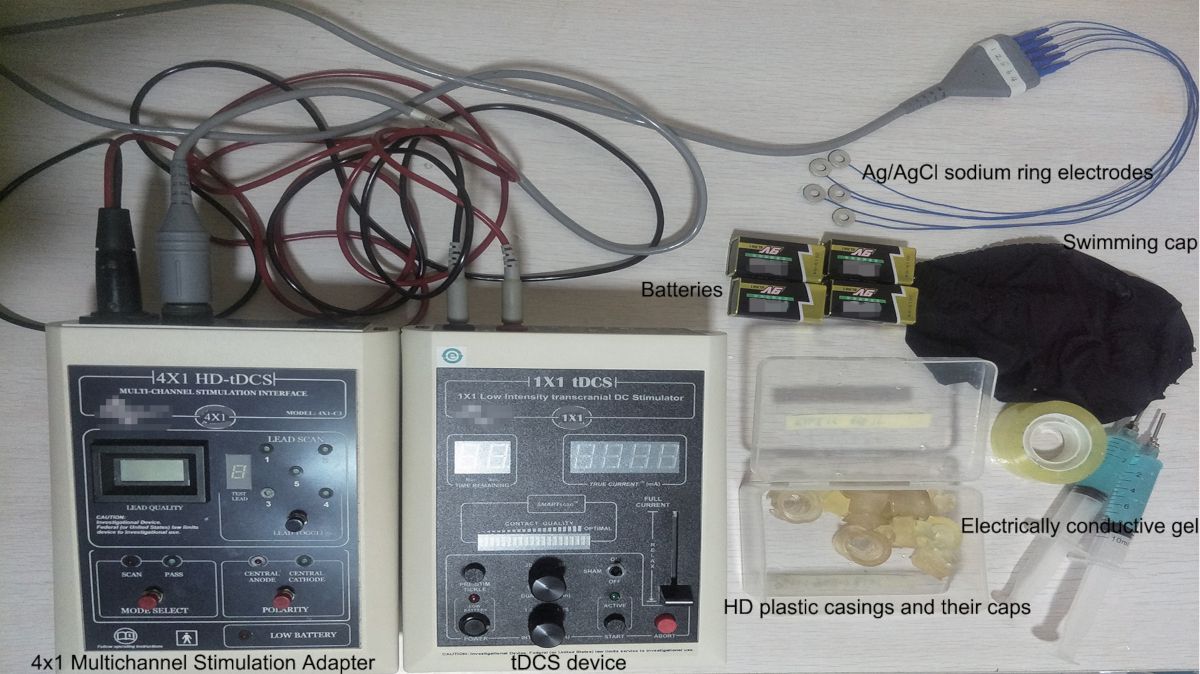
Figure 1: Necessary materials for stimulation. These materials include a tDCS device, a 4x1...
Access restricted. Please log in or start a trial to view this content.
Materials
| Name | Company | Catalog Number | Comments |
|---|---|---|---|
| 1X1 Low intensity transcranial DC stimulator | Soterix Medical | 1300A | |
| 3-Dimensional Polhemus-Patriot digitizer | POLHEMUS | 1A0453-001 | PATRIOT system component |
| 4X1 Multi-channel stimulation interface | Soterix Medical | 4X1-C3 | |
| Dell desktop computer | Dell | CRFC4J2 | Master computer to run 3D digitizer application |
