Method Article

Wireless Surface Electromyography Recording of Facial Muscle Activity During Expressions

November 10th, 2025

In This Article

Abstract

Loading...
$$\rightleftharpoonup{xx}$$ $$\longleftharp{xx}$$, $$\longrightharp{xx}$$,

Source:
Hila Man1, Paul F. Funk2, Ieva Vebraite-Adereth3, Christoph Anders4, Orlando Guntinas-Lichius2, Yael Hanein1,3,5

1Sagol School of Neuroscience, Tel Aviv University, 2Department of Otorhinolaryngology, Jena University Hospital, Friedrich-Schiller-University Jena, 3School of Electrical Engineering, Tel Aviv University, 4Division Motor Research, Pathophysiology and Biomechanics, Department of Trauma, Hand and Reconstructive Surgery, Jena University Hospital, Friedrich-Schiller-University Jena, 5X-trodes Ltd.

This video demonstrates the procedure for non-invasive recording of facial muscle activity using wireless surface electromyography (sEMG) during video-guided facial expressions performed by a participant.
Protocol

Loading...
$$\rightleftharpoonup{xx}$$ $$\longleftharp{xx}$$, $$\longrightharp{xx}$$,

All procedures involving human participants have been performed in compliance with the institutional, national, and international guidelines for human welfare and have been reviewed by the local institutional review board.

1. Preparation of equipment and software

  1. Charge data acquisition unit (DAU): Charge the wireless DAU fully before the experiment.
  2. Prepare a secure digital (SD) card: Insert a formatted v30-type SD card inside the DAU and turn it ON.
  3. Minimize disruptions: Place all cellular phones in quiet mode and turn off Bluetooth to avoid interference.
  4. Tablet setup
    1. Install and open the electrodes' application (see Table of Materials) on the Android tablet.
    2. The application will scan for available devices. Select the DAU by ID number, and click Confirm to pair the tablet with the DAU.
    3. Choose the electrode mask montage and click Confirm.
    4. Select channels (1-16) to display on the screen and click Confirm. A screen showing signals from the selected channels will appear, indicating readiness for the experiment.
      NOTE: All 16 channels are selected by default.
  5. Connect the tablet to the computer using a cable. Change the Android tablet's universal serial bus (USB) settings from transferring files to USB tethering.
  6. Install PsychoPy: Download and install the PsychoPy program (version v2023.1.3) on the computer.
  7. Download protocol files: Open the Github repository at https://github.com/NeuroEngLabTAU/facial_expressions_experiment and download all the files by clicking on <> code and then clicking on Download ZIP. This folder contains the experiment file facial_expressions.psyexp; subfolder schaede-cut-tlv with necessary videos for running the experiment, and other files used automatically by PsychoPy. Extract the folder to the desired location on the computer.

2. Participant setup

  1. Electrode mask application
    1. Face preparation: Instruct the participant to clean the face if face cream or makeup was applied. Clean using a prep gel, an alcohol-based fiberless cloth, or water and soap. Allow the skin to dry for at least 1 min.
      NOTE: This step is optional.
    2. Electrode placement:
      1. Carefully peel off the protective films from the skin-contact side of the electrode array mask, following the order indicated on the sticker (1-6).
      2. Place electrode number 11 (marked with an eye symbol) near the participant's right eye and electrode number 8 (marked with a nose symbol) on the nose.
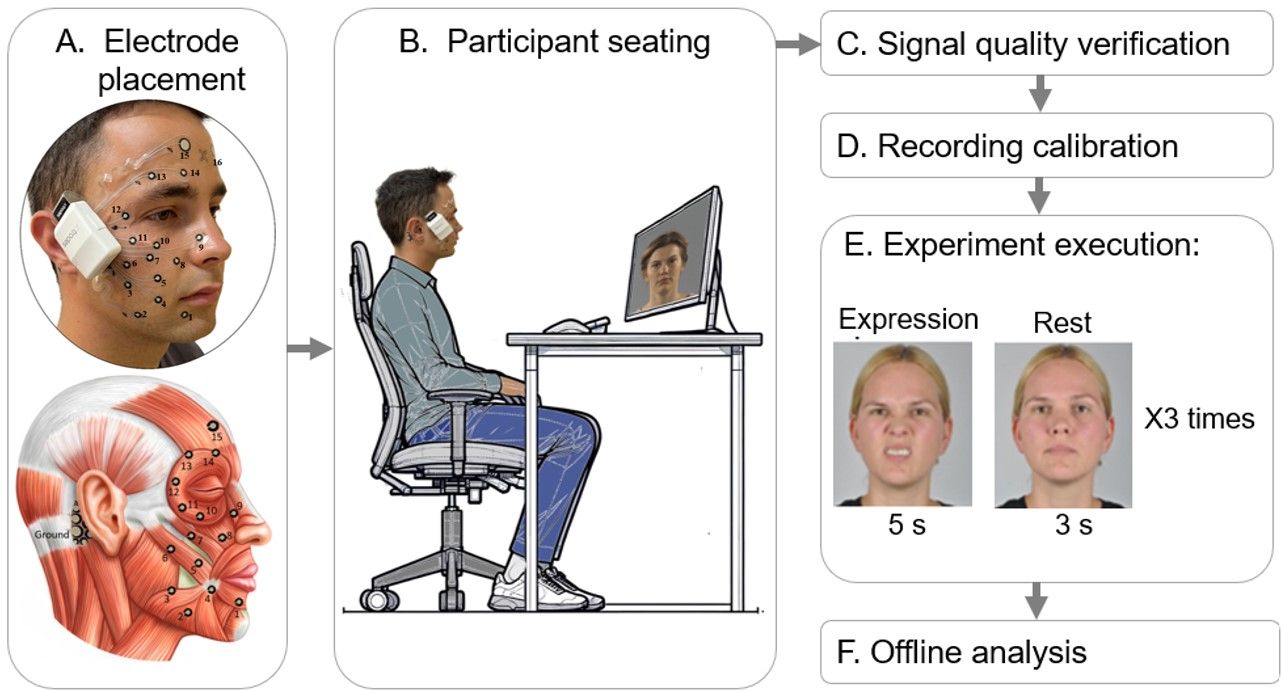
      3. Attach electrodes 1-15 on the right side of the face and electrode 16 on the left forehead. Place the reference electrode on the right mastoid. Refer to Figure 1A for electrode positions relative to muscles.
    3. Attachment: Gently press the mask onto the skin, then carefully peel off the outer transparent support films one by one to fully attach the mask. Be careful not to detach the mask during this process.
    4. Connect DAU: Insert the electrode array connector card into the DAU's connector socket, then secure the DAU to the tape.
  2. Photographic documentation:
    1. Take at least 3 pictures of the participant from various angles (90°, 45°, 0°) to document electrode placement.
  3. Seating the participant (see Figure 1B)
    1. Chair and distance: Seat the participant in an upright chair at a fixed distance (e.g., 70 cm) from the computer screen where facial exercise instructions will be displayed.
    2. Comfort check: Ensure the participant is seated comfortably and can see the screen clearly.

3. Signal validation

  1. Check EMG signal quality: Verify that the tablet application detects all 16 EMG electrode signals.
  2. Troubleshoot if necessary:
    1. Press each electrode gently against the participant's skin and ensure no air bubbles are trapped.
    2. Allow time for the signal to stabilize.
    3. Move away from electronic devices that may cause interference.
    4. If issues persist, consider reattaching the DAU or switching rooms.
    5. As a last resort, replace the electrode patch.

4. Running the experiment

  1. Start EMG recording: Open the electrodes application on the Android tablet and press Start session.
  2. Fill in session details.
    1. A window will appear for session details. Enter the Study name, Session name, Site, Operator, Patient ID, Age, Gender, and Remarks.
      1. Click Start Recording to begin EMG data capture. From this moment, EMG data is being recorded. The raw data will be saved to the SD card at a sampling rate of 4 kS/s.
  3. Calibration (optional): The application will initiate a calibration process where the participant performs specified basic tasks (e.g., close eyes, chew) after pressing Start. Recalibration can be performed if needed. After calibration is completed, click OK. Skip this step if desired by clicking Next.
  4. Open the experiment file.
    1. On the computer, double-click the downloaded experiment file, facial_expressions.psyexp, to open it in PsychoPy.
    2. Click Run experiment to launch the experiment.
    3. Enter session details (participant number, session number, tablet name), when prompted,and click OK.
      NOTE: The tablet name is the serial number of the tablet that can be found in the Android tablet settings under About Tablet.
  5. Session in action
    1. Have the participant perform 11 facial expressions (Figure 2) as instructed by a video guide. After the first expression (Rest), each expression is repeated three times consecutively. The participant will be asked to hold each expression for 5 s, followed by a 3 s rest.
    2. Observe and guide participants if necessary to ensure accuracy and synchronization with instructions.
  6. End the experiment.
    1. When completed, PsychoPy will stop the experiment automatically. Stop the EMG data recording on the tablet by clicking END recording. Confirm by clicking Yes, stop. A window will confirm that the session was completed, then click OK.
    2. Press the Sync button to synchronize the session data to the system's cloud. When completed, quit the application.

5. Post-experiment data handling and analysis

  1. Collect the data from Psychopy.
    NOTE: Once the session is complete, Psychopy automatically saves a CSV file in the data subfolder. The file name indicates the session details. CSV files contain video names, time stamps, participant identifying number, session number, and Android tablet number.
  2. Convert the EMG data.
    1. Log in to the electrode system's cloud service and select the session details.
    2. Upload EMG data from the SD card.
    3. Convert uploaded XF2 files containing EMG data to EDF (European data format) file format by clicking Generate EDF files. Download the selected files for offline analysis.
  3. Perform basic EMG data analysis.NOTE: EDF files contain raw EMG data from 16 channels (EMG CH-1 to CH-16), gyro data from 3 channels (GYRO-X, Y, Z), and accelerometer data from 3 channels (ACC-X, Y, Z). Annotations from the Psychopy indicating time points for specific facial expressions are saved within the file automatically. For further analysis, only raw EMG data from 16 channels and annotations were used.
    1. Filter the raw EMG data using a bandpass 10-500 Hz filter.
    2. Apply a 50 Hz notch filter to reduce noise.
    3. Proceed with the desired analysis for the research purpose.

Access restricted. Please log in or start a trial to view this content.

Results

Loading...
$$\rightleftharpoonup{xx}$$ $$\longleftharp{xx}$$, $$\longrightharp{xx}$$,
Facial muscle electromyography diagram; electrode placement, calibration, experiment flowchart.

Figure 1: Schematic experimental setup overview. (A) Positions of the electrodes on the face: 1-16 ...

Access restricted. Please log in or start a trial to view this content.

Materials

List of materials used in this article
NameCompanyCatalog NumberComments
Alcohol prep padMEDI PLUS7290010993833To clean the face area for electrode placement.
Android tabletSamsungGalaxy Tab S7To run electrode application
DAUX-trodes Ltd.XTR-BT V1.3Wireless data acquisition unit
Facial expression experiment fileN/AN/Ahttps://github.com/NeuroEngLabTAU/facial_expressions_experiment
Long Type-C to Type-C cableN/AN/AConnection of the Tablet to the PC
Micro-SD cardSanDiskN/ATo place into DAU and store recorded data
NuPrep skin prep gelWeaver and companyhttps://www.weaverandcompany.com/products/nuprep/ To clean the face area for electrode placement. It lowers the skin impedance with minimal skin irritation and patient discomfort.
PC monitorPhillips, Dell For viewing experiment instructions
Personal computer (PC)AntecN/AWindows 10+; Processors: Intel i7 processor. BT receiver.
USB SD card readerSIYOTEAMSY-368To transfer recorded EMG data from SD card to the PC
XTR EXG16X-trodes Ltd.XTELC0004005RMDisposable 16-channel wearable dry electrode array patch for EMG, ECG monitoring
X-trodes applicationX-trodes Ltd.N/AAn application for recording data from X-trodes electrodes on Android tablet

Reprints and Permissions

Request permission to reuse the text or figures of this JoVE article

Request Permission

Tags

Wireless sEMG RecordingFacial Expression AnalysisElectrode PlacementDry Electrode MaskWireless Data UnitEMG Signal DetectionMuscle Contraction MonitoringPsychoPy Experiment Protocol

Related Articles