NOTE: During all of the following steps, use only dim red light illumination and ensure that the ommatidia's exposure to light is minimal (i.e., work rapidly and turn off the dissecting light source and chamber red illumination used for viewing the ommatidia when performing tasks that do not demand viewing the ommatidium). In addition, perform all of the following steps according to standard electrophysiological protocol.
- Under an inverted microscope (40X objective), carefully inspect all of the ommatidia in the bath and choose a suitable ommatidium for the experiment.
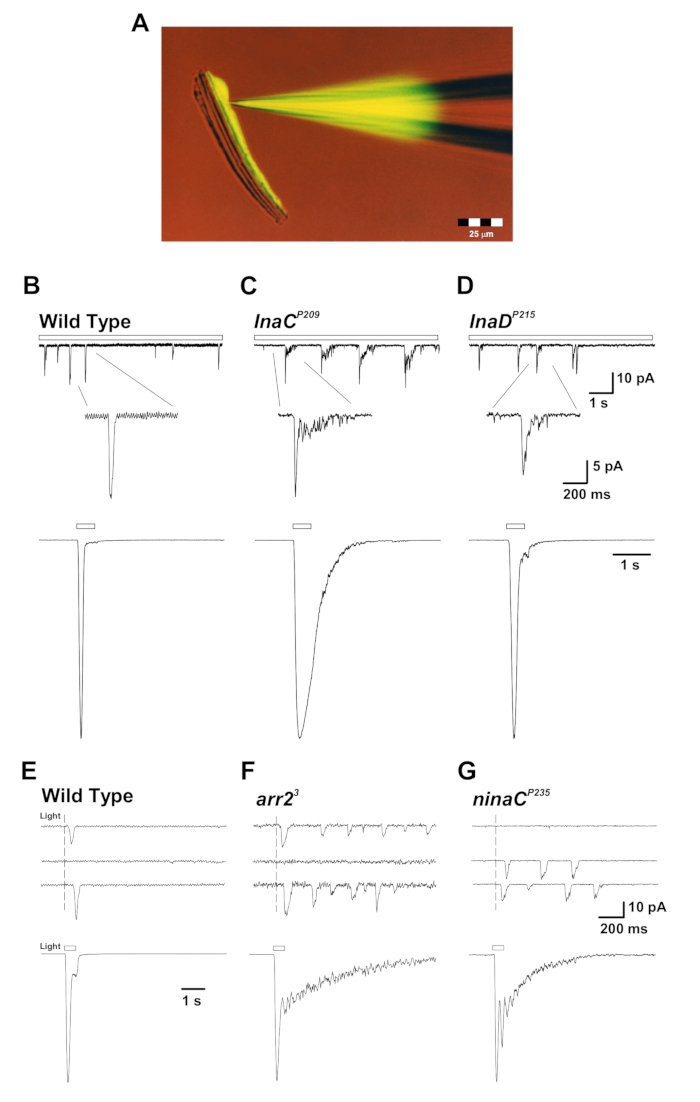
- Ensure that the outer membrane of the ommatidium is smooth and intact, that the long axis is approximately at a right angle relative to the electrode approach direction (as seen in Figure 1A), and that the distal section of the ommatidium is not surrounded by any excess tissue. Place the chosen ommatidium at the optical axis of the objective lens (in the center of the field of vision) to ensure uniform illumination.
- Fill a patch pipette with intracellular solution (IS1 or IS2).
NOTE: To measure the intensity response and bump analysis, use IS1. To measure the reversal potential of the light-sensitive channels, use IS2.
- Mount the patch pipette onto the electrode holder.
- Blow into the pipette by mouth through the tube connected to the electrode holder, causing it to fill with positive pressure. Close the tube valve to maintain the pressure.
- Using the micromanipulator, insert the electrode into the bath chamber.
- Guide the electrode close to the distal section of the ommatidium, such that there is no contact between the electrode and the ommatidium, until a small dimple (due to the positive pressure in the patch pipette) can be observed in the ommatidium.
- Open the recording software (see the Table of Materials). Open the "membrane test module" to apply continuous square voltage pulses of 2 mV at a rate of 100 Hz.
- Set the junction potential to "zero," by adjusting the appropriate knob in the patch clamp amplifier to set the base of the square pulse to "zero" current
NOTE: The electrophysiological setup includes a head stage (i.e. first-stage amplification) connected to an amplifier (i.e. second-stage amplification). The amplified analog signal is converted to a digital signal using the A/D converter, which is controlled by software installed on a PC computer.
- Release the positive pressure in the pipette by opening the valve of the tube connected to the electrode holder. Gently create negative pressure in the pipette by sucking out of the tube, leading to the association of the pipette to the cell membrane. Close the tube valve to maintain the pressure.
- Ensure that the electrode resistance viewed on the computer screen is elevated to 100 - 150 MΩ. Release the negative pressure in the pipette by manually opening the valve of the tube connected to the electrode holder.
- Ensure that the electrode resistance is elevated to at least 1-2 GΩ.
NOTE: At this point, a seal has been formed between the electrode and the photoreceptor.
- Offset the capacitive currents of the pipette by adjusting the appropriate knob in the patch clamp amplifier.
- Create rapid, short, and forceful bouts of negative pressure in the electrode, sucking by mouth out of the tube connected to the electrode holder to "break" into the photoreceptor membrane and create a whole-cell configuration. Alternatively, use the "Zap button" to apply short, rectangular electrical pulses, starting with a duration of "0.1 ms," or apply a combination of both methods.
NOTE: The generation of the whole-cell configuration is revealed by a sudden increase in pipette capacitance (typically ~60 pF for a wildtype R1-6 photoreceptor; a capacitance of only ~20 pF indicates a recording from an R7 photoreceptor; a capacitance above ~90 pF indicates a recording from two photoreceptors).
- Set the holding potential of the photoreceptor to the required voltage (usually -70 mV) manually using the appropriate knob in the patch clamp amplifier.
NOTE: This step can be performed after a seal has been obtained and before the whole-cell configuration has been achieved.
- Offset the capacitive currents and series resistance (a measured series resistance value greater than 25 MΩ indicates that the electrode pipette has been clogged) and, if required (i.e. for larger currents), apply series resistance compensation using the appropriate knobs in the patch clamp amplifier.
- Close the black front curtain of the Faraday cage to obtain maximal darkness and electrical isolation.
- Begin the recording process using the software and administer light stimuli and/or pharmacological substances according to the desired experimental procedure.