This video demonstrates a technique for in vivo retinal imaging using two-photon microscopy. Anesthetized mice are prepared for imaging by securing their heads, Applying eye lubricant, and placing a coverslip over the eye. Retinal ganglion cells (RGCs) expressing fluorescent proteins are first visualized using epifluorescence for alignment. Finally, two-photon imaging is employed, allowing for high-resolution visualization of RGCs.
A subscription to JoVE is required to view this content. Sign in or start your free trial.
Method Article
Two-Photon In Vivo Imaging of the Mouse Retina
1.8K views
⸱
April 28th, 2025
In This Article
Abstract
Protocol
All procedures involving animal models have been reviewed by the local institutional animal care committee and the JoVE veterinary review board.
1. Preparation of mouse for image acquisition
- Anesthetizing mouse for imaging
NOTE: To mitigate exposure to isoflurane, ensure proper waste gas scavenging. Make sure the exhaust port of the anesthesia induction chamber is connected to a passive scavenging gas filter canister and the outlet of the mouse anesthesia nosepiece is connected to an active scavenging gas filter canister with a vacuum provided by a gas evacuation apparatus. Follow the manufacturer's guidelines for monitoring the filter canister weight for replacement.- Anesthetize the mouse using the ketamine/xylazine cocktail. Alternatively, induce anesthesia via isoflurane inhalation if also using isoflurane for maintenance of anesthesia (imaging session > 30 min). Set the small animal anesthesia device to fill the induction chamber with 5% isoflurane mixed with room air at a flow rate of 0.5 L/min. Place the mouse in the induction chamber, and allow 15 s for the mouse to become anesthetized.
- Switch the isoflurane vaporizer to 0% and direct the anesthesia flow to the nosepiece. Perform a 5-second "O2 flush" of the induction chamber. Take the mouse out of the induction chamber, and secure it in the head holder, attaching the nosepiece.
- Use a mixture of 1% isoflurane with room air at a flow rate of 0.5 L/min for maintenance of anesthesia. Monitor respiratory rate at 5-minute intervals throughout anesthesia, adjusting the isoflurane percentage to maintain a respiratory rate of ~60 breaths/min.
NOTE: These settings (% isoflurane, flow rate) can also be used for the maintenance of anesthesia induced by the ketamine/xylazine cocktail.
- Pupil dilation
- Prepare a solution of 1% w/v atropine and 2.5% w/v phenylephrine hydrochloride in water. Store the dilator solution at room temperature protected from light.
- Using a disposable pipette eye dropper, apply a drop of the dilator solution to each eye that will be imaged. Turn off the room lights, and wait 5 min for the pupil to dilate. When the pupil is dilated, blot away the dilator solution with lint-free tissue.
NOTE: Ensure dilator solution does not enter the nostrils. - Apply a large drop of lubricant eye gel to each eye that will be imaged. If both eyes are to be imaged, apply a small piece of plastic cling film over the eye gel on the non-imaging eye to prevent dehydration. If only imaging one eye, apply lubricant eye ointment to the eye that will not be imaged.
- Positioning mouse for imaging
- To secure the mouse in the imaging head holder, rotate the main arm of the head holder until the earpiece bar is tilted at an angle of 60° or more below horizontal. Secure the lower ear canal pin in the inward extended position and the upper ear canal pin in the withdrawn position.
- With the mouse facing the bite bar, mount one ear onto the extended lower pin, inserting the pin into the ear canal. Loosen the screw securing the upper ear canal pin, and extend the pin into the other ear canal. Tighten the screw to secure the head.
- Slide the bite bar toward the head of the mouse. Gently elevate the head of the mouse, then lower the maxillary incisors of the mouse into the hole of the bite bar. Retract the bite bar with gentle force to secure the head of the mouse, and secure the bite bar position by tightening the screw.
- If using isoflurane, slide the nosepiece through its slot onto the bite bar prior to securing the incisors of the mouse. Secure and tighten the bite bar position as in step 1.3.3. Tighten the nosepiece using the two screws on its upper face until it fits snugly on the nose of the mouse, but does not constrict the snout.
- Transfer the mouse, in the head holder, to the microscope stage beneath the objective. Rotate the main arm of the head holder until the pupil of the eye is oriented straight up, in line with the light path (Figure 1).
- Place a #1.5 coverslip in the compact filter holder and attach the holder to the microscope stage. Lower the coverslip toward the eye, contacting the lubricant eye gel, so that it lies horizontally immediately above the cornea (Figure 1). Ensure that the coverslip does not touch the cornea.
NOTE: On the microscope, ensure the excitation light path is set to epifluorescence and the emission light path is set to the eyepiece. Turn on the epifluorescence illuminator at its lowest power and open the illuminator shutter. Choose the epifluorescence illuminator wavelength and fluorescence filter corresponding to the fluorophore being imaged. - Maneuver the stage in the X-Y dimensions and objective in the Z-position using the stage control and motorized focus drive until the widefield excitation light fully covers the cornea. Looking through the eyepiece, continue to adjust the Z-position of the stage until the fluorescent cells or structures in the retina come into focus. Increase epifluorescence illuminator power if the sample signal is insufficiently bright to resolve individual cells or structures of interest through the eyepiece.
NOTE: If having trouble locating the retina, the iris is a high-contrast landmark to anchor on and then focus down toward the retina. This step will also allow verification that the pupil is maximally dilated. - Obtain an imaging area on the axis with the mouse lens. Adjust the angle of the mouse using the various degrees of freedom on the head holder until only expansion or contraction of out-of-focus light occurs when adjusting the focal plane. Turn off the epifluorescence illuminator and close the illuminator shutter.
NOTE: Significant X-Y parallax of out-of-focus light while scrolling through the Z-direction focal planes indicates that the retina is not on the axis with respect to the imaging light path.
2. Two-photon image acquisition
- Image setup and acquisition parameters
NOTE: Turn off room lights, and cover stray light sources in the room. Ensure the epifluorescence illuminator is off, and the illuminator shutter is closed.- Switch the excitation light path to the laser and the emission light path to the photomultiplier tubes (PMTs).
- In the image acquisition software, set a frame size of 512 x 512 and a frame average of 3. Set the steps per slice to -8 µm. Designate z-stepping to start at the top of the stack and progress downward, minimizing two-photon laser activation of photoreceptors.
NOTE: The step size can be reduced to increase Z-resolution at a cost of increased imaging time, but 8 µm steps are sufficient to resolve cell somata in this imaging configuration. - Turn on and enable the PMTs. Adjust the PMT voltage to 680 V. Enable the excitation shutter.
NOTE: Powered PMTs are susceptible to light damage. Ensure that the epifluorescence illuminator is off, the microscope enclosure curtain is drawn, and the room lights are off. - Begin a live image preview of the target tissue, starting with 1% laser power. Auto-adjust the display brightness to visualize the cells or structures of interest. Auto-adjust the scan phase. If the target tissue is dim or unclear, increase the laser power percentage until structures become visible without surpassing the limit set in step 2.4.4, which corresponds to 45 mW.
NOTE: For a 16-bit image, a display value of ~1000 when auto-adjusting brightness in a Z-plane containing structures of interest indicates sufficient brightness of the sample. - Maneuver the microscope stage in the X-Y direction to center on a desired imaging area, then navigate to the Z-plane with the structures of interest in focus.
NOTE: Imaging adjacent to the optic nerve head allows it to serve as an unambiguous landmark for chronic imaging experiments. - If this is a chronic time-lapse experiment, open a previous image on the acquisition computer and use it as a reference to find the same area of interest. Ensure that the angle of imaging is similar to that of previous images to acquire the same set of cells with minimal parallax.
NOTE: To image the same cells as in previous time points (Figure 2), further adjustment of the mouse head position is likely required. - Set the Z-limits of the imaging stack by navigating to the uppermost and lowermost Z-planes of interest, and acquire the image. Upon completion of image acquisition, disable the PMTs and the emission shutter. Switch the emission light path back to the eyepiece, and the excitation light path to epifluorescence illumination. Remove the mouse from the microscope stage.
Access restricted. Please log in or start a trial to view this content.
Results
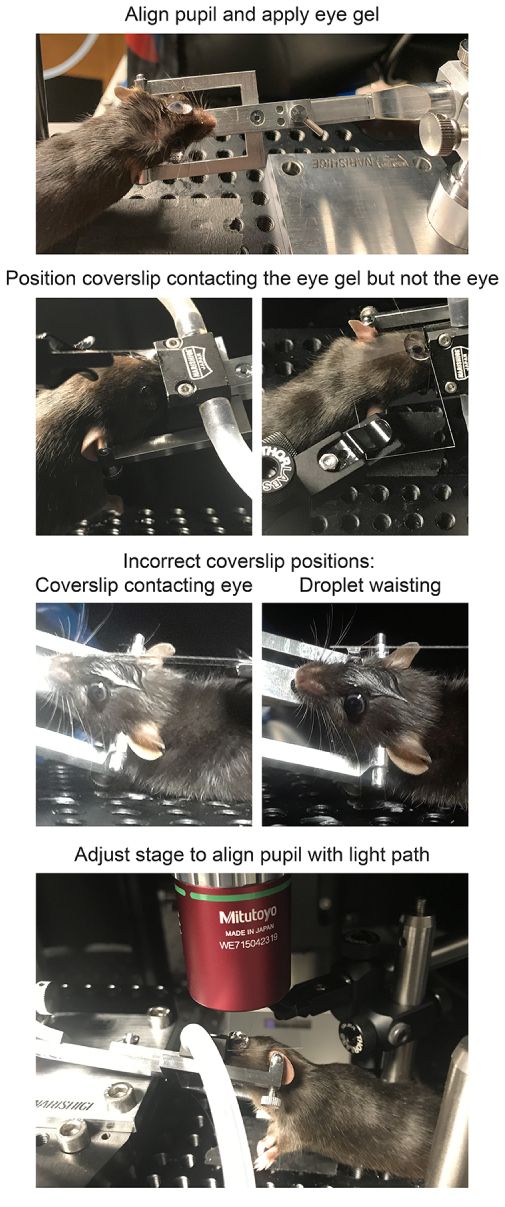
Figure 1: Positioning mice for in vivo imaging. To position the mouse with the pupil on the axis with the light path, the anesthetized mouse is first restrained in a head holder, the head is rotated and angled...
Access restricted. Please log in or start a trial to view this content.
Materials
| Name | Company | Catalog Number | Comments |
|---|---|---|---|
| #1.5 coverslip | ThermoFisher | 152440 | Richard-Allan #1.5 24 mm x 40 mm |
| 50 mL glass syringe | Hamilton | 80950 | 22G cemented needle |
| Anesthesia Air Pump | RWD Life Science | R510-30 | |
| Atropine | Sigma | A0132 | For pupil dilator solution |
| Basic Small Animal Anesthesia Device | RWD Life Science | R500IE | |
| Borosilicate glass capillary | Sutter | B150-86-10 | Outside diameter 1.50 mm, inside diameter 0.86 mm, length 10 cm |
| CFP/YFP filter cube | Chroma | custom | 480/40, 505 long pass, 535/30 |
| ChromoFlex - Two channel PMT detection unit | Scientifica | S-MPLG-1002 | |
| Circulating heating pump | Braintree Scientific | tp-700 | Set to 37 °C |
| Cling film | VWR | 10713-916 | |
| Compact Filter Holder | ThorLabs | DH1 | Holds coverslip over mouse eye |
| Cx3cr1-GFP transgenic mice (B6.129P2(Cg)-Cx3cr1tm1Litt/J) | The Jackson Laboratory | 5582 | |
| DAQ controller chassis | National Instruments | PXIe-1073 | |
| Data acquisition device | National Instruments | BNC-2090A | |
| FPGA module with digitizer | National Instruments | NI-5734 | |
| Gas Evacuation Apparatus | RWD Life Science | R546W | |
| GenTeal Severe lubricant eye gel | Alcon | (from local pharmacy) | For use during imaging |
| GFP/Red filter cube | Chroma | custom | 535/30, 560 long pass, 605/70 |
| Heating pad | McKesson Medical and Surgical | 190147 | |
| HyperScope Launch Optics for use with Pockels Cell | Scientifica | S-MP-101080 | |
| HyperScope Main module | Scientifica | S-MP-100466 | |
| HyperScope Scan Path | Scientifica | S-MP-100406 | |
| HyperScope X galvo Module | Scientifica | MP-100443 | |
| ImageJ Fiji software | Freeware | ||
| Isoflurane | Patterson Veterinary | NDC 14043-704-06 | |
| Isoflurane gas filter cannister (active scavenging) | RWD Life Science | R510-31 | |
| Isoflurane gas filter cannister (passive scavenging) | RWD Life Science | R510-31S | |
| ketamine HCl (100 mg/mL) | Vedco | NDC 50989-161-06 | |
| M32 to M26 adapter | ThorLabs | M32M26S | |
| MaiTai GUI software | Spectra-Physics | NA | |
| MATLAB software | MathWorks | NA | R2015b |
| meloxicam (5 mg/mL) | Boehringer Ingelheim | NDC 0010-6013-01 | Analgesic |
| Micorscope Objective | Edmund Optics | 46-404 | Mitutoyo WE715042319 |
| micropipette puller | Sutter | Flaming/Brown Model P-97 | |
| Mineral oil | Fisher | BP2629-1 | |
| Mini bulldog hemostatic clamp | Fine Science Tools | 18053-28 | |
| Miniature EVA Tubing 0.02" ID, 0.06" OD | McMaster Carr | 1883T1 | |
| Miniature EVA Tubing 0.05" ID, 0.09" OD | McMaster Carr | 1883T4 | |
| Mouse head holder | Narishige | SGM-4 | |
| No. 5 Forceps | Fine Science Tools | 11251-10 | |
| Optic Posts 1/2" | ThorLabs | TR3-P5 | |
| Optical power meter kit | ThorLabs | PM100D | |
| pE-300 Ultra LLG Deivery | Scientifica | COO-LED3ULLGs | |
| Phenylephrine hydrochloride | Sigma | P6126 | For pupil dilator solution |
| Pockels cell | Conoptics | 350-80-02 | |
| Pockels cell amplifier | Conoptics | Model 302RM | |
| Proparacaine hydrochloride | Sigma | 1571001 | For eye immobilization |
| Red & Far Red short pass filter Cube | Chroma | custom | 560 short pass |
| Rotating 1/2" post clamp | ThorLabs | SWC | |
| ScanImage package | Vidrio Technologies | Freeware | Image acquisition software; Version 5.4.0 (2018); requires MATLAB |
| sodium chloride solution, sterile (0.9%) | Fresenius Kabi | NDC 63323-186-01 | |
| Stereomicroscope | Leica | S9 E | |
| Tabletop centrifuge | Oxford | Benchmate C8 | |
| Terramycin oxytetracycline/polymyxin B antibiotic ophthalmic ointment | Zoetisus | NA | For use after intravitreal injection |
| ThermoRack cooling system | Solid State Cooling Systems | ThermoRack 401 | Set to 20 °C |
| Ultrafast Ti:Sapphire laser | Spectra-Physics | Mai Tai DeepSee | |
| Vgat-Cre transgenic mice (Slc32a1tm2(cre)Lowl/J) | The Jackson Laboratory | 16962 | |
| VGlut2-Cre transgenic mice (Slc17a6tm2(cre)Lowl/J) | The Jackson Laboratory | 16963 | |
| VivoScope for In Vivo Imaging | Scientifica | S-MPVS-1200-00P | |
| White petrolatum-mineral oil lubricant eye ointment | Stye | NA | For use after imaging |
| xylazine HCl (20 mg/mL) | Akorn | NDC 59399-110-20 |
