Presented here is a protocol for collecting and processing underwater photogrammetry data, including a significantly simplified and fully automated image processing pipeline resulting in georeferenced and time-series aligned outputs ready for ecological data extraction, analysis, and application.
Method Article
Reefshape: A System for the Efficient Collection and Automated Processing of Time-Series Underwater Photogrammetry Data for Benthic Habitat Monitoring
In This Article
Summary
Abstract
Large-area imaging (LAI) through structure-from-motion photogrammetry has gained significant traction as a monitoring tool for coral reef ecosystems, allowing for the creation of a digital model of a section of reef that can be analyzed ex situ to collect data on a benthic composition, structural complexity, and other metrics. While a variety of approaches have been used, a systematic approach to data collection and computer processing remains a need for many researchers. To address this, we have developed ReefShape, a straightforward and comprehensive workflow for underwater image collection, georeferencing, data processing, and time-series alignment. Specific camera system recommendations and image acquisition instructions are provided based on our experience. A process to incorporate real-world georeferencing using permanent ground control markers fixed to the substrate that facilitates the automatic alignment of time-series datasets is described. A set of processing scripts was developed to automate the data processing workflow, streamlining and dramatically simplifying the normally time-consuming and complex process. Our scripted approach aims to reduce the burden of data processing on coral reef researchers, increase the efficiency of the photogrammetry pipeline, and export data in analysis-ready formats for use in common GIS and coral reef imagery segmentation programs. The methods described here provide a comprehensive solution to integrate photogrammetry as a reef monitoring tool while remaining flexible and leaving the specific analyses to be conducted up to the researcher.
Introduction
Coral reefs are one of the most biodiverse and economically important ecosystems globally and face unprecedented challenges from climate change, disease, overfishing, and other stressors1,2,3. The monitoring of coral reef ecosystems is uniquely difficult due to their often-remote locations and inherent difficulties with underwater research; therefore, reefs have historically been understudied4. Monitoring coral reefs effectively at multiple spatial scales ranging from microbial5 to archipelago6 and global7 is essential to understanding their decline, as well as planning, tracking, and evaluating intervention efforts8. A tool that has become popular for monitoring the condition of coral reef benthos at the scale of tens to hundreds of square meters is photomosaic imaging, a term referring to high-resolution maps consisting of stitched-together overlapping underwater photographs9. These mosaics allow researchers to image an area of reef that is larger than can be captured in a single photograph, hence the term large-area imaging (LAI)10. The mosaics can later be analyzed to extract relevant ecological information, such as coral cover percentage, colony size, species distribution, and benthic composition11. Advances in computing and the availability of off-the-shelf software now allow this process to be completed using structure-from-motion (SfM) photogrammetry. SfM involves analyzing photos for matching points that are used to reconstruct the three-dimensional orientation of the photos and tie-points, enabling the creation of an accurate virtual reef replica12,13,14. SfM/LAI surveys have become commonplace within coral reef research, allowing for novel insights into coral community ecology10, habitat complexity15,16, coral community responses to bleaching events17,18, hurricanes19, and coral restoration20.
Several approaches for using LAI for coral reef monitoring have been developed21,22,23,24, resulting in a diverse array of choices available to practitioners seeking to leverage the technology. However, the effective use of LAI in coral reef research is complex and demands a substantial learning effort. Proficiency in SCUBA diving, underwater navigation, underwater photography, software utilization, data curation, and management are essential. Additionally, expertise in ecology is fundamental to effectively analyzing and interpreting data products. Existing workflows tend to focus primarily on image acquisition without providing sufficient guidance for time-series protocols, metadata collection (e.g., scaling, depth, and location), or post-field trip data processing: all steps that are essential for accurate and repeatable data collection. Costs associated with LAI workflows also tend to be high, utilizing expensive camera systems and computer setups. There remains a strong need among researchers for a comprehensive, straightforward, and efficient methodology, resulting in data of sufficient quality to answer a wide range of current and future research questions. We address this by developing a robust and efficient approach for underwater LAI that reduces processing effort and complexity and minimizes costs while improving the quality of data. Our new approach allows for rapid acquisition, automated processing, and time-series alignment of imagery to provide high-quality data products for coral reef ecological study and analysis. The total startup cost of implementing this approach is about $5,000 - $8,000 USD (including camera system, materials, dedicated computer, and software), depending on whether the user can access educational pricing for photogrammetry software. Through the application of our methods, we aim to assist coral reef researchers in optimizing their data collection and processing endeavors, enabling more efficient workflows that facilitate rapid extraction and analysis of critically important coral reef ecological data.
The method described here, which we name "ReefShape," has three main novel contributions: (1) the use of semi-permanent ground control markers fixed to the substrate to enable automatic georeferencing and time-series alignment of datasets, (2) the use of a custom app-based survey to facilitate location data collection and formatting, and (3) the implementation of a comprehensive scripted process built to fully automate the photogrammetry pipeline, dramatically reducing the human labor during the processing phase that is relied on in other LAI protocols20,21,22,23. Like these other LAI protocols, ReefShape relies on the use of Agisoft Metashape25 (hereafter termed "the photogrammetry program") for photogrammetric processing and additionally utilizes the free ESRI Survey12326smartphone application (hereafter termed "the survey app") for location data collection. This protocol is designed to be simple yet robust, not requiring multi-camera systems24 or complex geodetic surveys13 while still meeting the goal of delivering high-quality data, defined as completed 3D models, photomosaics, and digital elevation models with accurate geometry, scale, and position; sufficient resolution and sharpness to visually identify benthic organisms at the species or genus level; no major data gaps or holes; accurate color; and in the case of time-series data, proper alignment between time points. The specific approach described here provides a framework for collecting and processing data to meet these goals.
Driven by advances in machine learning, we anticipate that new analysis tools will be developed for faster, more accurate extraction of ecological data from photomosaics. Therefore, we focus our efforts on the collection of high-quality underwater imagery and the automation of the photogrammetry pipeline, leaving specific analyses largely up to users of this protocol based on their own diverse sets of needs. This scripted process, aimed to be broadly applicable to the coral reef research community, includes options to export data products formatted as GeoTIFFs of varying specifications tailored for common GIS software and TagLab, a purpose-built application for rapid annotation of coral reef orthomosaics27.
Protocol overview
The ReefShape method is broken down into two main phases: in situ data collection and data processing on a computer. The method is functional for plot sizes from ~25 m2 up to >1000 m2, ranging in depth from ~1 m to 30 m. It has been demonstrated that plots of 300-400 m2 are ideal to effectively capture the coral diversity on Caribbean reefs28. However, it was found that plots larger than ~100 m2 can be difficult for novice surveyors to navigate. Therefore, a plot size of 10 m x 10 m is described in the protocol as a starting point, but we do not intend to constrain users with this suggestion. Rather, it is suggested that users choose their plot size based on their own experience and research needs. The process for data collection remains effectively the same for any plot size chosen.
When a plot is first established, the surveyor begins by permanently fixing four unique marker tags featuring coded photogrammetry targets (Figure 1D) to the substrate at each corner (Figure 2), using a dive computer to measure the depth of each marker. Coded scale bars (Figure 1E) are temporarily placed within the plot, and substrate-facing photos are collected by the diver with a single mirrorless camera and wide-angle rectilinear lens positioned 1.5 m - 2 m above the reef, swimming in a double-crossed "lawnmower" pattern, similar to other established protocols11,21,24,. The entire process (including first-time setup and photography) can typically be completed in a single dive, though multiple dives may be required for deeper or larger plots. After photography, the surveyor uses a Bluetooth GPS unit mounted to a floatation device (Figure 1C) and a smartphone to collect GPS points at the surface above each corner marker using a custom form within the survey app, which then emails the reference data to the user in a pre-formatted spreadsheet. At subsequent plot surveys, the surveyor does not collect reference data or install markers and needs only to locate and clean the existing corner markers and collect photos, streamlining the process for time-series data collection.
For data processing, a set of custom Python scripts was developed that interface with the photogrammetry program to automate the pipeline (Figure 3), normally a process that requires human intervention at several points. The main processing steps of the automated pipeline include creating a tie-point cloud and estimating camera positions, building a 3D mesh model of the reef, building a 2.5D digital elevation model (DEM), building a 2D orthorectified photomosaic, and defining a region of interest (ROI) bounded by the four corner markers (Figure 4). In this workflow, the user inputs the photos and reference data in a graphic interface (Supplementary Figure 1) at the onset of processing, rather than needing to proceed through numerous steps before manually adding reference data and generating data products, as is common in other workflows21,22,23,24. For time-series processing, permanent corner markers facilitate the automatic alignment of time points, eliminating the need for manual alignment. The use of a standardized, scripted workflow helps ensure data consistency and saves significant human effort during processing, especially in projects with many time points. A suite of standalone scripts is also included to automate various processing tasks, including calculating a 3D surface area to planar area ratio, an important metric for assessing reef structural complexity19,29.

Figure 1: Key materials required for the data collection portion of this protocol. (A) mirrorless camera with wide-angle rectilinear lens, (B) underwater housing with dome port to fit camera/lens, (C) Bluetooth GPS kickboard device, (D) automatically detectable coded corner markers for permanent plot ground control and georeferencing, and (E) coded scale bars used for setting model size. Please click here to view a larger version of this figure.
Protocol
NOTE: See Supplementary File 1, Sections 1 and 2 for equipment preparation steps.
1. Plot setup
- Installing corner markers (only for initial time-point)
- Select a suitable plot in a field. Ensure safety is prioritized throughout the process. For this protocol, a 10 m x 10 m plot is described.
NOTE: The protocol can be executed by a single researcher or buddy pair and can be adapted for most plot sizes depending on research needs. - Once the plot is chosen, install the four corner markers while on SCUBA. Fix corner markers 1-4 (Figure 1D) to the substrate in sequential order at the corners of the plot using a hammer and 4 nails, exercising caution to not fracture the substrate or damage sensitive living corals. Find suitable locations to install the markers (e.g., relatively flat areas of non-living substrate that are easily visible from directly above and not likely to be damaged or quickly bio-eroded).
- For consistency and to aid in plot navigation and relocation, install plot markers in clockwise order. Install marker 1 in the NE corner, marker 2 in the SE corner, marker 3 in the SW corner, and marker 4 in the NW corner, using a tape measure and compass, if necessary.
NOTE: Figure 2A shows a properly installed marker, and Figure 2D shows an overview of the plot layout, with all markers laid out ~10 m apart in a square pattern. - Record marker depths. Using a dive computer or other depth gauge, record the depth of each of the four corner markers to the nearest 10 cm on a dive slate.
- Optionally, in cases where permanent marker installation is not permitted or feasible, temporary corner markers (see Supplementary File 1, Section 3) can be placed on the substrate in the plot corners instead. These markers can be retrieved later.
- Select a suitable plot in a field. Ensure safety is prioritized throughout the process. For this protocol, a 10 m x 10 m plot is described.
- Scale bar placement (all time-points)
- After the corner markers are laid out, place 3-5 scale bars (see Supplementary File 1, Section 1) on stable locations within the plot, using a dive weight or a small rock to weigh down each scale bar to prevent them from moving during photography. Unless using a gray card for camera white balancing (see step 2.1.2), make sure at least one scale bar is near the plot's median depth.
NOTE: Scale bars must be visible from above, cannot cover objects of importance such as corals, and cannot be flexed/bent so that the measured length between markers would be shortened.
- After the corner markers are laid out, place 3-5 scale bars (see Supplementary File 1, Section 1) on stable locations within the plot, using a dive weight or a small rock to weigh down each scale bar to prevent them from moving during photography. Unless using a gray card for camera white balancing (see step 2.1.2), make sure at least one scale bar is near the plot's median depth.
2. Image acquisition
NOTE: Special attention must be paid to correctly configuring camera settings, as this is critical to ensuring high-quality data. A mirrorless camera with a wide-angle lens is recommended for this protocol. See Table 1 and Supplementary File 1, Section 4 for key camera settings and system recommendations. Pair with an underwater housing and a dome port that matches the lens. The goal is to maintain sharp images.
| Camera Setting | Recommendation |
| Imaging Mode | Manual |
| Aperture | F8, F5.6 if plot is >15m depth or in low light |
| Shutter Speed | 1/500s, 1/320s in low light or zero surge |
| ISO | Auto |
| White Balance | Custom (set to white point at median depth) |
| Image Stabilization | On (if available) |
| Image Format | JPEG + RAW |
| Interval | 1s |
| Autofocus | AF-S (focuses on first frame of sequence) |
| Shutter Type | Mechanical or EFCS (not silent or electronic) |
| Exposure Smoothing/AE Tracking Sensitivity | Off / High |
Table 1: Important camera settings necessary for maximizing data quality when collecting images for underwater photogrammetry. These settings apply to most any mirrorless or DSLR camera but are tailored to the specific setup recommended in the table of materials.
- Imaging the reef (all time-points)
- Assemble the camera system and housing according to the manufacturer's recommendations and standard underwater photography practices to ensure proper underwater function and waterproofing. Ensure the camera is in manual exposure mode (M), the aperture is set to f/8, the shutter speed is 1/500th of a second, and the ISO is set to automatic mode to achieve correct exposure for every frame. For detailed settings, see Table 1.
NOTE: In darker and deeper conditions, an aperture of 5.6 and a shutter speed of 1/320 s can be used to increase the amount of light and reduce image noise. - Using a gray card or scale bar at the median depth of the plot, set a custom white balance with the camera pointed downwards at the gray card or white part of the scale bar, taking care to avoid shadowing the white reference point. Complete this immediately before beginning image collection.
- Navigate to one corner of the plot and position the camera at 1.5-2 m above the substrate, pointed down (Figure 2C). Autofocus the camera on the reef and begin the interval to collect photos at 1 frame/s.
- Begin swimming at a comfortable speed toward an adjacent plot corner, collecting the first pass of photos. Turn 180° and collect a second photo pass at about 1 m spacing from the first pass, consistently 1.5-2 m above the substrate. Repeat to complete antiparallel passes in a lawnmower-like pattern above the entire plot, including at least a 0.5 m buffer around the perimeter (Figure 2D, set 1). Avoid gaps in photo coverage and ensure that all scale bars and corner markers are included in the photos.
NOTE: Navigation is performed by the surveyor, typically on SCUBA (or snorkel for plots at < 2m depth), using memorization of key reef features to maintain coverage. A second surveyor and/or dive buddy can assist with navigation. The goal is to collect overlapping photos (~80% front overlap, ~60% side overlap) that fully cover all surfaces of the reef within the area contained by the markers and a 0.5 m buffer area. - Perform image collection pass set 2. When the first set of passes is complete, turn 90° and collect a second set of passes above the reef, completing a grid pattern (Figure 2D, set 2). Photos must be taken primarily downward-facing, except in high-relief areas where the camera must be tilted obliquely to remain pointed perpendicular to the substrate surface.
NOTE: This second set of passes is intended to ensure complete overlap and coverage of the plot. Additional photo collection in key and/or high-relief areas of the plot is acceptable and recommended for complex plots to ensure complete imagery coverage. - Clean up the plot. After image collection is complete, pick up scale bars and any left-behind materials. Permanent corner markers are the only materials intended to be left on the reef.
NOTE: If using temporary corner markers, reference data (section 3) must be collected before removing the markers. Having a second surveyor collect the reference data while the first is photographing the plot is recommended.
- Assemble the camera system and housing according to the manufacturer's recommendations and standard underwater photography practices to ensure proper underwater function and waterproofing. Ensure the camera is in manual exposure mode (M), the aperture is set to f/8, the shutter speed is 1/500th of a second, and the ISO is set to automatic mode to achieve correct exposure for every frame. For detailed settings, see Table 1.
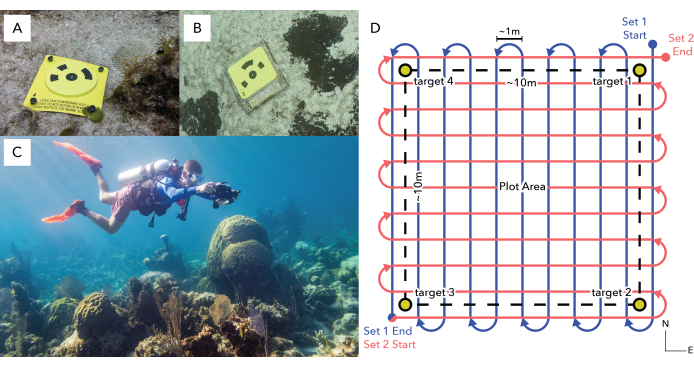
Figure 2: Plot setup and photography. (A) shows a newly installed corner marker, while (B) shows a marker in place 13 months after installation. (C) shows a diver conducting a survey at the appropriate distance above the reef, and (D) shows a diagram of the plot photography process with two perpendicular sets of antiparallel passes (red and blue lines) encompassing the area contained by the corner markers (black dashed box), with no sizable gaps. Please click here to view a larger version of this figure.
3. Reference data collection
NOTE: For GPS kit and ReefShape survey setup, see Supplementary File 1, Section 2. If the collection of GPS points is unfeasible, the ReefShape automated processing approach (section 5) may still be used. A separate survey that facilitates formatting a reference file with local coordinates can be found on the GitHub page (https://github.com/Perry-Institute/ReefShape) along with usage instructions.
- ReefShape survey (only for initial time-point)
- Open the ReefShape survey within the survey app (Supplementary Figure 1) on a smartphone and input important metadata (surveyor initials, email, plot name, and notes). Place the smartphone in a waterproof pouch. With the GPS kickboard kit (Figure 2C) and smartphone, swim out over the plot.
- Locate target 1, position the GPS kickboard on the surface directly above the target, and within the ReefShape survey on the phone, tap the crosshairs icon to collect a GPS point. Move on to the next target. Record target 2 location in the second repeat, target 3 in the 3rd, and target 4 in the 4th. Return to the boat or shore.
- In the ReefShape survey, input the depth information corresponding to each marker. Verify that the data is correct (i.e., reasonable accuracy estimates, no empty locations or depths), then submit.
NOTE: The GPS data collection process can be completed by a second researcher while the first collects photos to save time. Submission requires internet access, but surveys can be stored in the outbox to submit later if needed. Once sent, the user will receive an email with the pre-formatted location data.
4. Repeat time points
- Plot inspection and maintenance (only for subsequent time-points)
- Upon returning to a plot for repeat imagery, first relocate the plot and find the corner markers (Figure 2B), using the original GPS data or a printout of the original time-point photomosaic as a reference if needed. If there is any biofouling on the marker surface, use a plastic scraper or similar device to clean the surface, ensuring the target design is easily visible.
- If a marker is lost or damaged such that the circular target design is no longer clear, replace it with the same installation process as step 1.1.2. If possible, replace the marker in the previous location (+/- ~5 cm). It is critical that the replacement marker has the same target number as the original. Make a note of the marker(s) that are replaced.
- Plot photography (same process for all time points)
- Place scale bars. See protocol step 1.2.
- Set custom white balance and collect images. See protocol section 2.
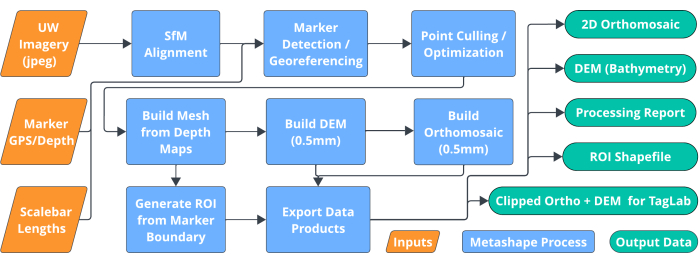
Figure 3: Flow chart showing the photogrammetry workflow steps automated through the main ReefShape script. The images, a scale bar length file, and the georeferencing file (orange boxes) are input into the script, which then automates all essential processing steps (blue boxes), resulting in data products (green boxes) ready for analysis. Please click here to view a larger version of this figure.
5. Data processing
NOTE: See Supplementary File 1, Section 5 for software setup steps.
- Image import
- Import all photos from plot imaging onto the processing computer, separating out JPEG and RAW photos into separate subfolders.
- Download reference data. Ensure that the scale bar length text file (see Supplementary File 1, Section 1) is stored in an easy-to-access location on your computer. Download and similarly store the georeferencing CSV file that was automatically emailed upon georeference data submission within the ReefShape survey (protocol section 3).
- Main ReefShape workflow (first time-point)
- Open a new project within the photogrammetry program and select Full ReefShape Workflow from the ReefShape custom menu bar. This will bring up a graphic interface panel (see Supplementary Figure 2).
- In the first section (Project Setup), click Create New to name the project (plot name) and select its storage location. In the second box, click Rename Chunk to name the active chunk with the image collection date in YYYYMMDD format. In the third box, click Select Photos to select and import the folder containing JPEG photos for the plot. Click Save Project to finish initializing the project.
- In the second panel (General) of the Full ReefShape Workflow interface, begin by setting the coordinate system. Select WGS84 + EGM96 height (EPSG: 9707), as this combines the WGS84 coordinate system used by the GPS unit with a built-in geoid model (EGM96) that approximates sea-level.
NOTE: If the user did not collect real-world location data, the coordinate system should be set to Local Coordinates (m) instead. The default settings in the general panel (Generic Preselection: On, Mesh Quality: Medium, Default Resolution: Off, Custom Resolution: 0.5 mm) are designed to apply to the specific protocol described here. The script is flexible to accommodate the needs of researchers and settings can be adjusted accordingly. - Near the bottom of the General panel, click the Select Folder button to set an output path for data products. Check the boxes for desired output data products as needed for analysis.
- Set up the Georeferencing panel. Select Yes for using auto-detectable markers. Click Select File next to the scale bar box to locate the scaling text file (see Supplementary File 1, Section 1). Click Select File next to the georeferencing file box to locate the referencing CSV from the ReefShape survey for the plot.
NOTE: If during the plot setup, the markers were installed out of order (i.e., target 1, target 3, target 2, target 4 rather than 1, 2, 3, 4 going around the plot), the actual order can be specified by clicking the Adjust Corner Markers button and re-ordering the markers in the pop-up window. This allows the script to properly generate an ROI encompassing the area between the markers. - Run the script. Once all data has been entered, click OK at the bottom of the panel to run the process. It will display progress bars for each step. The process that the script automates is shown in Figure 3.
NOTE: If the script encounters an error or the software or computer crashes, the script will save progress up to the most recently completed step. The project can be reopened, the error corrected if necessary, and the script re-run to pick back up and complete the process. So long as the process is finished with alignment and the intregration of scale and georeference data, the user does not need to re-enter anything in the georeferencing panel. - Inspect data to ensure high-quality outputs. See section 5.4 for the data validation workflow.
- Optionally, calculate the surface area ratio. If the user wishes to calculate the 3D to 2D surface area ratio for the plot to measure rugosity, select the Calculate Surface Area Ratio button in the Tools submenu of the ReefShape dropdown menu. The resulting ratio will be printed in the console, as well as a pop-up box.
- Align timepoints (subsequent time points)
NOTE: Each time point of a plot will be stored as a new "chunk" within the same project.- As with the first time point, import and organize photos into separate JPEG and RAW folders. Open the project for the plot in the photogrammetry software, then open the ReefShape dropdown menu and select Align Timepoints (Supplementary Figure 3).
- In the Project Setup panel, click Create Chunk to add a new chunk (representing a new time point) to the project. Enter the date the new imagery was collected in YYYYMMDD format as the chunk name. Choose Select Folder to add the new images to this chunk.
- Within the General panel, select the initial time point for Select Reference Chunk. In the dropdown for Select Active Chunk, select the new time point. Click OK when finished to detect markers in the active chunk images and import the precise coordinates of each from the reference chunk.
NOTE: If any corner markers were replaced underwater, this must be noted in the Add Damaged Marker(s) dropdown to inform the software that the marker may not be in the same precise geographic location as before. - Inspect markers and georeferencing. In the Reference panel (Supplementary Figure 4), ensure all markers were detected and targets 1-4 inherited the location information from the reference chunk.
NOTE: If any markers fail to be detected (usually due to marker damage if they were not replaced), markers must be added manually, at least three source images, and named to correspond to the marker labels from the Reference Chunk. The Align Timepoints script can then be run again to add location information for the manually placed markers. - Run the Full ReefShape Workflow script by choosing it from the ReefShape menu. Leave the project setup and georeference panels blank and only edit the General panel as needed, selecting processing settings, where to export data products, and which products to generate as in step 5.2.3. Click OK to complete the photogrammetry process and export the aligned data products for the new time point.
- Inspect data to ensure high-quality outputs. See section 5.4 for the validation workflow.
- Calculate surface area ratio (optional). See step 5.2.8.
- Data validation (each time-point)
NOTE: For each time-point, it is important to inspect the alignment and data products for accuracy. If issues arise, manual intervention may be needed. Data pieces (i.e., Orthomosaic, DEM, 3D Model, Tie-Points) downstream of any error must be deleted. The issue can then be corrected (if possible), and the Full ReefShape Workflow script run again to complete processing. Once the user is satisfied with the data products, they can begin analysis.- Check the photo alignment. In the Workspace panel within the photogrammetry program, first verify how many photos out of the total were successfully aligned. If <10 photos are not aligned, it's likely that their absence will not have detrimental effects on the final data products.
NOTE: If a significant portion of the photos are not aligned, reset the alignment and re-run the Full ReefShape Workflow with Generic Preselection unchecked. If many photos are still not aligned, it is likely that there is insufficient overlap in the dataset, and rephotographing is necessary. - Inspect the tie-point cloud and camera positions (Figure 4A) in the Model viewer window to assess if there are obvious problems in the alignment. Sections of tie-points or camera positions that are clearly misplaced with respect to the overall point cloud are obvious signs of alignment issues.
NOTE: Misaligned photos must be selected, and their alignments reset by right-clicking and choosing Reset Camera Alignment. Next, select Align Photos in the Workflow menu bar dropdown. If they do not align correctly, it is likely that there is insufficient overlap in the dataset, and rephotographing is necessary. - Check georeferencing. Inspect the model and DEM in the Model and Ortho viewer windows (Figure 4B and C) to ensure correct leveling and positioning. In the Reference panel (Supplementary Figure 4), the marker error should be less than 1 or 2 m, and the internal scaling error should be less than 1 or 2 mm.
NOTE: Large scaling error, marker error, or an upside-down model indicate referencing errors that may be due to an incorrectly set coordinate system, incorrectly detected markers, or very poor GPS location data (such that the marker locations are positioned out of geographic order). Manual editing of the reference data may be needed to solve the issue. - Check orthomosaic. Inspect the orthomosaic in the Ortho viewer window and verify that image quality is sufficient by visually examining it for substantial blurring, distortion, imagery holes, or extremely high noise (Figure 6).
NOTE: If these problems are detected, it is likely that camera settings were not properly set, photos were taken at an improper distance from the reef, or there is insufficient image overlap in some areas, and rephotographing the site may be necessary to achieve acceptable results. - Check boundary polygon. In the Ortho viewer window, verify that the automatically generated boundary polygon that defines the region of interest within the four corner markers is correct, as shown in Figure 4.
NOTE: If the boundary is crossed or connects the wrong markers, right-click on the polygon in the viewer and delete it. Select Create Boundary from the Tools submenu of the ReefShape dropdown to define the correct order of corner markers or define a new custom boundary with the polygon tool and set it to the Outer Boundary polygon type. Re-run the Full ReefShape Workflow script to re-export data products.
- Check the photo alignment. In the Workspace panel within the photogrammetry program, first verify how many photos out of the total were successfully aligned. If <10 photos are not aligned, it's likely that their absence will not have detrimental effects on the final data products.
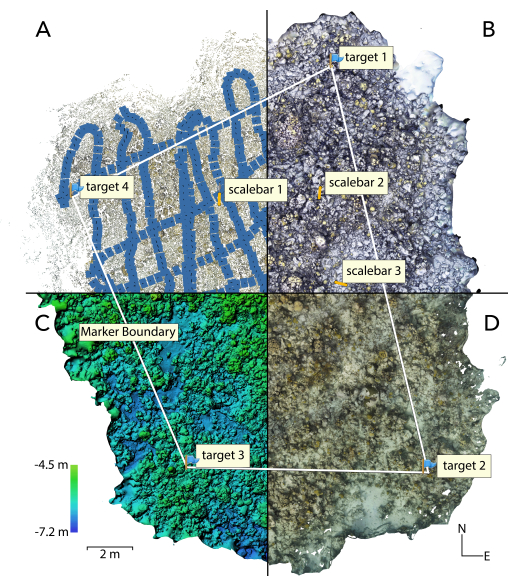
Figure 4: Visual of a reef plot split into the four main steps in the ReefShape process. (A) tie-point cloud and camera positions, (B) three-dimensional mesh model, (C) digital elevation model (DEM), and (D) ortho-rectified photomosaic. Labels show locations of detected corner markers (targets 1-4), three scale bars, and an automatically generated region of interest polygon for structural and ecological analysis. Please click here to view a larger version of this figure.
Results
A time-series LAI dataset was collected using this methodology at Simms Point Reef, off the southwestern end of New Providence, The Bahamas. Figure 4, Figure 5, Figure 6 and Supplementary Figure 4 all depict results from this experiment. The reference network was established, and the first images were collected in January 2023. It was rephotographed in August 2023, during a severe marine heat wave, to assess the severity of coral bleaching. Both time points were processed using the full ReefShape workflow script, with no user intervention required in the intermediate steps. Timepoint one involved 1,299 images, all of which were aligned successfully, with an average swim altitude of 1.8 m above the substrate, native ground resolution of 0.567 mm/px (standardized to 0.5 mm/px), a total coverage area of 208 m2 (as measured by the area within the corner markers), a 3D/2D surface area ratio of 2.887, a reprojection error of 1.12 px, a total internal geolocation accuracy of 30.6 cm, and scaling error of 1.4 mm. The entire process, at default settings within the Full ReefShape script, took 8 h 23 min, using a circa 2018 desktop computer with a 6-core CPU, 32 GB RAM, and an 8 GB discrete GPU (total cost ~$1,500 USD). A 2024 desktop with 14-core CPU, 64GB RAM, and a 24GB discrete GPU (total cost ~$4,000 USD) processed the same plot in 1 h 58 min total. The second time-point, including 1,974 / 1,974 aligned images, took 7 h 45 min on the older 2018 desktop.
A zoomed-in section of the two timepoints and basic coral bleaching analysis completed in TagLab27 is demonstrated in Figure 5, showing the utility of this process for analyzing benthic habitat change over time. Results from the analysis indicated that over 90% of individuals across many of the coral species experienced complete bleaching, confirming the severity of the event, while other species experienced minimal to no bleaching, giving insight into the patterns of resilience within the coral community. Both time points (Figure 5) demonstrate high-quality imagery, with sufficient sharpness and resolution for expert identification of benthic organisms to the species or genus level. The white balance is properly set, and there are no significant areas of blurring, data holes, or other artifacts, indicating that the protocol was successful in efficiently delivering the data needed to study the dynamics of coral reef benthic ecology. Figure 6 (top) shows a zoom-in of this plot as an example of high-quality imagery as compared to a poor-quality dataset (bottom) that does not meet data quality requirements, where image artifacts hamper ecological data extraction. The poor-quality dataset was collected with improper camera settings (incorrect white balance leading to red overall hue, and too open of an aperture leading to blurring) and insufficient photo overlap due to poor diver navigation, highlighting the importance of image acquisition (protocol section 2).
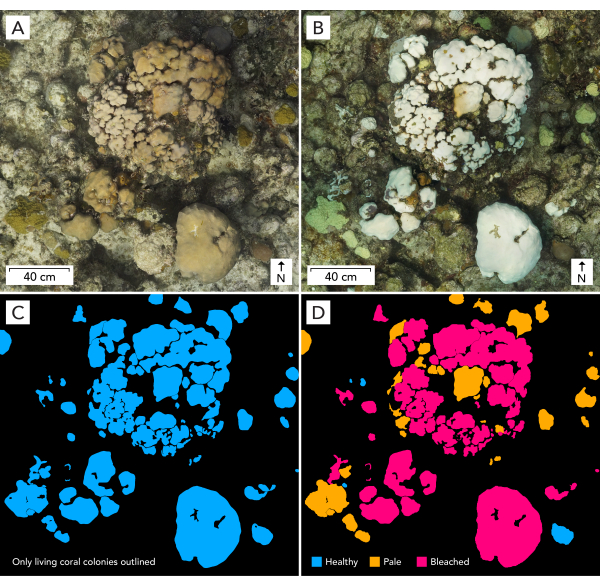
Figure 5: Representative results showing time-series imagery and coral colony outlines from a plot photographed before and during a bleaching event, showing the accuracy of automatic alignment achieved with our protocol and the utility of this data to monitor benthic change over time. (A) shows the January 2023 image for the Simms Point site in New Providence, The Bahamas, (B) the August 2023 image, (C) living coral colonies in January 2023 classified as healthy (blue), pale (orange) or bleached (red), and (D) living coral colonies in August 2023 outlined with the same classification scheme. Coral colony outlining was completed using AI-assisted segmentation in TagLab. Please click here to view a larger version of this figure.
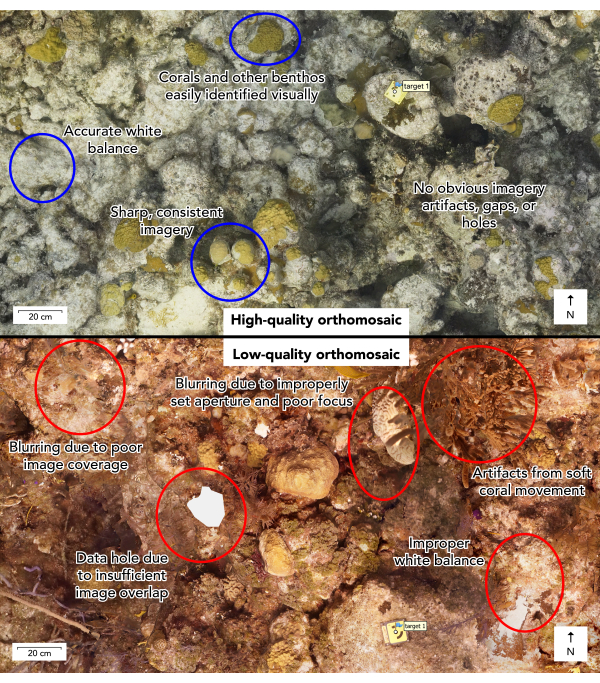
Figure 6: Example of a high-quality orthomosaic and a low-quality orthomosaic, with annotations demonstrating the key attributes that distinguish the two. Visual inspection of the orthomosaic and other data products during protocol step 5.4 is necessary to evaluate whether the protocol was executed properly or if a re-do of plot photography is needed to meet the data quality goals. Please click here to view a larger version of this figure.
Software access:
The ReefShape python scripts, installation and use instructions, and more detailed instructions on data collection and software use in the form of a white paper are available at https://github.com/Perry-Institute/ReefShape. We intend to update the scripts to address issues as they arise and make improvements. Therefore, we recommend using the latest version.
Supplementary Figure 1. Screenshot illustrating the ReefShape georeference data collection survey within the Survey123 app on a smartphone. Users can access the survey without a paid account and are emailed their data pre-formatted for use in ReefShape processing upon submission. Please click here to download this File.
Supplementary Figure 2. Screenshot of the Full ReefShape Workflow script GUI. Users can enter all necessary information for processing in this interface, allowing for full automation of the photogrammetry workflow. Please click here to download this File.
Supplementary Figure 3. Screenshot of the Align Timepoints script GUI. Users can utilize this script to facilitate automatic alignment of subsequent surveys to the original time point, allowing for time-series change analysis. Please click here to download this File.
Supplementary Figure 4. Screenshot of a 3D model, highlighting representative results and the reference panel. All information in the reference panel is set up automatically according to the scale bar and georeferenced files input into the Full ReefShape Workflow script. The varying accuracy measures for different reference data (0.25 mm for scaling, 10 cm for depth, and ~70 cm for XY geolocation) are input automatically and facilitate preferential treatment of scale, then depth, then XY coordinates in the final location solution computed by Metashape. Please click here to download this File.
Supplementary File 1: Equipment preparation instructions, camera system requirements and settings, and computer requirements and software setup steps that fall outside the scope of the protocol itself are contained within the Supplementary File. Please click here to download this File.
Discussion
This protocol was designed to address some of the key challenges in underwater photogrammetry for coral reef habitats, including image quality and overlap during acquisition, metadata collection for the scaling, leveling, geolocation, and time-series alignment of models and maps, human decision-making during the photogrammetry processing pipeline, and preparation, and export of data for analysis. We address the first challenge with careful selection, testing, and recommendation of a camera system and important settings. While many systems can work for image acquisition, we find that setups involving action cameras (e.g., GoPro or similar) are insufficient due to rolling shutter distortion, lack of manual white balance, and inability to collect RAW photos at 1 Hz, all of which limit the quality of the final imagery and the ability to precisely align time-series data. Multi-camera DLSR setups can facilitate improved image coverage of the study plot24, but these setups are expensive and more cumbersome underwater. We instead choose a single, relatively inexpensive (~$2,800 USD total cost) mirrorless camera system with a mechanical shutter, custom white balancing, the ability to collect RAW and JPEG photos, a modern APS-C image sensor with low noise levels, and a wide-angle lens (~100° field of view) and dome port combination that yields sharp images. A wide lens is chosen to increase image coverage and overlap, which improves 3D rendering of vertical and overhung surfaces, and reduces potential model holes. Using a 1 s interval and a single camera reduces the overall number of images over other methods without losing detail or model quality, speeding up processing. Finally, while RAW imagery is not immediately critical to the function of the current image processing pipeline that relies on JPEG images, we consider RAW imagery essential for archival purposes because it contains higher-quality color information. The white balance can be adjusted after collection in image processing software, and the higher quality color information could, in the future, be fed into a color correction algorithm such as SeaThru30 or DeepSeeColor31 and integrated into the photogrammetry pipeline for more consistent colors and detailed study of phenomena such as coral pigmentation and bleaching.
The second key challenge is 3D geolocation, scaling, and time-series alignment. While real-world coordinates are not necessary for many analyses, models must be scaled and leveled accurately for the orthorectification process and accurate measurements32,33. This process is difficult to automate within photogrammetry software without the use of detectable coded targets or without depth measurements and an XY coordinate system. Most protocols require the manual incorporation of reference information either in Metashape or later in other software, adding complexity and inefficiency to the workflow. By incorporating coded targets into scale bars of precisely known length and permanently fixed corner markers, coupled with a user-friendly geolocation and depth collection system, we provide the software with the necessary information to automatically define a coordinate system, locate, scale, and level the model. By specifying the accuracy of each measurement, the software correctly weights the final location solution such that it places priority on the scale, then depth, and finally XY coordinates, allowing highly accurate scaling and leveling even with relatively low-accuracy GNSS data. Co-registration of time-series photomosaics typically requires human intervention to locate, mark, and match consistent points on the reef; this process is very time-consuming and challenging if there are no clearly static features between time points. The use of durable ground control point markers alleviates this problem by providing a set of 4 automatically detectable static targets. With our scripted process, subsequent time points inherit the precise georeferencing from a previous time point, simplifying the alignment process significantly and reducing human input while facilitating highly accurate co-registration of time points that allow tracking fine-scale ecological and structural changes on the reef.
The third challenge that is addressed by this protocol is inefficiencies within the photogrammetry workflow, both in terms of human intervention and demands on computer hardware. We have designed the ReefShape scripts to allow the user to input all required information for the entire process in a single GUI box, removing any intervention typically needed at key steps in the process (i.e., the incorporation of scale, leveling, and georeferencing information). This allows the user to initiate the process and leave the rest to the computer, saving time and effort. The photogrammetry pipeline used in the Full ReefShape Workflow script (Figure 3 and Figure 4) is optimized to provide efficient processing. We employ a specialized alignment process consisting of two phases. A first alignment pass is run with generic preselection enabled, an option that can decrease image alignment time by many hours without leading to loss of accuracy34. A second phase then attempts to add any remaining unaligned photos to the pre-existing alignment without the use of generic preselection, which can mitigate alignment issues caused by suboptimal overlap or caustic bands from wave lensing in shallow water. Taken together, these steps represent an efficient and powerful alignment process that frequently leads to a much greater proportion of properly aligned photos than standard Metashape processing procedures. We generate a 3D-mesh directly from depth maps, bypassing the time and resource-intensive process of dense point cloud construction. Meshes generated this way tend to have less noise and better reconstruction of areas of low-coverage, preventing the need for point-cloud cleaning before meshing as used in other methods23. In our experience, this process for mesh generation tends to be more stable, leading to less computer crashes than dense point cloud construction and meshing. Finally, we generate a high-resolution DEM that is used as the orthorectification surface instead of the mesh, as this reduces orthomosaic building time dramatically without any perceptible loss in quality.
A final challenge is the preparation, standardization, and export of data for ecological analysis. By standardizing image product resolution at 0.5mm/pixel, we ensure consistent and comparable products across plots and across time-points, enhancing future efforts to utilize AI and machine-learning for analysis. The full ReefShape workflow script provides options to export a processing report and data products in the proper format for GIS software and TagLab27, standardizing formatting and saving time and effort over workflows where this step is done manually. A region of interest (ROI) polygon, necessary for many analyses, is generated automatically using the known corner marker positions, and exported as a standard shapefile for incorporation into GIS workflows, such as generating and identifying random points across the plot to analyze benthic composition. This ROI also enables cropped and pixel-aligned outputs for TagLab, necessary for time-series analysis as shown in Figure 5. The ROI also enables the automatic calculation of a 3D surface area to planar area ratio for each time-point (protocol step 5.2.8), important for measuring reef structural complexity and its change over time.
While this protocol represents an advance in efficiency and usability for underwater photogrammetry, limitations exist. Most notably, if the photogrammetry process fails in one of the key steps, user intervention is required to troubleshoot and fix issues before continuing. While our scripted process is designed to be usable by researchers without in-depth photogrammetry knowledge, a basic understanding is important to solve issues when they arise. A few key parts of the process are most prone to issues. First, images can fail to align due to poor image overlap or due to severe caustic bands on the substrate in shallow water and sunny conditions. Alignment failure can be detected by inspecting the tie-point cloud and camera positions. If the alignment fails due to caustic bands, re-running the full ReefShape workflow with Generic Preselection unchecked can typically solve the problem at the cost of dramatically longer processing time. If image overlap is insufficient for the software to align photos, then re-photographing the site is likely the best solution. Failed marker detection can also lead to an error in mapping. This is most often the case if a marker is damaged or not sufficiently cleaned. In this case, markers can be placed on individual photos within Metashape and named manually, and the ReefShape script(s) can be re-run to finish processing. In some cases, georeferencing can fail if the GPS points are so inaccurate that they are geographically out of order or if the GPS points were assigned to the incorrect targets. This can be solved by manually editing the georeferencing CSV to appropriately match the data and subsequently re-running the script. Finally, software crashes are possible, especially when using a less powerful computer with a large plot or with higher quality settings. In anticipation of this, our scripted process will auto-save after each completed step, allowing the user to restart and adjust settings without losing progress. Further troubleshooting recommendations are provided on our GitHub page.
The primary aim of ReefShape is to simplify the collection and processing components of underwater photogrammetry and to reduce costs as much as possible so that users can focus time and effort more fully on ecological data extraction. We provide a complete process that is designed to realize high-quality data outputs that are tailored to meet the needs of common ecological analysis options. While the protocol described is highly specific, the scripted approach to processing is flexible and can handle modifications to aspects of the method such as plot size, swim/photo collection pattern, target output resolution, and specific camera system used without issue. The method can also be applied without significant modification to most underwater or fine-scale terrestrial photogrammetry projects, such as the documentation of shipwrecks or archaeological sites.
Disclosures
The authors have no competing financial interests or other conflicts of interest.
Acknowledgements
ReefShape is a non-copyrighted term that we have used as a name for this method. Project conceived by CD and WG, methods development by WG, coding by WG and SM, writing by WG, editing and reviewing by JL and CD. Special thanks to the entire team at the Perry Institute for Marine Science for their feedback and support throughout the development of this method. Funding was provided by Disney Conservation Fund. This material is based upon work supported by the National Science Foundation Graduate Research Fellowship under Grant No. 2233001. Data collected under Bahamas Department of Environmental Planning and Protection permits no. SRBS-0013-2021-CD, BS-2021-930119, BS-2022-281752, BS-2022-315006, BS-2023-661916, BS-2023-610959, and BS-2023-211510.
Materials
| Name | Company | Catalog Number | Comments |
|---|---|---|---|
| 0.3m length 1/2" PVC pipe | generic | N/A | for GPS kit |
| 1" PVC table cap | generic | N/A | for GPS kit |
| 1/2" to 1" PVC reducer bushing | generic | N/A | for GPS kit |
| 12mm f/2.0 AF E-mount lens | Samyang | SYIO12AF-E | also sold under brand name Rokinon |
| 2" fluted shank round masonry nails | generic | N/A | for corner marker installation |
| 256GB UHS-1 V30 SD Card | SanDisk | SDSDXXD-256G-ANCIN | fastest possible UHS-1 SD card recommended |
| 30m tape measure (optional) | N/A | N/A | for plot setup |
| Acrylic sheet, 3mm thick, cut to 80mm x 580mm (3x) | N/A | N/A | scale bar material |
| Aluminum camera tray | KitDive | N/A | fits camera housing and aids with holding camera |
| Underwater corner marker set with printed photogrammetry targets | N/A | N/A | custom made, contact author for details |
| Duracopy waterproof laser printer paper | Rite in the Rain | 6511 | can be replaced with waterproof sticker paper |
| E6000 epoxy | generic | N/A | for GPS kit |
| GLO2 Bluetooth GPS | Garmin | 010-02184-01 | other options exist, GLO2 is the most economical |
| ILCE a6700 mirrorless camera | Sony | ILCE6700/B | a6700 camera preferred, a6600 or a6400 are low-cost options |
| Laser Printer | N/A | N/A | any laser printer (not inkjet) |
| Metashape Professional Edition | Agisoft | N/A | required software |
| Plastic card (roughly 1mm x 5mm x 5mm) | N/A | N/A | for GPS kit, can also use discarded credit card or similar, cut in half. |
| Smartphone | N/A | N/A | any reasonably modern smartphone, for GPS data collection |
| Sony A6700 Sea Frogs 40M/130FT Waterproof housing with acrylic 6" Dome Port V.1 | SeaFrogs | N/A | if using a6600 or a6400 cameras, replace with appropriate SeaFrogs housing |
| Super glue | N/A | N/A | for GPS kit and scale bar creation |
| Swim fitness-style kickboard | Speedo | 877530050021SZ | for GPS kit, brand unimportant |
| Watch-style dive computer | N/A | N/A | for collecting corner marker depths |
| Waterproof pouch | Xuniea | W-1188 | brand unimportant, to fit GPS device |
| Waterproof phone pouch | Pelican | PP048884 | brand unimportant, to fit smartphone |
References
- Hughes, T. P., et al. Coral reefs in the Anthropocene. Nature. 546 (7656), 82-90 (2017).
- Fisher, R., et al. Species richness on coral reefs and the pursuit of convergent global estimates. Current Biology. 25 (4), 500-505 (2015).
- Costanza, R., et al. Changes in the global value of ecosystem services. Glob Environ Change. 26 (1), 152-158 (2014).
- Jackson, J. B. C. Reefs since Columbus. Coral Reefs. 16 (1), S23-S32 (1997).
- Bourne, D., Iida, Y., Uthicke, S., Smith-Keune, C. Changes in coral-associated microbial communities during a bleaching event. ISME Journal. 2 (4), 350-363 (2008).
- Asner, G. P., et al. Mapped coral mortality and refugia in an archipelago-scale marine heat wave. Proc Natl Acad Sci U S A. 119 (19), e2123331119(2022).
- Li, J., et al. A global coral reef probability map generated using convolutional neural networks. Coral Reefs. 39 (6), 1805-1815 (2020).
- Hedley, J. D., et al. Remote sensing of coral reefs for monitoring and management: A review. Remote Sens. 8 (2), (2016).
- Lirman, D., et al. Development and application of a video-mosaic survey technology to document the status of coral reef communities. Environ Monit Assess. 125 (1), 59-73 (2007).
- Edwards, C. B., et al. Large-area imaging reveals biologically driven non-random spatial patterns of corals at a remote reef. Coral Reefs. 36 (4), 1291-1305 (2017).
- Burns, J. H. R., Delparte, D., Gates, R. D., Takabayashi, M. Utilizing underwater three-dimensional modeling to enhance ecological and biological studies of coral reefs. Int Arch Photogramm Remote Sens Spat Inf Sci. 40 (5W5), 61-66 (2015).
- Burns, J. H. R., Delparte, D., Gates, R. D., Takabayashi, M. Integrating structure-from-motion photogrammetry with geospatial software as a novel technique for quantifying 3D ecological characteristics of coral reefs. PeerJ. 7, (2015).
- Nocerino, E., et al. Coral reef monitoring by scuba divers using underwater photogrammetry and geodetic surveying. Remote Sens. 12 (18), (2020).
- Westoby, M. J., Brasington, J., Glasser, N. F., Hambrey, M. J., Reynolds, J. M. 34;Structure-from-Motion" photogrammetry: A low-cost, effective tool for geoscience applications. Geomorphology. 179, 300-314 (2012).
- Burns, J. H. R., et al. 3D habitat complexity of coral reefs in the Northwestern Hawaiian Islands is driven by coral assemblage structure. Int Arch Photogramm Remote Sens Spat Inf Sci. 42 (2/W10), 61-67 (2019).
- Storlazzi, C. D., Dartnell, P., Hatcher, G. A., Gibbs, A. E. End of the chain? Rugosity and fine-scale bathymetry from existing underwater digital imagery using structure-from-motion (SfM) technology. Coral Reefs. 35 (3), 889-894 (2016).
- Fox, M. D., et al. Limited coral mortality following acute thermal stress and widespread bleaching on Palmyra Atoll, central Pacific. Coral Reefs. 38 (4), 701-712 (2019).
- Kopecky, K. L., et al. Quantifying the loss of coral from a bleaching event using underwater photogrammetry and AI-assisted image segmentation. Remote Sens. 15 (16), (2023).
- Pascoe, K. H., Fukunaga, A., Kosaki, R. K., Burns, J. H. R. 3D assessment of a coral reef at Lalo Atoll reveals varying responses of habitat metrics following a catastrophic hurricane. Sci Rep. 11 (12050), (2021).
- Peterson, E. A., Carne, L., Balderamos, J., Faux, V., Gleason, A., Schill, S. R. The use of unoccupied aerial systems (UASS) for quantifying shallow coral reef restoration success in Belize. Drones. 7 (4), 221(2023).
- Neufeld, A. M., Fundakowski, G. Coral Restoration Foundation TM Photomosaic Manual Second Edition-November 2020. , www.coralrestoration.org (2020).
- Roach, T. N. F., et al. A field primer for monitoring benthic ecosystems using structure-from-motion photogrammetry. J Vis Exp. , e61815(2021).
- Suka, R., et al. Processing photomosaic imagery of coral reefs using structure-from-motion standard operating procedures. NOAA Technical Memorandum. (NOAA-TM-NMFS-PIFSC-93. , (2019).
- Sandin, S. A., et al. Large area imagery collection & processing standard operating procedures - Version 3.0 (2021). Standard Operating Procedure Documents for Coral Reef Ecological Monitoring Collection. UC San Diego Library Digital Collections. , (2023).
- Agisoft Metashape Professional Edition. , (2024).
- ESRI Survey123. , (2023).
- Pavoni, G., et al. TagLab: AI-assisted annotation for the fast and accurate semantic segmentation of coral reef orthoimages. J Field Robot. 39 (3), 246-262 (2022).
- Hernández-Landa, R. C., Barrera-Falcon, E., Rioja-Nieto, R. Size-frequency distribution of coral assemblages in insular shallow reefs of the Mexican Caribbean using underwater photogrammetry. PeerJ. 8, e8957(2020).
- Fukunaga, A., Burns, J. H. R. Metrics of coral reef structural complexity extracted from 3D mesh models and digital elevation models. Remote Sens. 12 (17), RS12172676(2020).
- Akkaynak, D., Treibitz, T. Sea-Thru: a method for removing water from underwater images. Proc IEEE Comput Soc Conf Comput Vis Pattern Recognit. , 1682-1691 (2019).
- DeepSeeColor: realtime adaptive color correction for autonomous underwater vehicles via deep learning methods. In. Jamieson, S., How, J. P., Girdhar, Y. 2023 IEEE Int Conf Robot Autom, , 3095-3101 (2023).
- Menna, F., Nocerino, E., Chemisky, B., Remondino, F., Drap, P. Accurate scaling and levelling in underwater photogrammetry with a pressure sensor. Int Arch Photogramm Remote Sens Spat Inf Sci. 43 (B2-2021), 667-672 (2021).
- Edwards, C. B., et al. Large-area imaging in tropical shallow water coral reef monitoring, research and restoration: a practical guide to survey planning, execution, and data extraction. NOAA Technical Memorandum NOS NCCOS 313. , (2023).
- Agisoft Agisoft Metashape User Manual Professional Edition, Version 2.1. , https://www.agisoft.com/pdf/metashape-pro_2_1_en.pdf (2024).
Reprints and Permissions
