方法文章

ITS2 数据库

DOI:

10.3791/3806

2012年3月12日

本文内容

摘要

Loading...
$$\rightleftharpoonup{xx}$$ $$\longleftharp{xx}$$, $$\longrightharp{xx}$$,

ITS2数据库是一个用于系统发育推断的工作平台,可同时分析内转录间隔区2(ITS2)的序列及其二级结构。该平台包含数据收集与精确注释、结构预测、序列-结构多序列比对以及快速建树等功能。简而言之,该工作平台将初步的系统发育分析简化为几次简单的点击操作。

摘要

Loading...
$$\rightleftharpoonup{xx}$$ $$\longleftharp{xx}$$, $$\longrightharp{xx}$$,

内转录间隔区2(ITS2)作为系统发育标记已被使用了二十多年。由于ITS2研究主要集中在高度变异的ITS2序列上,这使得该标记仅限于低分类阶元的系统发育分析。然而,将ITS2序列与其高度保守的二级结构相结合,能够提高系统发育分辨率1,并可在多个分类等级上进行系统发育推断,包括物种界定2-8

ITS2数据库9提供了一个来自NCBI GenBank11的内部转录间隔区2(ITS2)序列的详尽数据集,并进行了准确的重新注释10。在通过轮廓隐马尔可夫模型(HMMs)进行注释后,预测每条序列的二级结构。首先,检测基于最小自由能的折叠方法12(直接折叠)是否能形成正确的四螺旋构型。若不能,则采用同源建模方法13预测其结构。在同源建模中,将已知的二级结构迁移至另一条ITS2序列,该序列无法通过直接折叠形成正确的二级结构。

ITS2 数据库不仅是一个用于存储和检索 ITS2 序列-结构的数据库,还提供了多种工具来处理您自己的 ITS2 序列,包括基于序列-结构联合信息的注释、结构预测、基序检测以及 BLAST14 搜索。此外,该数据库整合了 4SALE15,16 和 ProfDistS17 的精简版本,用于进行多序列-结构比对计算以及邻接法18 系统发育树的构建。这些工具共同构成了一个连贯的分析流程,可从一组初始序列出发,基于序列和二级结构信息推导出系统发育关系。

简而言之,该工作平台将最初的系统发育分析简化为仅需几次鼠标点击即可完成的操作,同时还提供了用于全面大规模分析的工具和数据。

方案

Loading...
$$\rightleftharpoonup{xx}$$ $$\longleftharp{xx}$$, $$\longrightharp{xx}$$,

1. Correct Annotation of ITS2 Sequence

  1. Access the ITS2 Database phylogeny workbench here: http://its2.bioapps.biozentrum.uni-wuerzburg.de
  2. Begin your analysis by clicking the "Annotate" icon in the section "Tools." Then, type or paste your sequence into the sequence editor at the top of the website. The sequence editor automatically checks, whether your ITS2 sequences are valid.
  3. Choose an HMM model suitable for your sequences (e.g. Viridiplantae for plants).
  4. Start the process by clicking "Annotate."
  5. By hovering over the "Hybridize" icon you can view an image of the 5.8S and 28S rRNA hybrid as a confirmation of the HMM annotation’s accuracy.
  6. Click on the green plus sign of the resulting ITS2 sequence to select your way of secondary structure prediction: To predict the structure without a known template, click on "Predict structure." If you want to use your own template for the Homology Modeling, click "Model structure."

2. Secondary Structure Prediction

  1. Predict
    1. The annotated ITS2 sequence is automatically pasted into the sequence editor.
    2. To start the secondary structure prediction with default settings, click the "Predict structures" button.
    3. Save the resulting ITS2 sequence including the modeled secondary structure into the data pool by clicking on the green plus sign and then "Add to pool." Alternatively, you can add it to your data pool via drag and drop (Figure 1).
    4. If the sequence could not fold directly, the best results of the homology modeling are shown. Save the most suitable sequence-structure via drag and drop to the data pool. Alternatively, save the sequence-structure into the data pool with a right click and then a click on "Add to pool."
  2. Custom Modeling
    1. Type or paste one or multiple templates (with known structure) into the upper sequence editor.
    2. Type or paste one or multiple target sequences (without structure) into the lower sequence editor.
    3. Click on "Predict best template(s)" to start the Homology Modeling with default settings.
    4. The best template-target combinations are shown in the resulting list.
    5. Save the modeled sequence-structure(s) of your choice either via drag and drop to the data pool or by a right click and a click on "Add to pool."

3. Motif Search

  1. Type or paste your query sequence(s) into the sequence editor at the top of the website.
  2. Choose the correct HMM model (e.g. Viridiplantae for plants). 3.3. Click on "Motif search" to start the process.
  3. ITS2 sequences with highlighted motifs are illustrated at the bottom of the website.
  4. Click on the icon beside the sequence header to display the motifs highlighted in the secondary structure.

4. Search and Browse

  1. Search
    1. Type either a taxon name or a GenBank Identifier (GI) into the search field at the top of the website.
    2. A search by taxon name is supported by an appearing live-search box.
    3. You can perform a multiple search by comma-separating your queries.
    4. Click the "Search" button to execute the search.
    5. Your results appear listed in a new tab.
    6. Click on a column name to sort your results according to the particular column. You can also add or remove columns of your choice with the column menu. The column menu can be entered with a click on the appearing arrow icon within a column name.
    7. Click on "Show details" to view the details of a sequence-structure.
    8. Save the sequence-structure(s) of your choice either via drag and drop to the data pool or by a right click and a click on "Add to pool."
    9. To save your results to an external file, click on "Save selection" or "Save all."
  2. Browse
    1. Browse the ITS2 Database by navigating through the tree-like structure at the left of the website.
    2. Click on a plus-sign to view the taxa one level lower.
    3. Click on a taxon name to open a new tab containing each sequence-structure of the taxon.
    4. Click on "Show details" to view the details of a sequence-structure pair.
    5. Save the sequence-structure(s) of your choice either via drag and drop to the data pool or by a right click and a click on "Add to pool."
    6. To save your results to an external file, click on "Save selection" or "Save all."

5. ITS2 Blast

  1. Type or paste one or multiple query sequences into the sequence editor. Your sequences may either be plain nucleotide sequences or sequence-structure pairs. You can also type several secondary structures below one sequence. By checking the box "Serialize XXFASTA sequences" these structures are used subsequently as individual queries.
  2. To start BLAST with default settings, click on "Blast." Depending on the nature of your query, either a common BLASTN or the ITS2 sequence-structure BLAST is performed.
  3. A sub-tab is opened for each query sequence within the appearing tab "BLAST Results," as well as an overview of the executed searches.
  4. Click on "Show Alignments" to view the calculated BLAST alignments.
  5. Save the BLAST hits of your choice either via drag and drop to the data pool or by a right click and a click on "Add to pool."
  6. To save your results to an external file, click on "Save selection" or "Save all."

6. Multiple Sequence-structure Alignment

  1. Take a look at your data pool by clicking "Manage dataset" and then the magnifying glass symbol right next to the number of sequences in your pool. Alternatively, you can click on the data pool sign at the bottom left of the website.
  2. Click on a sequence-structure pair in your data pool to view its details.
  3. To create a multiple sequence-structure alignment of all sequence-structure pairs in your pool, click on "Analyze dataset" and then "Sequence & Structure."
  4. Now you are asked to select the graphic mode of your alignment. If your alignment contains only a few sequences, decline the slim mode by clicking "No." Otherwise choose the slim graphic mode by clicking "Yes."
  5. In a few moments, your alignment is shown in a new tab (Figure 2). Moreover, it is automatically saved to the data pool.
  6. To save your alignment to an external file, click on "Save alignment."

7. Phylogenetic Tree

  1. To calculate a sequence-structure based Neighbor Joining tree of your multiple alignment, click on "Analyze Dataset" and then "Neighbor Joining."
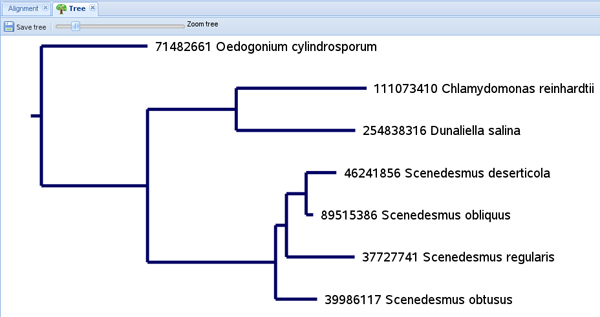
  2. The resulting tree is illustrated in a new tab (Figure 3).
  3. Scale your tree freely with the scroll bar "Zoom tree."
  4. Reroot your tree by clicking on a node or leaf of the tree and then "Reroot at this node."
  5. If you want to remove a taxon from your data pool, click on the leaf and choose "Remove this node from pool." Now you can recalculate your alignment and tree with the reduced taxon sampling.
  6. Click on "Save tree" to save your phylogenetic tree as a final result of your analysis to an external NEWICK file.

8. Additional Software

  1. Click on "About this website"-"Tools" to find additional information about the stand-alone tools 4SALE and ProfDistS.
  2. Beside the alignment and Neighbor Joining function provided by the ITS2 Database web interface, you can now access several new functions, e.g. species delimitation based on compensatory base changes (CBCs).

9. Representative Results

The workflow as described above has successfully been applied in several open access surveys3,4. Examples can be viewed through the following links:

In these large scale studies, we were able to resolve the phylogeny of Chlorophyta as well as Hypnales (Bryophyta) with high resolution. In both cases, an exhaustive taxon sampling was gathered from the ITS2 Database9, automatically aligned with 4SALE15,16 and lastly processed by ProfDistS17 into a phylogenetic tree. In all these steps, sequence and structure information were used simultaneously. Bootstrap support for the phylogenetic backbone was achieved using Profile Neighbor Joining (PNJ)19, which is available in the stand-alone version of ProfDistS.

For a smaller set of sequence-structure pairs, figures 1 to 3 describe the key steps of this automated workflow5 directly on the new ITS2 Database workbench: taxon sampling, the multiple sequence-structure alignment and eventually the phylogenetic tree calculation.

figure-protocol-1
Figure 1. Taxon sampling per drag and drop. At any time sequences or sequence-structure pairs can be added to the data pool, for instance via drag and drop. Here a sequence-structure is added using drag and drop after secondary structure prediction. The blue ellipse marks the area where the sequence-structure is dropped into the data pool. Click here to view the full-sized version of this image.

figure-protocol-2
Figure 2. Multiple sequence-structure alignment in full graphic mode. For the few sequences in the data pool, the full graphic mode was chosen. Bases are colored; base pairs can be highlighted with red circles by clicking on one base or bracket of a base pair. Click here to view the full-sized version of this image.

figure-protocol-3
Figure 3. Sequence-structure Neighbor Joining tree. The freely scalable tree calculated of a seven taxa multiple sequence-structure alignment can be saved in the NEWICK format.

讨论

Loading...
$$\rightleftharpoonup{xx}$$ $$\longleftharp{xx}$$, $$\longrightharp{xx}$$,

ITS2 数据库是一个完整且功能完备的基于内转录间隔区 2(ITS2)序列-结构的系统发育学工作平台。该网站操作极为快速且直观。与其他仅能处理序列和/或共识结构信息的基于网页的系统发育工作平台(如 ARB20 或 Mobyle21)不同,ITS2 数据库9能够同时考虑每个分类单元的序列及其各自的二级结构。然而,由于网页服务器计算能力的限制,对于大规模数据集,强烈建议分别使用独立工具 4SALE15,16 和 ProfDistS17 进行多序列比对和邻接法(Neighbor Joining)18 分析。除了基本的 ITS2 序列-结构系统发育分析流程5 外,这些工具还具备多种附加功能,例如计算自举重复值(bootstrap replicates)、轮廓邻接法(Profile Neighbor Joining, PNJ)19,或基于互补碱基变化(compensatory base changes, CBCs)8 的物种界定分析。这些工具可通过“关于本网站”-“工具”部分进行下载并获取详细信息。使用 4SALE 和 ProfDistS 时,必须始终将文件转换为正确的格式。供 4SALE 处理的分类单元采样文件必须以 .fasta 或 .txt 为扩展名,而作为 ProfDistS 输入的序列-结构比对文件则必须以 .xfasta 为扩展名。

我们目前正在 ITS2 数据库及相关工具中实施用于系统发育树构建的替代方法。因此,基于序列-结构的简约法22和/或最大似然法23将在未来提供使用。

披露

Loading...
$$\rightleftharpoonup{xx}$$ $$\longleftharp{xx}$$, $$\longrightharp{xx}$$,

未声明任何利益冲突。

致谢

Loading...
$$\rightleftharpoonup{xx}$$ $$\longleftharp{xx}$$, $$\longrightharp{xx}$$,

我们诚挚感谢维尔茨堡大学生物中心ITS2团队提供的丰富而宝贵的反馈。同时感谢德国研究基金会(DFG;资助号 Mu-2831/1-1)提供的经费支持。

材料

本文使用的材料清单
姓名公司目录编号评论
互联网接入建议使用高速网络
ITS2 数据库9维尔茨堡大学网站:http://its2.bioapps.biozentrum.uni-wuerzburg.de
软件:4SALE15,16维尔茨堡大学下载地址:http://4sale.bioapps.biozentrum.uni-wuerzburg.de/
软件:ProfDistS17维尔茨堡大学下载地址:http://profdist.bioapps.biozentrum.uni-wuerzburg.de/

参考文献

Loading...
$$\rightleftharpoonup{xx}$$ $$\longleftharp{xx}$$, $$\longrightharp{xx}$$,
  1. Including RNA secondary structures improves accuracy and robustness in reconstruction of phylogenetic trees. Biology Direct. 5, 4-4 (2010).">Keller, A. Including RNA secondary structures improves accuracy and robustness in reconstruction of phylogenetic trees. Biology Direct. 5, 4-4 (2010).
  2. A common core of secondary structure of the internal transcribed spacer 2 (ITS2) throughout the Eukaryota. RNA. 11, 361-364 (2005).">Schultz, J., Maisel, S., Gerlach, D., Müller, T., Wolf, M. A common core of secondary structure of the internal transcribed spacer 2 (ITS2) throughout the Eukaryota. RNA. 11, 361-364 (2005).
  3. Internal Transcribed Spacer 2 (nu ITS2 rRNA) Sequence-Structure Phylogenetics: Towards an Automated Reconstruction of the Green Algal Tree of Life. PLoS ONE. 6, 16931-16931 (2011).">Buchheim, M. Internal Transcribed Spacer 2 (nu ITS2 rRNA) Sequence-Structure Phylogenetics: Towards an Automated Reconstruction of the Green Algal Tree of Life. PLoS ONE. 6, 16931-16931 (2011).
  4. A molecular phylogeny of Hypnales (Bryophyta) inferred from ITS2 sequence-structure data. BMC Research Notes. 3, (2010).">Merget, B., Wolf, M. A molecular phylogeny of Hypnales (Bryophyta) inferred from ITS2 sequence-structure data. BMC Research Notes. 3, (2010).
  5. ITS2 sequence-structure analysis in phylogenetics: a how-to manual for molecular systematics. Molecular Phylogenetics and Evolution. 52, 520-523 (2009).">Schultz, J., Wolf, M. ITS2 sequence-structure analysis in phylogenetics: a how-to manual for molecular systematics. Molecular Phylogenetics and Evolution. 52, 520-523 (2009).
  6. ITS2 is a double-edged tool for eukaryote evolutionary comparisons. Trends in Genetics. 19, 370-375 (2003).">Coleman, A. ITS2 is a double-edged tool for eukaryote evolutionary comparisons. Trends in Genetics. 19, 370-375 (2003).
  7. The significance of a coincidence between evolutionary landmarks found in mating affinity and a DNA sequence. Protist. 151, 1-9 (2000).">Coleman, A. The significance of a coincidence between evolutionary landmarks found in mating affinity and a DNA sequence. Protist. 151, 1-9 (2000).
  8. Distinguishing species. RNA. 13, 1469-1472 (2007).">Müller, T., Philippi, N., Dandekar, T., Schultz, J., Wolf, M. Distinguishing species. RNA. 13, 1469-1472 (2007).
  9. The ITS2 Database III-sequences and structures for phylogeny. Nucleic Acids Research. 38, 275-279 (2010).">Koetschan, C. The ITS2 Database III-sequences and structures for phylogeny. Nucleic Acids Research. 38, 275-279 (2010).
  10. 5.8 S-28S rRNA interaction and HMM-based ITS2 annotation. Gene. 430, 50-57 (2009).">Keller, A. 5.8 S-28S rRNA interaction and HMM-based ITS2 annotation. Gene. 430, 50-57 (2009).
  11. GenBank. Nucleic Acids Research. 39, 32-37 (2011).">Benson, D., Karsch-Mizrachi, I., Lipman, D., Ostell, J., Sayers, E. GenBank. Nucleic Acids Research. 39, 32-37 (2011).
  12. Software for nucleic acid folding and hybridization. Methods in Molecular Biology. , 453-453 (2008).">Markham, N., Zuker, M. Software for nucleic acid folding and hybridization. Methods in Molecular Biology. , 453-453 (2008).
  13. Homology modeling revealed more than 20,000 rRNA internal transcribed spacer 2 (ITS2) secondary structures. RNA. 11, 1616-1623 (2005).">Wolf, M., Achtziger, M., Schultz, J., Dandekar, T., Müller, T. Homology modeling revealed more than 20,000 rRNA internal transcribed spacer 2 (ITS2) secondary structures. RNA. 11, 1616-1623 (2005).
  14. Gapped BLAST and PSI-BLAST: a new generation of protein database search programs. Nucleic Acids Research. 25, 3389-3402 (1997).">Altschul, S. Gapped BLAST and PSI-BLAST: a new generation of protein database search programs. Nucleic Acids Research. 25, 3389-3402 (1997).
  15. Synchronous visual analysis and editing of RNA sequence and secondary structure alignments using 4 SALE. BMC Research Notes. 1, (2008).">Seibel, P., Müller, T., Dandekar, T., Wolf, M. Synchronous visual analysis and editing of RNA sequence and secondary structure alignments using 4 SALE. BMC Research Notes. 1, (2008).
  16. 4 SALE - A tool for synchronous RNA sequence and secondary structure alignment and editing. BMC Bioinformatics. 7, (2006).">Seibel, P., Müller, T., Dandekar, T., Schultz, J., Wolf, M. 4 SALE - A tool for synchronous RNA sequence and secondary structure alignment and editing. BMC Bioinformatics. 7, (2006).
  17. ProfDistS:(profile-) distance based phylogeny on sequence-structure alignments. Bioinformatics. 24, 2401-2402 (2008).">Wolf, M., Ruderisch, B., Dandekar, T., Schultz, J., Müller, T. ProfDistS:(profile-) distance based phylogeny on sequence-structure alignments. Bioinformatics. 24, 2401-2402 (2008).
  18. The neighbor-joining method: a new method for reconstructing phylogenetic trees. Molecular Biology and Evolution. 4, 406-425 (1987).">Saitou, N., Nei, M. The neighbor-joining method: a new method for reconstructing phylogenetic trees. Molecular Biology and Evolution. 4, 406-425 (1987).
  19. Accurate and robust phylogeny estimation based on profile distances: a study of the Chlorophyceae (Chlorophyta. BMC Evolutionary Biology. 4, (2004).">Müller, T., Rahmann, S., Dandekar, T., Wolf, M. Accurate and robust phylogeny estimation based on profile distances: a study of the Chlorophyceae (Chlorophyta. BMC Evolutionary Biology. 4, (2004).
  20. ARB: a software environment for sequence data. Nucleic Acids Research. 32, 1363-1371 (2004).">Ludwig, W. olfgang ARB: a software environment for sequence data. Nucleic Acids Research. 32, 1363-1371 (2004).
  21. Mobyle: a new full web bioinformatics framework. Bioinformatics. 25, 3005-3011 (2009).">Néron, B. Mobyle: a new full web bioinformatics framework. Bioinformatics. 25, 3005-3011 (2009).
  22. A method for deducing branching sequences in phylogeny. Evolution. 19, 311-326 (1965).">Camin, J. H., Sokal, R. R. A method for deducing branching sequences in phylogeny. Evolution. 19, 311-326 (1965).
  23. Evolutionary trees from DNA sequences: a maximum likelihood approach. Journal of Molecular Evolution. 17, 368-376 (1981).">Felsenstein, J. Evolutionary trees from DNA sequences: a maximum likelihood approach. Journal of Molecular Evolution. 17, 368-376 (1981).

重印与许可

申请许可以重复使用本 JoVE 文章的文本或图表

申请许可

标签

BLAST

相关文章