Recent advancements in remotely piloted aircraft systems (RPAS) allow sub-meter resolution, ideal for forest recovery monitoring. Integrating artificial intelligence (AI) enables deeper insights from large remotely sensed datasets. This protocol improves monitoring by supporting more efficient assessment and management of forested lands recovering from disturbance.
Method Article
Collecting and Processing Drone-based Remotely Sensed Data for Use in Forest Recovery Monitoring
In This Article
Summary
Abstract
Remote sensing (RS) technologies, particularly light detection and ranging (LiDAR) and multispectral (MS) imagery, provide broad-scale vegetation monitoring capabilities at varying spatial resolutions. Remotely piloted aircraft systems (RPAS) equipped with LiDAR and MS sensors can enhance vegetation assessments by offering flexible flight schedules and capturing fine-resolution data. Further integration of deep learning (DL) models holds promise for automating the post-processing workflow, which is particularly important for vegetation monitoring applications.
This protocol outlines a suite of practical methods for collecting, processing, aligning, and merging RPAS-based LiDAR and MS data for individual 3D tree delineation using an interactive DL plugin. The proprietary DL model effectively detects and segments tree boundaries across various sensors, study sites, and data resolutions within forest ecosystems.
Our specific application and motivation for developing this protocol and tool is for monitoring forest recovery on reclaimed oil and gas wellsites. Currently field-based assessment methods are time-consuming, labor-intensive, and spatially limited. As reclamation efforts expand, there is a growing need for more efficient, and scalable approaches to monitor reclamation success and ecosystem recovery. By advancing RPAS-based DL applications, this research supports the monitoring of ecological recovery on reclaimed wellsites and is also applicable to other forested landscapes.
Introduction
The extraction of oil and gas resources has led to the establishment of hundreds of thousands of wellsites across Alberta1, many of which are located within the boreal forest2. Reclamation efforts aim to restore disturbed lands to their original ecological state3. Conventional ground-based surveys remain the primary means of reclamation certification monitoring4; however, this is a time-consuming and labor-intensive process that is becoming less efficient as the number of disturbed and reclaimed areas continues to increase.
Recent advances in remote sensing (RS) technologies, especially the use of remotely piloted aircraft systems (RPAS), offer promising solutions to the spatial and temporal challenges of wellsite monitoring5,6,7,8. These platforms deliver very high-resolution data, allowing accurate measurements at the individual tree level. Integration with artificial intelligence (AI), as we have seen in recent years9,10,11, facilitates the processing and analysis of large remotely sensed data sets through the automation of vegetation detection and measurement. However, the generation of appropriate training and validation data sets for deep learning (DL) models remains the main challenge, particularly for 3D data sets.
This protocol outlines a step-by-step workflow for collecting, processing, aligning, and merging RPAS-based LiDAR and multispectral (MS) data from forested environments to delineate individual trees. This method uses the newly developed TreeAIBox12 plugin, integrated into CloudCompare, to analyze the RPAS-derived point cloud for individual tree crown segmentation. The plugin introduces a novel 3D DL approach based on the TreeisoNet13 model, a suite of supervised deep neural networks tailored for 3D tree segmentation, which was trained and verified on RPAS-derived datasets from five different reclaimed wellsites. The sites selected for the model training varied in tree heights, densities, and species composition to ensure the generalizability of the model. In addition, the training dataset included data collected during three consecutive seasons: summer (Aug 2023), fall (Oct 2023), and spring (May 2024) to ensure that the model could accurately perform under different seasonal conditions with variations in tree visibility. The plugin automates the processes of point cloud filtering (trees versus ground), detection of treetops, and segmentation of individual tree crowns. The output of the plugin could be used to calculate vegetation metrics, such as crown area, canopy fraction, stem density, and tree heights, used for post-reclamation vegetation monitoring.
The TreeisoNet model, integrated into the TreeAIBox plugin, offers significant improvements over traditional 3D segmentation methods such as watershed segmentation or ShortestPath. TreeisoNet has reported higher accuracy across diverse forest types, demonstrating the advantages of a supervised deep learning approach over unsupervised alternatives13. Specifically, the treetop locator module (TreeLoc) achieved an average F1 score of 0.96, significantly outperforming the local maximum (LM) method, which averaged an F1 score of 0.5713. Similarly, the crown delineation module (TreeOff) recorded an average mean Intersection over Union (mIoU) of 0.85, surpassing traditional Watershed3D (mIoU 0.68) and ShortestPath methods (mIoU 0.79)13. These metrics highlight TreeisoNet's superior accuracy in detecting treetops and delineating crowns, particularly in complex environments like reclaimed wellsites with varying tree heights, stem densities, and species compositions.
The TreeisoNet model was trained on RPAS-derived LiDAR data with point density above 1100 points per square meter. The method described in this paper is focused on monitoring forest recovery in oil and gas wellsites; however, it could be adapted for use in other forested areas. The workflow is well-suited for young plantations and mixedwood forests with sparse to moderate stem density (<3,000 stems per ha), where occlusion is minimal. In closed-canopy or multi-layered forests, detection of understory trees may be reduced due to limited LiDAR penetration. The model supports both coniferous and deciduous canopies, though accuracy may vary with species-specific features, such as thin leaders in young conifers. The TreeAIBox plugin includes a library of predefined, pre-trained models that are designed to be broadly applicable across various forest types and validated on diverse datasets from reclaimed wellsites. Users can leverage these built-in models and adjust plugin parameters, such as maximum gap or minimum radius, to optimize outputs for their specific datasets without needing to train new models. This flexibility allows users to adapt the workflow to different forest conditions, such as varying tree heights or densities, directly within CloudCompare's user-friendly graphical user interface (GUI). The current version of the TreeAIBox plugin does not support training new models within the software itself; however, it is possible for advanced users to add new pre-trained models to the model library.
Protocol sections 1 and 2 describe our data collection and processing steps while section 3 of the protocol describes the use of the TreeAIBox plugin to extract tree metrics. Our specific research uses a fusion of drone-based LiDAR data and MS imagery; however, different procedures, equipment, and software could be applied to generate a high-density point cloud file for use in protocol section 3. This workflow represents a significant advancement in vegetation monitoring by integrating a state-of-the-art AI-driven tree segmentation approach with RPAS-based RS, enabling faster, accurate, and scalable assessments of forest recovery.
Protocol
1. Using an RPAS for data collection
NOTE: All RPAS operations must comply with local airspace regulations and safety requirements. Use the Table of Materials to review the equipment and materials needed for data collection.
- Preflight preparation: Before going into the field, check the equipment and update the firmware if necessary. Create flight files for each flight mission and upload them to the remote controller. Create a safety plan and emergency procedures document for each flight mission. See Supplemental File 1 for a detailed preflight setup procedure.
- Field data collection: In the field, set up equipment and conduct flight missions to collect LiDAR and MS data over an area of interest. See Supplemental File 2 for a detailed workflow of equipment setup and flight parameters.
- GNSS base station setup: Set up and run a GNSS base station over the RPAS's base station location to obtain accurate coordinates of its location that will be used for Precise Point Positioning (PPP) correction14 during data preprocessing (for high accuracy, the minimum recommended run time of the base station is 2 h) (see Supplemental File 3 for an example of GNSS base station setup and procedure to obtain the coordinates).
- Data transfer: Use a card reader to transfer the collected LiDAR and MS data from the sensors to a workstation for further processing.
2. Raw data processing
- Multispectral data preprocessing: Use photogrammetry software to pre-process the collected MS data, perform geometric and radiometric corrections, and generate an MS orthomosaic.
NOTE: See Supplemental File 4 for a general workflow for processing RPAS-derived MS data using photogrammetry software. - LiDAR point cloud reconstruction: Use appropriate software to reconstruct the raw LiDAR data into a point cloud file (e.g. *.las/laz file). See Supplemental File 5 for a detailed procedure on how to perform the reconstruction.
- Align and merge LiDAR and multispectral data. Use geospatial tools to align the LiDAR point cloud and the MS orthomosaic. See Supplemental File 6 for a detailed procedure for performing the alignment. Use a Python script (see Supplemental File 7) for merging the LiDAR point cloud with the MS orthomosaic to create a MS point cloud.
NOTE: Any integrated development environment (IDE) can be used to run the Python script. Supplemental File 8 demonstrates a general data merging workflow.
3. Using the TreeAIBox plugin for individual tree segmentation
NOTE: This section of the protocol can be followed using any high-resolution point cloud data from a forested environment in *.las/.laz file format.
TreeAIBox has only been tested using Windows OS.
- Installation and setup: Download and install the 3D point cloud processing software, CloudCompare15. Next, download the plugin installer from GitHub (TreeAIBox_Plugin_Installer_v1.0.exe)12 (Figure 1). Run the installer and follow the on-screen prompts.
NOTE: The installer auto-detects the CloudCompare software location and deploys the plugin with the required DL libraries based on GPU or CPU availability. For alternative installation methods or troubleshooting, follow the README instructions12. After setup, the folder structure should match what is shown in Figure 2. - Loading point cloud data:
- Open CloudCompare from the desktop icon, or by going to Start | All Programs | CloudCompare. Load the point cloud file (e.g. *.las/laz file) into CloudCompare by dragging to canvas or using Open one or several files button on the main console and click Apply (Figure 3).
- If the point coordinates are large, a prompt will ask whether to apply a global shift/scale. Select Input, which reads the metadata from the .las/laz file, and click Yes (Figure 4). The point cloud will now appear in the canvas.
- Opening the TreeAIBox plugin: Open the Python plugin toolbar, expand the Script Register dropdown, and click TreeAIBox to open the plugin GUI (Figure 5).
- Filtering tree and ground points
- Ensure Use GPU (CUDA) checkbox is checked if CUDA-supported GPU is available. From the top panel, select TreeFiltering, choose ALS if tree stems are not visible in the RPAS data, uncheck the Tile size, select 'treefiltering_als_esegformer3D_128_15cm(GPU3GB)' from the Predefined Models dropdown (Figure 6). If using this model for the first time, the font color will appear grayed out. Click Download and confirm the popup showing the local path.
- Select the point cloud in the canvas (highlighted with a bounding box) and click Apply in the TreeFilter panel. A new scalar field named treefilter will be created: value = 2 (tree points, red) and value = 1 (other points, blue) (Figure 7). Confirm this before proceeding to the next step.
- Detecting treetops
- From the TreeAIBox top panel, select TreeisoNet, enable Reclamation, ALS (stem implicit), and TreeLoc, and choose the pretrained model: 'treeisonet_als_reclamation_treeloc_esegformer3D_
128_10cm(GPU4GB)' from the dropdown. Make sure the point cloud in the canvas is selected (highlighted with a bounding box), then click and Apply (Figure 8). - When processing finishes, a new item named treetops will appear under the original point cloud in the DB Tree window. Select this item and increase the point size (e.g., to 16) for improved visibility. Confirm that treetop positions appear as white dots in the canvas (Figure 9).
- From the TreeAIBox top panel, select TreeisoNet, enable Reclamation, ALS (stem implicit), and TreeLoc, and choose the pretrained model: 'treeisonet_als_reclamation_treeloc_esegformer3D_
- Segmenting tree crowns
- Re-select the tree point cloud item (highlighted in red) (Figure 10). From the TreeAIBox top panel, select TreeisoNet and enable TreeOff. Download the pretrained model 'treeisonet_als_reclamation_treeoff
_esegformer3D_128_10cm(GPU4GB)' (Figure 11) if not already available, then click Apply to run the model. - A new scalar field treeoff will be created, assigning each tree a unique ID. Points from the same tree share the same ID. Optionally, reset treetop point size to default to reduce visual clutter. Confirm that the view of the software canvas is similar to the view shown in Figure 12.
- Optional visualization: Random tree colors: To improve the visual contrast of segmented trees, randomize tree colors by ID. First, clone the original point cloud to preserve the data (Edit | Clone). Then, go to Edit | Scalar Fields | Convert to Random RGB (Figure 13). Enter a large value (e.g., 256000) to ensure enough discrete colors and click OK. The point cloud will display trees in random colors (Figure 14).
NOTE: This step is for visualization only and does not affect segmentation IDs, but it will overwrite RGB values in the cloned point cloud.
- Re-select the tree point cloud item (highlighted in red) (Figure 10). From the TreeAIBox top panel, select TreeisoNet and enable TreeOff. Download the pretrained model 'treeisonet_als_reclamation_treeoff
- Exporting segmentation metrics and outputs: From the TreeAIBox top panel, select TreeisoNet and click Export stats to export tree segmentation results. Then, click Open Output Path to view the output file in the results folder (Figure 15). The exported CSV contains segmented tree IDs, coordinates, tree height, and crown area.
NOTE: This completes the data processing using TreeAIBox.
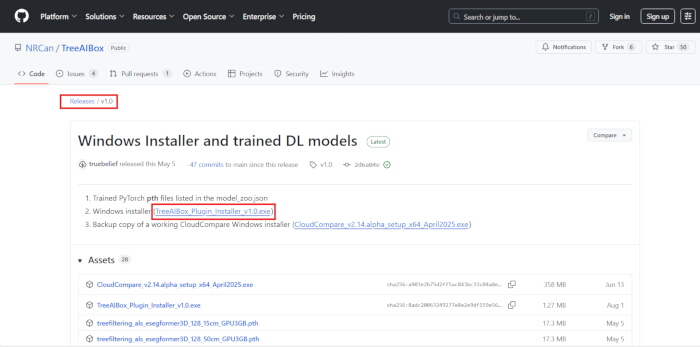
Figure 1: Access to the TreeAIBox plugin installer via the GitHub repository. Please click here to view a larger version of this figure.
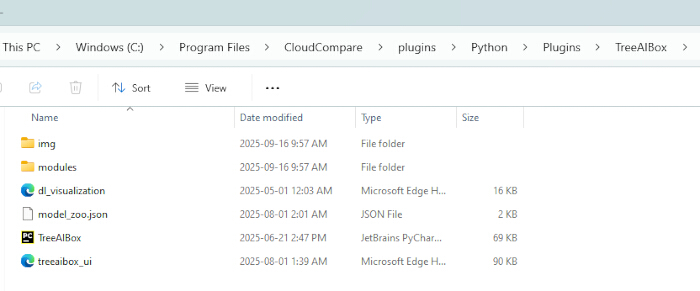
Figure 2: The folder structure with the TreeAIBox plugin. Please click here to view a larger version of this figure.
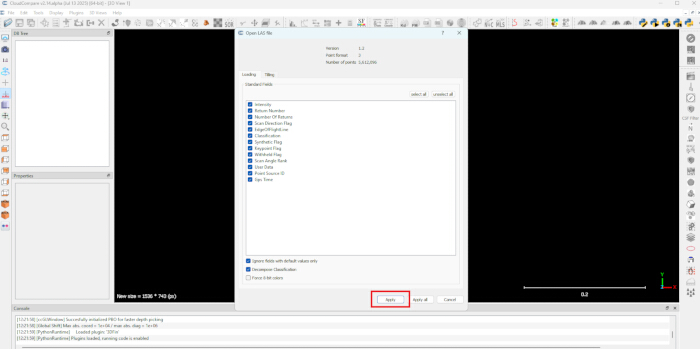
Figure 3: Loading the point cloud file into CloudCompare. Please click here to view a larger version of this figure.
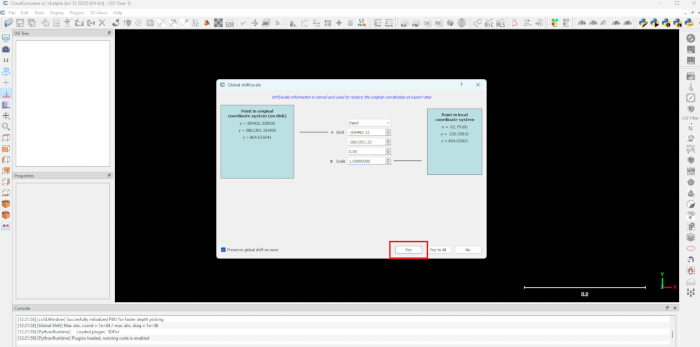
Figure 4: Setting a global shift for the point cloud as it is loaded into CloudCompare. Please click here to view a larger version of this figure.
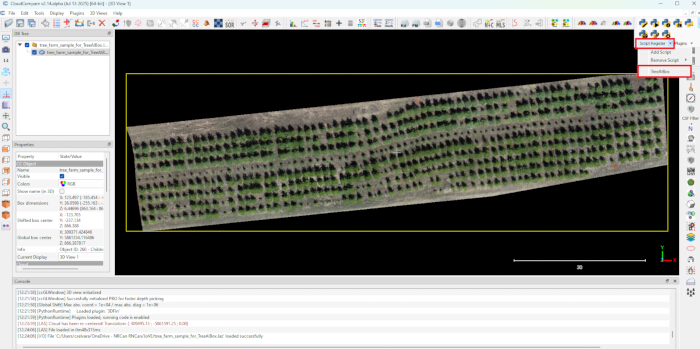
Figure 5: Using the CloudCompare's Python plugin toolbar to launch the TreeAIBox plugin. Please click here to view a larger version of this figure.
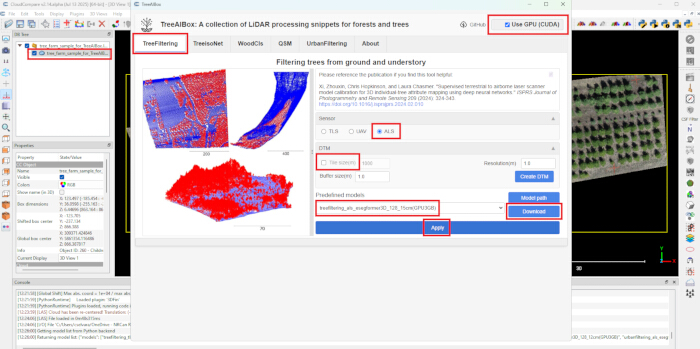
Figure 6: Setting up the TreeFiltering panel to separate the tree points from the ground points. Please click here to view a larger version of this figure.
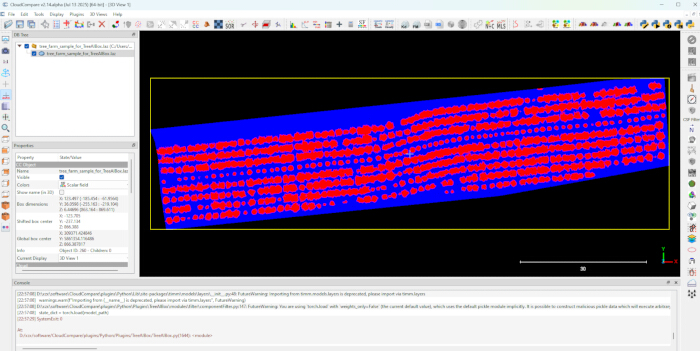
Figure 7: The results of separating the tree points from the ground points. The tree points are shown in red, while the ground points are shown in blue. Please click here to view a larger version of this figure.
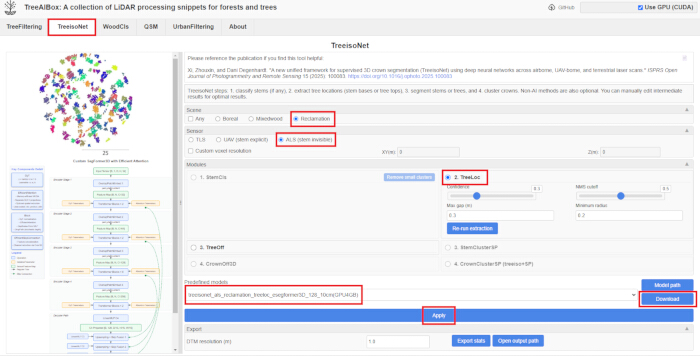
Figure 8: Setting up the TreeisoNet panel to detect treetops using TreeLoc. Please click here to view a larger version of this figure.
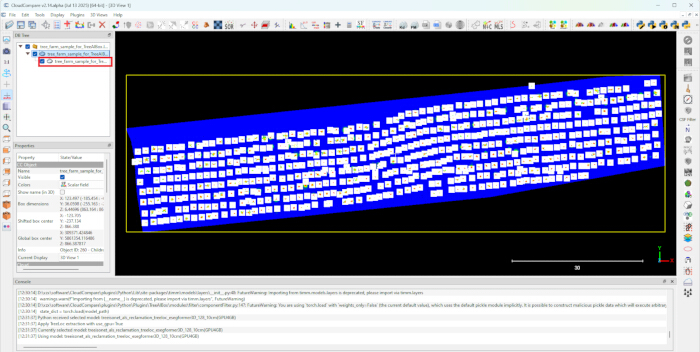
Figure 9: The results of the treetop detection. The white dots represent the positions of the treetops. Please click here to view a larger version of this figure.
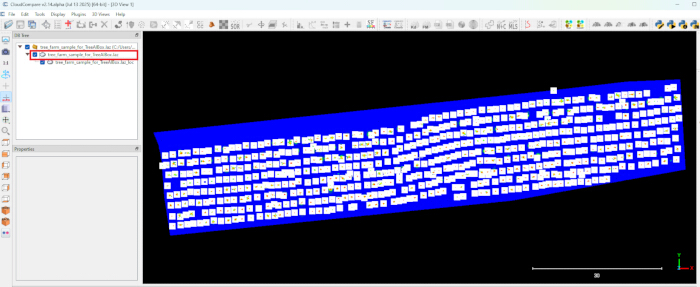
Figure 10: Reselecting the tree point cloud item before applying the TreeOff panel. Please click here to view a larger version of this figure.
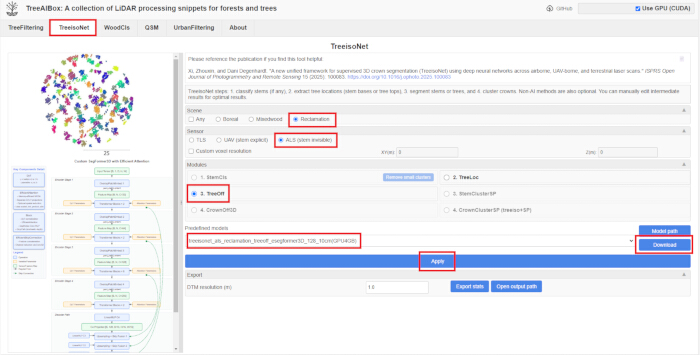
Figure 11: Setting up the TreeisoNet panel for tree crowns segmentation using TreeOff. Please click here to view a larger version of this figure.
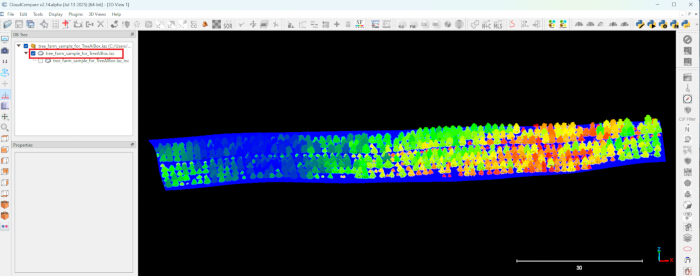
Figure 12: The results of the tree crowns segmentation. Please click here to view a larger version of this figure.
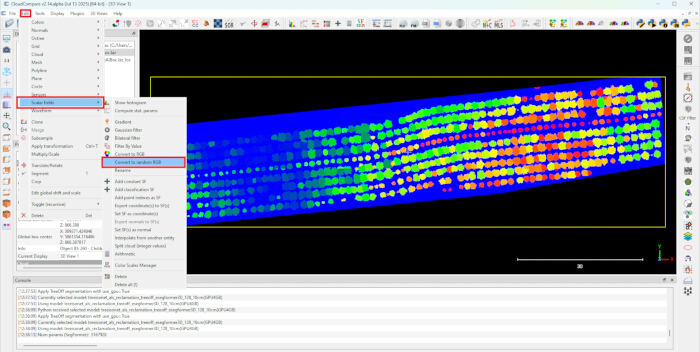
Figure 13: Setting up the segmented point cloud to randomize the colors of the trees according to their IDs for better boundary contrast. Please click here to view a larger version of this figure.
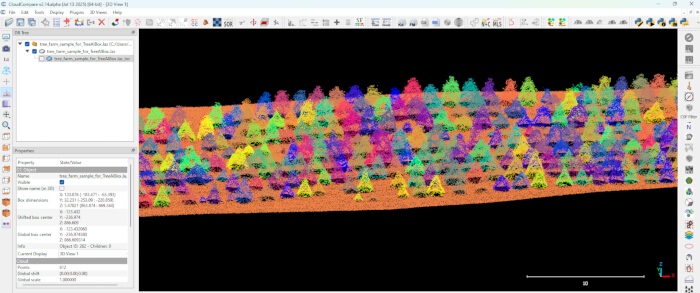
Figure 14: The results of the tree colors randomization. Please click here to view a larger version of this figure.
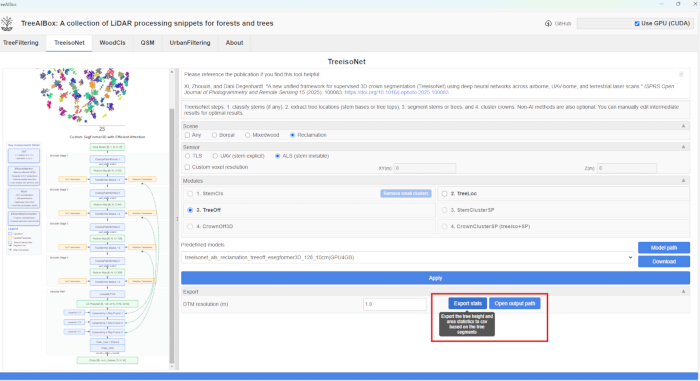
Figure 15: Extraction of tree segmentation results from the TreeisoNet panel into a csv file. Please click here to view a larger version of this figure.
Results
Following the established protocol, RPAS-derived LiDAR and MS data were collected across three study sites planted with young trees. These sites were selected to test the model's ability to detect individual trees of varying heights. Site 1 was planted with Abies balsamea (balsam fir), with an average height of 1.46 m. Site 2 featured Pinus contorta (lodgepole pine) trees averaging 2.17 m in height. Site 3 contained a mix of small Abies balsamea and Pinus contorta trees, with an average height of only 0.51 m. In addition to the RS data, the location of 224 reference trees were also recorded with a GNSS unit.
After data collection and processing, the TreeAIBox plugin was applied to filter tree points and delineate individual trees. The results produced by the plugin are shown in Figure 16.
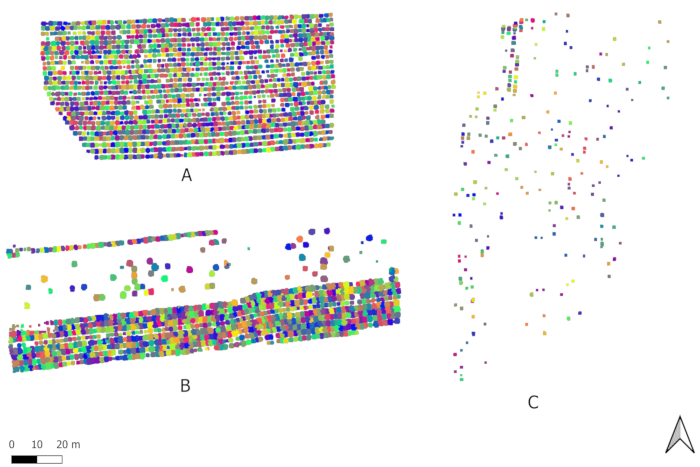
Figure 16: The distribution of delineated individual trees for three study sites (A - Site 1; B - Site 2; C - Site 3) generated by the TreeAIBox plugin. Please click here to view a larger version of this figure.
In total, 2,755 individual trees were detected across the three sites. The model identified 1,706 trees on Site 1 (Figure 16A), 882 trees on Site 2 (Figure 16B), and 167 trees on Site 3 (Figure 16C). The detection rate for reference trees varied among the sites, with 100% of reference trees detected for Site 2, 95% for Site 1, and only 21% for Site 3, as shown in Table 1. These results highlight the model's high performance in detecting trees > 1 m, with a 100% detection rate for all reference trees in this range. However, performance decreased for shorter trees: only 45% of reference trees between 0.5 to 1 m were detected, and none of the trees < 0.5 m were identified (Table 2).
| Site # | aver tree height, m (stdev) | # of reference trees | # of detected reference trees | % of detected reference trees |
| 1 | 1.46 (0.45) | 75 | 71 | 95 |
| 2 | 2.17 (0.4) | 74 | 74 | 100 |
| 3 | 0.51 (0.17) | 75 | 16 | 21 |
Table 1: Reference tree detection rates by different sites.
| Tree height range | # of reference trees | # of detected reference trees | % of detected reference trees |
| 0 - 0.5 m | 41 | 0 | 0 |
| 0.5 - 1 m | 40 | 18 | 45 |
| 1 - 1.5 m | 49 | 49 | 100 |
| 1.5 - 2 m | 42 | 42 | 100 |
| > 2 m | 52 | 52 | 100 |
Table 2: Reference tree detection rates by different tree height ranges.
Supplemental File 1: RPAS data collection workflow - pre-field tasks. Please click here to download this File.
Supplemental File 2: RPAS data collection workflow - in the field. Please click here to download this File.
Supplemental File 3: Using GNSS units for precise location tracking. Please click here to download this File.
Supplemental File 4: MS data processing procedure using photogrammetrysoftware. Please click here to download this File.
Supplemental File 5: A point cloud reconstruction from raw LiDAR data. Please click here to download this File.
Supplemental File 6: A LiDAR point cloud and MS orthomosaic aligning using geospatial tools. Please click here to download this File.
Supplemental File 7: A Python script for merging a LiDAR point cloud and MS image to generate a MS point cloud. Please click here to download this File.
Supplemental File 8: A general workflow of a LiDAR point cloud and MS image merging. Please click here to download this File.
Discussion
One of the key challenges in applying DL to RS data, particularly 3D point clouds, lies in the development of balanced and representative training and validation datasets. The effectiveness of any DL model is largely dependent on the diversity and quality of the annotated data used during training9,10,11,16. The novel 3D DL model employed in this study was trained and validated using datasets collected from multiple reclaimed well site within the boreal forest zone, characterized by young, planted, and naturally regenerating vegetation. These sites were carefully selected to encompass a wide range of forest conditions, including variation in tree heights, stem density, and species composition, to ensure broad model generalizability. In addition, the training dataset was temporally diverse, incorporating RS data collected across three consecutive seasons. This seasonal variation was critical for training the model to perform reliably under different canopy visibility conditions, accounting for changes in foliage cover and structural complexity. The integration of multi-seasonal and multi-structural data contributed to the robustness of the model, particularly in its ability to detect individual trees under changing light conditions and phenological stages.
A notable finding from this study was that incorporating MS or RGB data alongside LiDAR did not significantly enhance the accuracy of tree detection or crown segmentation within the TreeAIBox workflow. This suggests that the geometric properties of LiDAR point clouds, such as crown shape and spatial arrangement, are the primary drivers of effective tree detection and segmentation, particularly in environments with young or sparse vegetation. However, spectral data demonstrated value in complementary applications, such as species classification, where MS imagery improved the differentiation of coniferous and deciduous trees.
A critical factor influencing the success of individual-tree detection and segmentation in the TreeAIBox workflow is the quality of the input point cloud. Optimal performance requires very high-density LiDAR data, typically greater than 1,000 points per square meter. Modern RPAS-based LiDAR systems can achieve this density by using optimized flight parameters, such as low altitudes and high flight overlaps. While TreeAIBox is capable of processing lower-density point clouds, reduced point density can limit structural detail capture. This often leads to decreased detection and segmentation accuracy, particularly for smaller trees where crown and stem features may be underrepresented.
The TreeAIBox workflow enhances efficiency and automation compared to traditional or manual segmentation methods, with measurable indicators from our validation on reclaimed wellsites. Processing times for treetop detection and crown segmentation average 5-10 min per site on a standard GPU (e.g., NVIDIA RTX 3060), versus hours for manual delineation in software like CloudCompare. Automation is achieved through the plugin's GUI, which eliminates command-line scripting and dependencies, allowing non-experts to run end-to-end analyses with minimal input. In practical terms, this reduced a 1-hectare wellsite analysis from 5-8 h (manual methods) to under 30 min. The fallback to CPU mode ensures accessibility without high-end hardware, though GPU acceleration cuts times by 3-5x. These efficiencies enable frequent monitoring, supporting scalable applications in forestry management while maintaining high accuracy.
A specific limitation observed in this study was the model's reduced ability to detect trees < 1.0 m. While detection rates for trees > 1.0 m were high, with 100% reference trees correctly identified in that height range, performance declined significantly for smaller trees (Table 2). This limitation is likely due to several factors. First, lower LiDAR point density near the ground, especially under closed canopies, combined with dense herbaceous cover, impedes the detection of fine-scale structural details associated with small trees. Additionally, occlusion caused by taller vegetation often prevents sufficient point returns from reaching understory trees, which is a known source of error in such applications10,16. The algorithm may also fail to capture subtle morphological features, such as thin tree leaders, or misclassify tightly clustered trees as a single object. Addressing these challenges may involve optimizing LiDAR acquisition parameters, such as adjusting flight altitude or scan angle to enhance ground-level visibility, as well as refining segmentation methods to better handle occluded and sparse data.
Despite these limitations, the proposed method demonstrates substantial promise for application in post-reclamation and reforestation monitoring. RPAS-based RS, when combined with 3D DL algorithms, offers a scalable, cost-effective, and high-resolution solution for tracking vegetation recovery over time, particularly in areas disturbed by industrial activity such as oil and gas extraction. The ability to detect individual trees, estimate their height, and assess spatial distribution provides meaningful insights into site regeneration and compliance with reclamation standards. Moreover, this method can support adaptive management strategies by enabling frequent, non-invasive monitoring that captures seasonal and structural dynamics of recovering ecosystems. As restoration projects increasingly require long-term, fine-scale data to assess ecological recovery, this approach offers a powerful and practical tool for forest managers and researchers seeking to evaluate vegetation performance in complex, heterogeneous landscapes.
Disclosures
The authors have no conflicts of interest to disclose.
Acknowledgements
Funding for this research was provided by Office of Energy Research and Development CFS-23-101. The authors would like to thank Philip Hoffman, Daniels Kononovs, and Elizabeth Friel for assistance in the field.
Materials
| Name | Company | Catalog Number | Comments |
|---|---|---|---|
| Avenza Maps app | Avenza | NA | For offline field navigation using georeferenced pdfs maps created in QGIS |
| Checkered targets | Any Supplier | NA | Ground Control Points |
| CloudCompare | CloudCompare | NA | 3D point cloud processing and editing software |
| DJI BS60 Battery Station (with the M300 batteries (x8), D-RTK2 batteries (x4), power cord, and USB-C cable to connect to remote controller) | DJI | NA | |
| DJI M300 RTK Aircraft with DLS (with controller and replacement props) | DJI | NA | DLS (Downwelling Light Sensor) |
| DJI Terra Pro | DJI | NA | Reconstruction of raw LiDAR data into 3D point cloud. |
| DJI Zenmuse L1 LiDAR sensor (with microSD card) | DJI | NA | |
| D-RTK2 Mobile Station (with tripod, and extension rod) | DJI | NA | |
| Emlid Reach RS2+ Base Station (with tripod) | Emlid | NA | |
| Emlid Reach RS2+ Rover (with GNSS surveying pole) | Emlid | NA | |
| External hard drives | Any Supplier | NA | To backup data |
| Flight logbook | Any Supplier | NA | |
| Google Earth Pro | NA | Creation of KML flight files | |
| Landing pad | Any Supplier | NA | To launch/land an aircraft |
| Laptop | Any Supplier | NA | To be used in the field for downloading data, formating cards, etc. |
| MicaSense RedEdge-P sensor (with MicaSense SD card, USB-C cable, MicaSense calibrated reflectance panel (CRP)) | MicaSense | NA | |
| PIX4Dmapper | Pix4D S.A. | NA | Geometric and radiometric correction of multispectral images and orthomosaic generation. |
| Pneumometer | Any Supplier | NA | |
| PyCharm | JetBrains s.r.o. | NA | Python integrated development environment (IDE) |
| QGIS | QGIS | NA | Geospatial data processing, editing, and visualization |
| SD and microSD card reader | Any Supplier | NA | |
| Smartphone | Any Supplier | NA | To connect with MicaSense RedEdge-P sensor and Emlid Reach RS2+ units |
| Star pickets/nails, mallet, and flagging tape | Any Supplier | NA | To mark the location of D-RTK2 base station |
| Tablet | Any Supplier | NA | For navigation in the field |
| TreeAIBox (CloudCompare plugin) | NA | ||
| Two way radio | Any Supplier | NA | |
| Workstation (CPU i5 or later, CUDA-Enabled NVIDIA GPU with VRAM ≥ 4GB, RAM ≥ 32GB, SSD ≥ 512GB | Any Supplier | NA |
References
- Well status. , Alberta Energy Regulator. https://www.aer.ca/data-and-performance-reports/data-hub/well-status (2025).
- Western boreal forest - Canada. , Ducks Unlimited. https://www.ducks.org/conservation/where-ducks-unlimited-works/western-boreal-forest--canada (2023).
- Baah-Acheamfour, M., Dewey, M., Fraser, E. C., Schreiber, S. G., Schoonmaker, A. Assessing ecological recovery of reclaimed well sites: a case study from Alberta, Canada. Front. For. Glob. Change. 5, 849246(2022).
- 2010 reclamation criteria for wellsites and associated facilities for forested lands (Updated July 2013). , Environment and Sustainable Resource Development. https://open.alberta.ca/publications/1657667/resource/77e66fa1-f7ee-44ad-8c68-234854d38d44 (2013).
- Alvarez-Vanhard, E., Corpetti, T., Houet, T. UAV and satellite synergies for optical remote sensing applications: a literature review. Sci. Remote Sens. 3, 100019(2021).
- Hird, J., et al. Use of unmanned aerial vehicles for monitoring recovery of forest vegetation on petroleum well sites. Remote Sens. 9 (5), 413(2017).
- Mathews, A. J., Singh, K. K., Cummings, A. R., Rogers, S. R. Fundamental practices for drone remote sensing research across disciplines. Drone Syst. Appl. 11, 1-22 (2023).
- Zhang, Z., Zhu, L. A review on unmanned aerial vehicle remote sensing: platforms, sensors, data processing methods, and applications. Drones. 7 (6), 398(2023).
- Puliti, S., McLean, J. P., Cattaneo, N., Fischer, C., Astrup, R. Tree height-growth trajectory estimation using uni-temporal UAV laser scanning data and deep learning. Forestry. 96 (1), 37-48 (2023).
- Straker, A., et al. Instance segmentation of individual tree crowns with YOLOv5: a comparison of approaches using the ForInstance benchmark LiDAR dataset. ISPRS Open J. Photogr. Remote Sens. 9, 100045(2023).
- Xiang, B., et al. Automated forest inventory: analysis of high-density airborne LiDAR point clouds with 3D deep learning. Remote Sens. Environ. 305, 114078(2024).
- TreeAIBox CloudCompare Plugin. , https://github.com/NRCan/TreeAIBox (2025).
- Xi, Z., Degenhardt, D. A new unified framework for supervised 3D crown segmentation (TreeisoNet) using deep neural networks across airborne, UAV-borne, and terrestrial laser scans. ISPRS Open J. Photogr. Remote Sens. 15, 100083(2025).
- Elsheikh, M., Iqbal, U., Noureldin, A., Korenberg, M. The implementation of precise point positioning (PPP): a comprehensive review. Sensors. 23 (21), 8874(2023).
- CloudCompare. , https://www.cloudcompare.org/ (2024).
- Wielgosz, M., Puliti, S., Xiang, B., Schindler, K., Astrup, R. SegmentAnyTree: a sensor and platform agnostic deep learning model for tree segmentation using laser scanning data. Remote Sens. Environ. 313, 114367(2024).
Reprints and Permissions
