This protocol describes a method for rapid manufacturing of soft pneumatic actuators and robots with a thin form factor. The fabrication method starts with lamination of thermoplastic polyurethane (TPU) sheets followed by laser cutting/welding of a two-dimensional pattern to form actuators and robots.
Method Article
Rapid Manufacturing of Thin Soft Pneumatic Actuators and Robots
In This Article
Summary
Abstract
This protocol describes a method for rapid manufacturing of soft pneumatic actuators and robots with an ultrathin form factor using a heat press and a laser cutter machine. The method starts with the lamination of thermoplastic polyurethane (TPU) sheets using a heat press for 10 min at the temperature of ~93 °C. Next, the parameters of the laser cutter machine are optimized to produce a rectangular balloon with maximum burst pressure. Using the optimized parameters, the soft actuators are laser cut/welded three times sequentially. Next, a dispensing needle is attached to the actuator, allowing it to be inflated. The effect of geometrical parameters on the deflection of the actuator are studied systematically by varying the channel width and length. Finally, the performance of the actuator is characterized using an optical camera and a fluid dispenser. Conventional fabrication methods of soft pneumatic actuators based on silicone molding are time consuming (several hours). They also result in strong but bulky actuators, which limits the actuator’s applications. Moreover, microfabrication of thin pneumatic actuators is both time-consuming and expensive. The proposed manufacturing method in the current work resolves these issues by introducing a fast, simple, and cost-effective fabrication method of ultrathin pneumatic actuators.
Introduction
As a step forward in manufacturing of soft pneumatic actuators, the proposed method illustrates rapid fabrication of ultrathin (~70 μm) pneumatic actuators made of thermoplastic polyurethane (TPU)1. These actuators are particularly useful in applications that require the robots to be lightweight and/or fit within small spaces. Such applications can be envisioned to be transcatheter surgical manipulators, wearable actuators, search and rescue robots, and flying or swimming robots.
The conventional manufacturing method of thin soft pneumatic actuators, which is based on silicone molding, is time consuming (several hours) and very challenging due to the low resolution of the 3D printed molds and difficulties in demolding of thin (less than 0.5 mm) actuators. In particular, fabrication of thin actuators requires the application of specialized tools and methods2.
Microfabrication techniques can be adopted to fabricate thin actuators3,4,5,6,7. Alternatively, Ikeuchi et al. have developed thin pneumatic actuators using membrane micro-embossing8. These methods, although effective, require expensive tools and are time-consuming. Thus, they have limited applications.
Paek et al. demonstrated a simple method for fabrication of small-scale soft actuators using dip-coating of cylindrical templates2. Although effective, there are two issues with widespread application of this method: First, it is not easy to control the thickness of the dip-coated features, and secondly, its application is restricted to a limited number of three-dimensional (3D) designs.
Peano actuators9,10 and pouch motors11,12 have compact two-dimensional (2D) designs that result in thin form factors (i.e., large areas with small thickness). Veale et al. reported development of linear Peano actuators made of reinforced plastic and textile-silicone composites1,8. Niiyama et al. developed pouch motors using thermoplastic films manufactured by heat stamping and heat drawing systems11,12.
While the 2D design of Peano actuators and pouch motors makes them very thin in their unactuated state, upon inflation their zero-volume chamber expands to a relatively large volume, thus limiting their application for operation in limited spaces such as transcatheter therapies or search and rescue missions1. In contrast to these designs, the proposed soft actuators in the current method can actuate with relatively small strains. Thus, even in the actuated state they occupy relatively small spaces1.
Protocol
1. Smoothing the TPU sheets by heat pressing
- Calibrate a force sensor to be used in the heat press.
- Sandwich the force sensor between two layers of silicone (50 mm x 50 mm x 3 mm thick). Place the force sensor and silicone layers between the compression platens/anvils of the tensile machine. Decrease the distance between the platens by turning the knob of the heat press clockwise and write down the force and resistance of the sensor.
- Measure the area of the sensor using a digital caliper and divide the force values by the measured area to obtain the pressure data. Fit a linear line to the pressure versus resistance data using a spreadsheet to calibrate the sensor.
- Place the force sensor inside the heat press and turn the pressure knob until a pressure of ~200 kPa is read from the sensor.
- Wear gloves to avoid any contamination of the TPU films.
- Cut four layers of TPU with scissors or a laser cutter to fit the heat press plates (30 mm x 30 mm). Position the four sheets so all four edges are aligned.
- Place the TPU sheets inside the heat press.
- Set the temperature of the heat press to ~200 °F (~93 °C). Close the heat press fully.
- Keep the films inside the heat press for 10 min. Open the heat press and remove the laminated TPU films to be laser cut in step 3.12.
2. Finding the optimal laser parameters
- As described in section 1, heat press two layers of TPU.
- Using computer-aided design (CAD) software, design a square with 20 mm sides and a rectangle of 4 mm x 8 mm that will act as the inlet of the square balloon.
- Laser cut/weld the square pattern from step 2.2 out of the TPU layers from step 2.1 using the following settings in the laser cutter software: set pulses per inch (PPI) to 500, vary the power from 10% to 100%, and for each value of power vary the speed from 10% to 100%.
- Cut the end of the inlet of the square balloon with scissors.
- Insert a needle inside the square balloon inlet, apply glue (Table of Materials) around it, and wrap the polytetrafluoroethene (PTFE) tape around the connection.
NOTE: After 5 min it is ready to use. - Identify the average burst pressure of the square balloon by inflating it with a precise fluid dispenser.
- Increase the pressure of the balloon using the precise fluid dispenser until it bursts. Measure and write down the burst pressure. Repeat this step 5x and obtain the average burst pressure.
- Repeat steps 2.1−2.7 for the full range of power and speed values and identify the maximum burst pressure of the square balloon and its associated power and speed values as the optimal parameters for the laser machine.
3. Fabricating the actuators by laser cutting/welding
- Design the desired actuator pattern using CAD software.
NOTE: AutoCAD 2017 is used in this protocol. - Select the entire design in the CAD software by highlighting all segments of the design.
- In the task bar under the Properties section, change the line weight to 0 mm for the software to print successfully to the laser cutter.
- From the taskbar, select Print. Change the printer name to “VLS2.30” in the menu.
- In the Printer Settings, choose the paper size as User-defined Landscape.
- In the Plot Scale section, deselect the Fit to Paper Option and then scale the image size as 1 mm = one unit of length.
- In the Plot Offset (Origin Set to Printable Area) check the Center the Plot option.
- Turn on the air filter by pressing the power button.
- Turn on the laser cutter by pressing the power button or by clicking on the power icon on the Universal Laser System Control Panel software.
- In the Setting option, set the speed = 60%, PPI = 500, and power = 80%.
NOTE: These parameters may need to be changed based on the specific laser power of the system being used. - Using the Focus View tool, move the laser pointer to the left top corner and bottom right corner of the pattern to make sure the whole pattern fits inside the laminated TPU films (30 mm x 30 mm) made in step 1.10.
- To focus the laser machine, move the lens carriage to the middle of the table. Place the focus tool on the table and move the table up until the top of the focus tool touches the front of the lens carriage. Then, move the table up slowly until the lens carriage hits the notch of the focus tool and bumps it forward.
NOTE: The laser is focused and ready for use with the parameters in 3.11. - Without changing the position of the TPU sheet, run the laser again, but decrease the speed = 55%, increase the power = 85%, and keep PPI = 500.
- Perform a third run of the laser to ensure there are no leaks in the actuator. Set the speed = 50%, increase the power = 90%, and keep PPI = 500.
4. Bonding stainless steel dispensing needles with a Luer lock connection
- Cut the end of the balloon actuator inlet with scissors.
- Insert a needle inside the balloon actuator inlet, apply glue around it, and wrap the PTFE tape around the connection.
NOTE: After 5 min it is ready to use.
5. Characterization of the soft actuators
- Mount a camera over the actuator with a sufficient distance so that the actuator is in full view within the camera in both its pressurized and unpressurized states.
- Hold the actuator in an orientation such that its deflection upon pressurization is orthogonal to the camera.
- Increase the pressure of the actuator with a precise fluid dispenser until it deflects into its full range without bursting. Assume the full range as the maximum deflection of the actuator without any plastic deformation or leakage or bursting due to overinflation.
- Increase the actuator pressure until it reaches ~20% of its full range and write down the pressure.
- Take a picture of the actuator using the camera from step 5.1, and then use an image processing software (e.g., imageJ) to measure the X- and Y-coordinates of the tip of the actuator in the image.
- Repeat steps 5.4 and 5.5 until reaching the full range of actuator deflection.
- Plot an X-Y graph of the actuator’s deflection versus the inflation pressure using a plotting software.
Results
To demonstrate the proposed method, we show the fabrication of a single bending actuator. To fabricate this actuator, four sheets of TPU of dimension 25 cm x 25 cm were cut, stacked together, and then smoothed using a heat press (Figure 1A). Following the protocol, the heat press was applied for 10 min at a set temperature of 200 °F. Wrinkles in the laminated sheets can result in issues with bonding during the laser cutting step, therefore ensuring a perfectly smooth surface is critical for reproducible results. For example, Figure 1B shows a resulting lamination that contains wrinkles that will not produce desired results, while Figure 1C shows a resulting lamination that is sufficiently flat to produce the desired results.
The 2D design of the pneumatic actuator was drawn in AutoCAD. This actuator was made simply by drawing a rectangle of 8 mm x 150 mm. A linear pattern of eight lines, each 1.34 mm long, was added to the center of the design with a spacing of 10 mm (highlighted in red in Figure 2). Finally, the opening of the actuator (highlighted in blue in Figure 2) was designed by adding an open-ended rectangle of 4 mm x 8 mm. An AutoCAD file (.dwg) for this sample linear actuator is available in the Supplemental Material.
The laminated four-layer stack of TPU was then placed in the laser cutting machine (Figure 3A) and the 2D design was imported using the software of the laser cutting machine. The Focus tool on the laser cutter verified the fit of the 2D drawing’s position on the laminated TPU sheets. For a first run, the laser cut was set at speed = 60%, power = 80%, and PPI = 500. Once it was completed, without changing the position of the polyurethane sheets, a second run with new settings was started at speed = 55%, power = 85%, and PPI = 500. The same process was repeated with new settings for a third time at speed = 50%, power = 90%, and PPI = 500. Decreasing the speed and increasing the power exposes the pneumatic actuator to the heat source for a longer time and allows it to melt and bond to ensure a leak-free balloon that can separated from the rest of the TPU sheet easily (Figure 3B). It should be noted that the laser cutter is always simultaneously cutting and welding the TPU; the cutting and welding are not done in separate steps or achieved by different settings.
In order to couple the actuator to an air supply unit, the opening of the actuator was cut with scissors and a stainless steel needle (Figure 4B) was inserted between the second and third layers of the laser-cut actuator. To maintain a leak-free system, the outside of the needle was covered in glue beforehand (Figure 4C). Then the interface of the actuator and stainless steel needle was wrapped tightly with PTFE tape (Figure 4D).
Finally, using a digital fluid dispenser, the pneumatic actuator (Figure 5A) was inflated to a pressure of 5 psi to observe a deflection in the region where the array of lines was designed (Figure 5B).
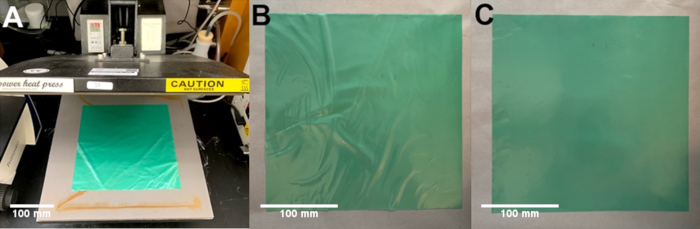
Figure 1: Heat pressing sheets. (A) Image of the heat press with the TPU sheets to be laminated. (B) Example image of poorly laminated sheets with excessive wrinkles. (C) Example image of successfully laminated sheets with a smooth surface. Please click here to view a larger version of this figure.
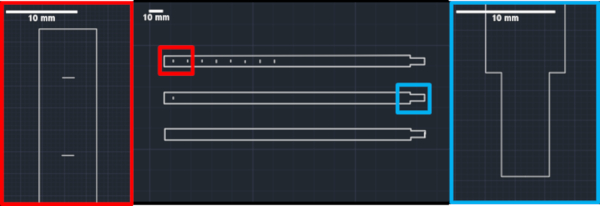
Figure 2: Actuator design. Image of a CAD drawing used to form a single bending actuator. The bottom design shows the outline of the actuator, the middle design shows a single line added as a bending feature, and the top design shows a complete actuator. The red box highlights the features that form the bending region of the actuator. The blue box highlights the region for connecting a needle for pressurization. Please click here to view a larger version of this figure.
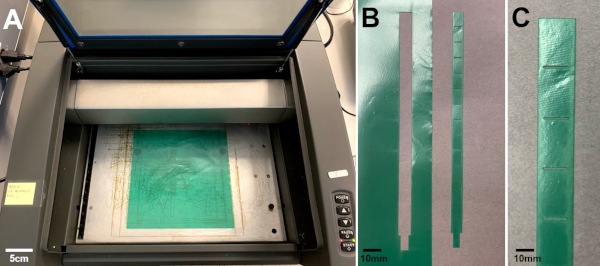
Figure 3: Laser cutter. (A) Image of the laminated sheets in a laser cutter. (B,C) Image of the actuator to be removed after laser cutting. (C) Image of the actuator. Please click here to view a larger version of this figure.
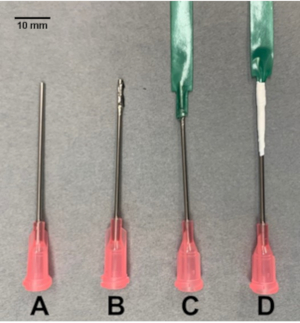
Figure 4: Needle connection. Images depicting the steps for connecting a blunt needle (A) to a balloon actuator using glue (B) as an adhesive. The needle is inserted into the narrow end of the actuator, which is opened using scissors (C) and sealed with PTFE tape (D). Please click here to view a larger version of this figure.
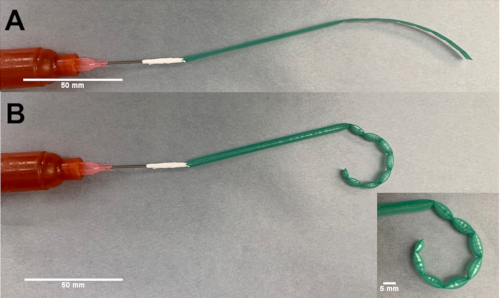
Figure 5: Bending actuator. (A) Image of the actuator in an unpressurized state. (B) Image of the actuator in a pressurized state. Please click here to view a larger version of this figure.
Supplemental Material. Please click here to download this file.
Discussion
The critical steps in the fabrication of the soft actuators include: i) The 2D CAD design. A proper 2D layout can dictate the deformation of the actuator (e.g. linear, biaxial, bending, and rotational motion). ii) Lamination of the TPU layers. The TPU films are heat pressed before laser cutting to make sure the layers are flat and in conformal contact everywhere. iii) Laser cut/weld. As the final step, the laminated TPU layers are laser cut/welded into soft actuators.
The success rate of the protocol can produce a 100% yield (for example, we have made 20 actuators simultaneously). The primary factor is the lamination step: to obtain the best results, the TPU should be flattened as much as possible before the heat press process. Examining different regions of the heat press plate with a force sensor may show that the pressure distribution is not uniform. Non-uniform pressure distribution can result in imperfect lamination of the TPU sheets, which in turn results in imperfect laser cutting/welding and leakage. Alternatively, non-uniform heat transfer due to small wrinkles in the TPU film during the laser cutting/welding can cause leakage.
In comparison to the conventional methods, the proposed method has several advantages including: i) Simple 2D design. While the current method only requires 2D CAD designs to laser cut/weld the actuators (various patterns are available1), the conventional fabrication methods based on silicone casting require a 3D mold design. ii) Rapid fabrication. Fabrication time from CAD design to lamination of TPU layers and laser cutting/welding can happen in several minutes, whereas the conventional fabrication method will take several hours. By allowing fabrication of soft devices and soft robots in a single step, without assembly, soft robots and devices can be designed from a combination of different types of actuators, and the CAD model can be laser cut/welded into the final product in a single step without requiring any assembly. For instance, a swimming robot, comprised of four legs each consisting of two types of bending actuators, is fabricated from a 2D CAD design in just a few minutes without requiring any assembly steps, as previously demonstrated1.
As a future direction of this work, different types of thermoplastic materials can be adopted for fabrication of the soft actuators. Generally, these materials need to have elastic behavior to be used as actuators. Application of stiffer thermoplastic material will result in higher burst pressure and higher blocking force of the actuators compared to those previously characterized in Figure S6 of Moghadam et al.1, showing forces up to 0.1 N. Thus, it can extend the application of the actuators to cases where higher blocking force is required, such as exoskeleton suites.
Disclosures
The authors have nothing to disclose.
Acknowledgements
We thank the Dalio Institute of Cardiovascular Imaging for funding this work.
Materials
| Name | Company | Catalog Number | Comments |
|---|---|---|---|
| Force Sensor | Omega | KHLVA-102 | https://www.omega.co.uk/pptst/KHRA-KHLVA-KHA-SERIES.html |
| High Precision Dispensers Ultimus I | Nordson | http://www.nordsonefd.com/searchengines/google/en/AirPoweredDispensers/?gclid=CjwKCAjw36DpBRAYEiwAmVVDMPuZ50xXoyzK3gvnghCA7yZUfJg4o9V28yDHKjY5Gs159RJIcMk_choCJIgQAvD_BwE | |
| Laser Cutter VLS2.30 | Universal Laser System | https://www.ulsinc.com/products/platforms/vls2-30 | |
| PowerPress Heat Press | Power Heat Press | OX-A1 | https://www.howtoheatpress.com/power-press-15x15-heat-press-review/ |
| PTFE Thread Sealant tape | McMaster-Carr | 4934A11 | https://www.mcmaster.com/ptfe-tape |
| Stainless Steel Dispensing Needle | McMaster-Carr | 75165A754 | https://www.mcmaster.com/75165a754 |
| Super Glue Loctite 409 | Henkel | 229654 | https://www.henkel-adhesives.com/us/en/product/instant-adhesives/loctite_409.html |
| Thermoplastic polyurethane Airtech’s Stretchlon 200 | ACP Composites | v-11A | https://store.acpsales.com/products/3321/stretchlon-200-high-stretch-bag-film-60 |
| Universal Testing Systems | Instron | 5943 |
References
- Moghadam, A. A. A., et al. Laser Cutting as a Rapid Method for Fabricating Thin Soft Pneumatic Actuators and Robots. Soft Robotics. 5 (4), 443-451 (2018).
- Paek, J. W., Cho, I., Kim, J. Y. Microrobotic tentacles with spiral bending capability based on shape-engineered elastomeric microtubes. Scientific Reports. 5, (2015).
- Gorissen, B., et al. Flexible pneumatic twisting actuators and their application to tilting micromirrors. Sensors and Actuators A-Physical. 216, 426-431 (2014).
- Gorissen, B., De Volder, M., De Greef, A., Reynaerts, D. Theoretical and experimental analysis of pneumatic balloon microactuators. Sensors and Actuators A-Physical. 168 (1), 58-65 (2011).
- Jeong, O. C., Konishi, S. All PDMS pneumatic microfinger with bidirectional motion and its application. Journal of Microelectromechanical Systems. 15 (4), 896-903 (2006).
- Konishi, S., Shimomura, S., Tajima, S., Tabata, Y. Implementation of soft microfingers for a hMSC aggregate manipulation system. Microsystems & Nanoengineering. 2, (2016).
- Lu, Y. W., Kim, C. J. Microhand for biological applications. Applied Physics Letters. 89 (16), (2006).
- Ikeuchi, M., Ikuta, K. Development of Pressure-Driven Micro Active Catheter using Membrane Micro Emboss Following Excimer Laser Ablation (MeME-X) Process. 2009 IEEE International Conference on Robotics and Automation. , Kobe, Japan. (2009).
- Sanan, S., Lynn, P. S., Griffith, S. T. Pneumatic Torsional Actuators for Inflatable Robots. Journal of Mechanisms and Robotics. 6 (3), 031003(2014).
- Veale, A. J., Xie, S. Q., Anderson, I. A. Modeling the Peano fluidic muscle and the effects of its material properties on its static and dynamic behavior. Smart Materials and Structures. 25 (6), (2016).
- Niiyama, R., Rognon, C., Kuniyoshi, Y. Printable Pneumatic Artificial Muscles for Anatomy-based Humanoid Robots. 2015 IEEE-RAS 15th International Conference on Humanoid Robots (Humanoids). , Seoul, South Korea. (2015).
- Niiyama, R., et al. Pouch Motors: Printable Soft Actuators Integrated with Computational Design. Soft Robotics. 2 (2), 59-70 (2015).
Reprints and Permissions
